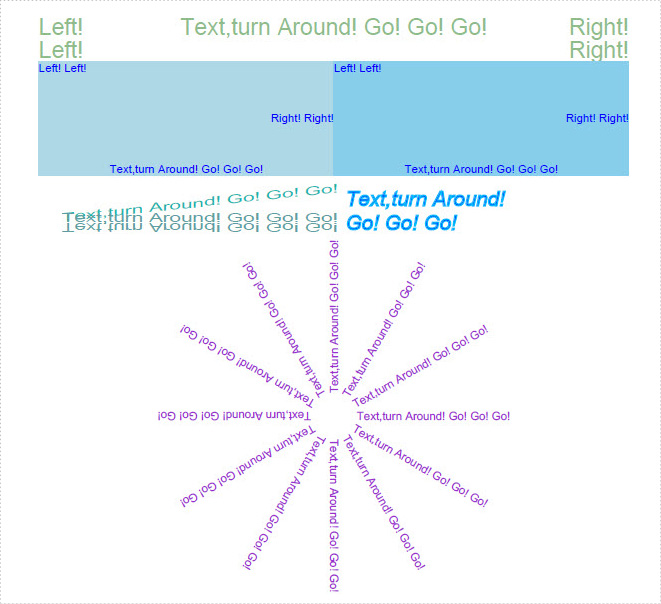
Text enjoys the same popularity whatever it is in PDF documents or in word files. Without it, people can hardly show their real purpose even with the help of images, tables, graphics or hyperlinks. Spire.PDF for WPF not only enables you to easily draw text in PDF document, but also allows you to align, rotate, transform Text and set text font & color in minutes.
Before you start, please make sure that Spire.PDF for WPF (or Spire.Office for WPF) is correctly installed on your system. Please follow the below procedure to realize this task.
Step 1: Create a new project
- Create a new project in WPF Application
- Add a button in MainWindow and set the button Content property to be "Run".
- Add Spire.Pdf.Wpf.dll and System.Drawing as references. After adding the namespaces, you can view the below codes.
using System.Drawing;
using Spire.Pdf;
using Spire.Pdf.Graphics;

namespace WPFPDFtext
{
    ///
    /// Interaction logic for MainWindow.xaml
    ///
    public partial class MainWindow : Window
    {
        public MainWindow()
        {
            InitializeComponent();
        }

        private void button1_Click(object sender, RoutedEventArgs e)
        {

        }
    }
}
Imports System.Drawing
Imports Spire.Pdf
Imports Spire.Pdf.Graphics
Namespace WPFPDFtext
	'''
	''' Interaction logic for MainWindow.xaml
	'''
	Public Partial Class MainWindow
		Inherits Window
		Public Sub New()
			InitializeComponent()
		End Sub

		Private Sub button1_Click(sender As Object, e As RoutedEventArgs)
	          End Sub
	End Class
End Namespace
Step 2: Draw text of various styles in PDF document
Create a new PDF document and add a page in it
            //Create a pdf document.
            PdfDocument doc = new PdfDocument();

            // Create one page
            PdfPageBase page = doc.Pages.Add();
	'Create a pdf document.
	Dim doc As New PdfDocument()

	'Create one page
	Dim page As PdfPageBase = doc.Pages.Add()
Draw text in the page
        private static void DrawText(PdfPageBase page)
        {
            //save graphics state
            PdfGraphicsState state = page.Canvas.Save();

            //Draw text - brush
            String text = "Text,turn Around! Go! Go! Go!";
            PdfPen pen = PdfPens.DeepSkyBlue;
            PdfSolidBrush brush = new PdfSolidBrush(System.Drawing.Color.Blue);
            PdfStringFormat format = new PdfStringFormat();
            PdfFont font = new PdfFont(PdfFontFamily.Helvetica, 18f, PdfFontStyle.Italic);
            SizeF size = font.MeasureString(text, format);
            RectangleF rctg
                = new RectangleF(page.Canvas.ClientSize.Width / 2 + 10, 180,
                size.Width / 3 * 2, size.Height * 3);
            page.Canvas.DrawString(text, font, pen, brush, rctg, format);

            //restor graphics
            page.Canvas.Restore(state);
        }
Private Shared Sub DrawText(page As PdfPageBase)
	'save graphics state
	Dim state As PdfGraphicsState = page.Canvas.Save()

	'Draw text - brush
	Dim text As [String] = "Text,turn Around! Go! Go! Go!"
	Dim pen As PdfPen = PdfPens.DeepSkyBlue
	Dim brush As New PdfSolidBrush(System.Drawing.Color.Blue)
	Dim format As New PdfStringFormat()
           Dim size As SizeF = font.MeasureString(text, format)
	Dim rctg As New RectangleF(page.Canvas.ClientSize.Width / 2 + 10, 180, size.Width / 3 * 2, size.Height * 3)
	page.Canvas.DrawString(text, font, pen, brush, rctg, format)

	'restor graphics
	page.Canvas.Restore(state)
End Sub
Align PDF text. This step allows you to align text and align text in rectangle
        private static void AlignText(PdfPageBase page)
        {
            //Draw the text - alignment
            PdfFont font = new PdfFont(PdfFontFamily.Helvetica, 20f);
            PdfSolidBrush brush = new PdfSolidBrush(System.Drawing.Color.DarkSeaGreen);

            PdfStringFormat leftAlignment = new PdfStringFormat(PdfTextAlignment.Left, PdfVerticalAlignment.Middle);
            page.Canvas.DrawString("Left!", font, brush, 0, 40, leftAlignment);
            page.Canvas.DrawString("Left!", font, brush, 0, 60, leftAlignment);

            PdfStringFormat rightAlignment = new PdfStringFormat(PdfTextAlignment.Right, PdfVerticalAlignment.Middle);
            page.Canvas.DrawString("Right!", font, brush, page.Canvas.ClientSize.Width, 40, rightAlignment);
            page.Canvas.DrawString("Right!", font, brush, page.Canvas.ClientSize.Width, 60, rightAlignment);

            PdfStringFormat centerAlignment
                = new PdfStringFormat(PdfTextAlignment.Center, PdfVerticalAlignment.Middle);
            page.Canvas.DrawString("Text,turn Around! Go! Go! Go!",
                font, brush, page.Canvas.ClientSize.Width / 2, 40, centerAlignment);
        }
        private static void AlignTextInRectangle(PdfPageBase page)
        {
            //Draw the text - align in rectangle
            PdfFont font = new PdfFont(PdfFontFamily.Helvetica, 10f);
            PdfSolidBrush brush = new PdfSolidBrush(System.Drawing.Color.Blue);
            RectangleF rctg1 = new RectangleF(0, 70, page.Canvas.ClientSize.Width / 2, 100);
            RectangleF rctg2
                = new RectangleF(page.Canvas.ClientSize.Width / 2, 70, page.Canvas.ClientSize.Width / 2, 100);
            page.Canvas.DrawRectangle(new PdfSolidBrush(System.Drawing.Color.LightBlue), rctg1);
            page.Canvas.DrawRectangle(new PdfSolidBrush(System.Drawing.Color.SkyBlue), rctg2);

            PdfStringFormat leftAlignment
                = new PdfStringFormat(PdfTextAlignment.Left, PdfVerticalAlignment.Top);
            page.Canvas.DrawString("Left! Left!", font, brush, rctg1, leftAlignment);
            page.Canvas.DrawString("Left! Left!", font, brush, rctg2, leftAlignment);

            PdfStringFormat rightAlignment
                = new PdfStringFormat(PdfTextAlignment.Right, PdfVerticalAlignment.Middle);
            page.Canvas.DrawString("Right! Right!", font, brush, rctg1, rightAlignment);
            page.Canvas.DrawString("Right! Right!", font, brush, rctg2, rightAlignment);

            PdfStringFormat centerAlignment
                = new PdfStringFormat(PdfTextAlignment.Center, PdfVerticalAlignment.Bottom);
            page.Canvas.DrawString("Text,turn Around! Go! Go! Go!", font, brush, rctg1, centerAlignment);
            page.Canvas.DrawString("Text,turn Around! Go! Go! Go!", font, brush, rctg2, centerAlignment);
        }
Private Shared Sub AlignText(page As PdfPageBase)
	'Draw the text - alignment
	Dim font As New PdfFont(PdfFontFamily.Helvetica, 20F)
	Dim brush As New PdfSolidBrush(System.Drawing.Color.DarkSeaGreen)

	Dim leftAlignment As New PdfStringFormat(PdfTextAlignment.Left, PdfVerticalAlignment.Middle)
	page.Canvas.DrawString("Left!", font, brush, 0, 40, leftAlignment)
	page.Canvas.DrawString("Left!", font, brush, 0, 60, leftAlignment)

	Dim rightAlignment As New PdfStringFormat(PdfTextAlignment.Right, PdfVerticalAlignment.Middle)
	page.Canvas.DrawString("Right!", font, brush, page.Canvas.ClientSize.Width, 40, rightAlignment)
	page.Canvas.DrawString("Right!", font, brush, page.Canvas.ClientSize.Width, 60, rightAlignment)

	Dim centerAlignment As New PdfStringFormat(PdfTextAlignment.Center, PdfVerticalAlignment.Middle)
	page.Canvas.DrawString("Text,turn Around! Go! Go! Go!", font, brush, page.Canvas.ClientSize.Width / 2, 40, centerAlignment)
End Sub
Private Shared Sub AlignTextInRectangle(page As PdfPageBase)
	'Draw the text - align in rectangle
	Dim font As New PdfFont(PdfFontFamily.Helvetica, 10F)
	Dim brush As New PdfSolidBrush(System.Drawing.Color.Blue)
	Dim rctg1 As New RectangleF(0, 70, page.Canvas.ClientSize.Width / 2, 100)
	Dim rctg2 As New RectangleF(page.Canvas.ClientSize.Width / 2, 70, page.Canvas.ClientSize.Width / 2, 100)
	page.Canvas.DrawRectangle(New PdfSolidBrush(System.Drawing.Color.LightBlue), rctg1)
	page.Canvas.DrawRectangle(New PdfSolidBrush(System.Drawing.Color.SkyBlue), rctg2)

	Dim leftAlignment As New PdfStringFormat(PdfTextAlignment.Left, PdfVerticalAlignment.Top)
	page.Canvas.DrawString("Left! Left!", font, brush, rctg1, leftAlignment)
	page.Canvas.DrawString("Left! Left!", font, brush, rctg2, leftAlignment)

	Dim rightAlignment As New PdfStringFormat(PdfTextAlignment.Right, PdfVerticalAlignment.Middle)
	page.Canvas.DrawString("Right! Right!", font, brush, rctg1, rightAlignment)
	page.Canvas.DrawString("Right! Right!", font, brush, rctg2, rightAlignment)

	Dim centerAlignment As New PdfStringFormat(PdfTextAlignment.Center, PdfVerticalAlignment.Bottom)
	page.Canvas.DrawString("Text,turn Around! Go! Go! Go!", font, brush, rctg1, centerAlignment)
	page.Canvas.DrawString("Text,turn Around! Go! Go! Go!", font, brush, rctg2, centerAlignment)
End Sub
Rotate PDF text
  private static void RotateText(PdfPageBase page)
        {
            //save graphics state
            PdfGraphicsState state = page.Canvas.Save();

            //Draw the text - transform
            PdfFont font = new PdfFont(PdfFontFamily.Helvetica, 10f);
            PdfSolidBrush brush = new PdfSolidBrush(System.Drawing.Color.DarkOrchid);

            PdfStringFormat centerAlignment
                = new PdfStringFormat(PdfTextAlignment.Left, PdfVerticalAlignment.Middle);
            float x = page.Canvas.ClientSize.Width / 2;
            float y = 380;

            page.Canvas.TranslateTransform(x, y);
            for (int i = 0; i < 12; i++)
            {
                page.Canvas.RotateTransform(30);
                page.Canvas.DrawString("Text,turn Around! Go! Go! Go!", font, brush, 20, 0, centerAlignment);
            }

            //restor graphics
            page.Canvas.Restore(state);
        }
Private Shared Sub RotateText(page As PdfPageBase)
	'save graphics state
	Dim state As PdfGraphicsState = page.Canvas.Save()

	'Draw the text - transform
	Dim font As New PdfFont(PdfFontFamily.Helvetica, 10F)
	Dim brush As New PdfSolidBrush(System.Drawing.Color.DarkOrchid)

	Dim centerAlignment As New PdfStringFormat(PdfTextAlignment.Left, PdfVerticalAlignment.Middle)
	Dim x As Single = page.Canvas.ClientSize.Width / 2
	Dim y As Single = 380

	page.Canvas.TranslateTransform(x, y)
	For i As Integer = 0 To 11
		page.Canvas.RotateTransform(30)
		page.Canvas.DrawString("Text,turn Around! Go! Go! Go!", font, brush, 20, 0, centerAlignment)
	Next

	'restor graphics
	page.Canvas.Restore(state)
End Sub
Transform PDF text
private static void TransformText(PdfPageBase page)
        {
            //save graphics state
            PdfGraphicsState state = page.Canvas.Save();

            //Draw the text - transform
            PdfFont font = new PdfFont(PdfFontFamily.Helvetica, 18f);
            PdfSolidBrush brush1 = new PdfSolidBrush(System.Drawing.Color.LightSeaGreen);
            PdfSolidBrush brush2 = new PdfSolidBrush(System.Drawing.Color.CadetBlue);

            page.Canvas.TranslateTransform(20, 200);
            page.Canvas.ScaleTransform(1f, 0.6f);
            page.Canvas.SkewTransform(-10, 0);
            page.Canvas.DrawString("Text,turn Around! Go! Go! Go!", font, brush1, 0, 0);

            page.Canvas.SkewTransform(10, 0);
            page.Canvas.DrawString("Text,turn Around! Go! Go! Go!", font, brush2, 0, 0);

            page.Canvas.ScaleTransform(1f, -1f);
            page.Canvas.DrawString("Text,turn Around! Go! Go! Go!", font, brush2, 0, -2 * 18);
            //restor graphics
            page.Canvas.Restore(state);
        }
Private Shared Sub TransformText(page As PdfPageBase)
	'save graphics state
	Dim state As PdfGraphicsState = page.Canvas.Save()

	'Draw the text - transform
	Dim font As New PdfFont(PdfFontFamily.Helvetica, 18F)
	Dim brush1 As New PdfSolidBrush(System.Drawing.Color.LightSeaGreen)
	Dim brush2 As New PdfSolidBrush(System.Drawing.Color.CadetBlue)

	page.Canvas.TranslateTransform(20, 200)
	page.Canvas.ScaleTransform(1F, 0.6F)
	page.Canvas.SkewTransform(-10, 0)
	page.Canvas.DrawString("Text,turn Around! Go! Go! Go!", font, brush1, 0, 0)

	page.Canvas.SkewTransform(10, 0)
	page.Canvas.DrawString("Text,turn Around! Go! Go! Go!", font, brush2, 0, 0)

	page.Canvas.ScaleTransform(1F, -1F)
	page.Canvas.DrawString("Text,turn Around! Go! Go! Go!", font, brush2, 0, -2 * 18)
	'restor graphics
	page.Canvas.Restore(state)
End Sub
Step 3: Save and launch the file
            //Save doc file.
            doc.SaveToFile("DrawText.pdf");
            doc.Close();

            //Launching the Pdf file.
            System.Diagnostics.Process.Start("DrawText.pdf");
	'Save doc file.
	doc.SaveToFile("DrawText.pdf")
	doc.Close()

	'Launching the Pdf file.
	System.Diagnostics.Process.Start("DrawText.pdf")
Effective Screeshot: