We have already demonstrated how to use Spire.PDF to add multiple layers to PDF file and delete layer in PDF in C#. We can also toggle the visibility of a PDF layer while creating a new page layer with the help of Spire.PDF. In this section, we're going to demonstrate how to toggle the visibility of layers in new PDF document in C#.
Step 1: Create a new PDF document and add a new page to the PDF document.
PdfDocument pdf = new PdfDocument();
PdfPageBase page = pdf.Pages.Add();
Step 2: Add a layer named "Blue line" to the PDF page and set the layer invisible.
PdfLayer layer = pdf.Layers.AddLayer(""Green line"", PdfVisibility.Off);
PdfPen pen = new PdfPen(Color.Green, 1f);
PdfCanvas pcA = layer.CreateGraphics(page.Canvas);
pcA.DrawLine(pen, new PointF(0, 30), new PointF(300, 30));
Step 3: Add a layer named "Ellipse" to the PDF page and set the layer visible.
layer = pdf.Layers.AddLayer(""Ellipse"", PdfVisibility.On);
 PdfPen pen2 = new PdfPen(Color.Green, 1f);
 PdfBrush brush2 = new PdfSolidBrush(Color.Green);
 PdfCanvas pcB = layer.CreateGraphics(page.Canvas);
 pcB.DrawEllipse(pen2, brush2, 50, 70, 200, 60);
Step 4: Save the document to file.
pdf.SaveToFile("LayerVisibility.pdf", FileFormat.PDF);
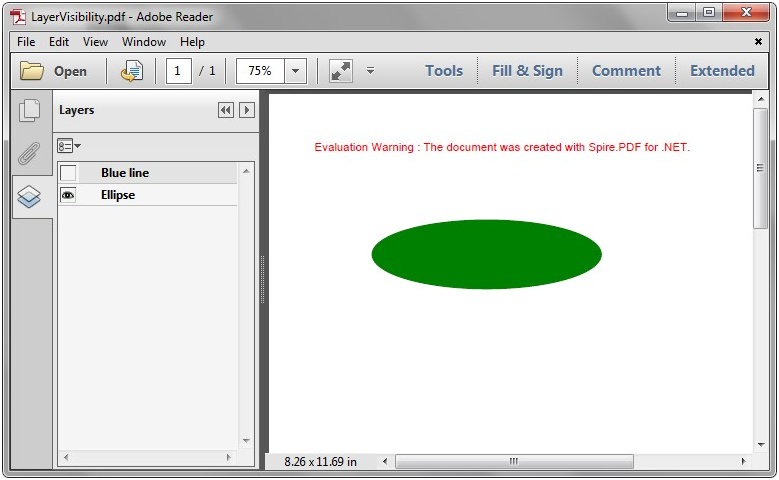
Effective screenshot after toggle the visibility of PDF layer:
Full codes:
using Spire.Pdf;
using Spire.Pdf.Graphics;
using System.Drawing;


namespace LayerVisibility
{
    class Program
    {
        static void Main(string[] args)
        {
            PdfDocument pdf = new PdfDocument();
            PdfPageBase page = pdf.Pages.Add();

            PdfLayer layer = pdf.Layers.AddLayer("Green line", PdfVisibility.Off);
            PdfPen pen = new PdfPen(Color.Green, 1f);
            PdfCanvas pcA = layer.CreateGraphics(page.Canvas);
            pcA.DrawLine(pen,new PointF(0, 30), new PointF(300, 30));

            layer = pdf.Layers.AddLayer("Ellipse", PdfVisibility.On);
            PdfPen pen2 = new PdfPen(Color.Green, 1f);
            PdfBrush brush2 = new PdfSolidBrush(Color.Green);
            PdfCanvas pcB = layer.CreateGraphics(page.Canvas);
            pcB.DrawEllipse(pen2, brush2, 50, 70, 200, 60);


            pdf.SaveToFile("LayerVisibility.pdf", FileFormat.PDF);
        }
    }
}