
Excel · Word · PDF · PPT → board-ready Word report + editable PPT briefing
From four business
documents to
one executive brief.
Pull finance, sales, and market data into one board-ready brief with
numbers traced back to their source documents.
4
source documents
18.2%
revenue growth,
verified across sources
verified across sources
1
board-ready brief
Meeting prep, before and after
Every briefing starts the same way: a pile of documents,
a tight deadline and someone volunteering to
"pull together the numbers".
The manual briefing
- 1 Collect the files, then read each one looking for the numbers
- 2 Reconcile metrics that disagree between documents — by guesswork
- 3 Write the executive summary, then rebuild it into slides
- 4 Chase the source of every number when questions come up
Typical cost per briefing:
half a day of analyst time, and the deck is a copy of the report
With the agent
- 1 Drop in 4 documents across Excel, Word, PDF and PowerPoint
- 2 12 KPIs extracted and reconciled — conflicts flagged, not hidden
- 3 6 key findings reasoned across documents, each with sources
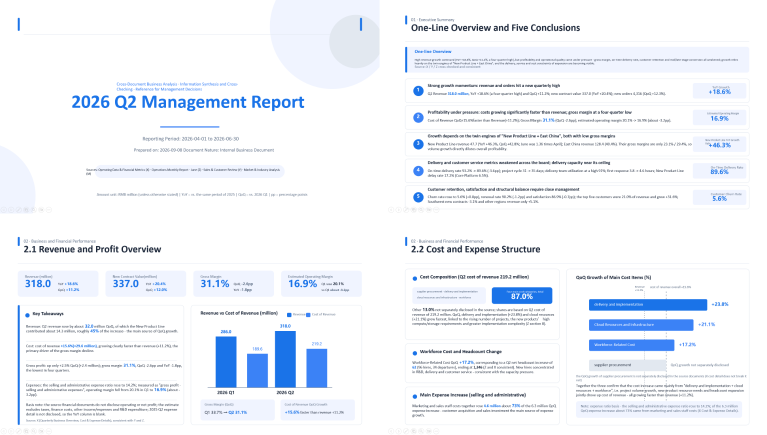
- 4 A Word executive summary and a 5-slide editable deck, natively
With the agent:
in minutes to a traceable briefing, in two editable formats
Run the brief generation
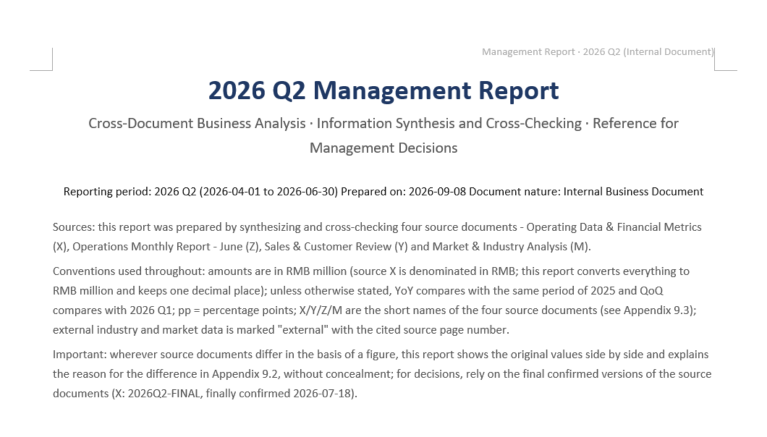
Four documents in, a Word report plus an editable PPT out

Operating Data &
Financial Metrics.xlsx

Operations Monthly
Report - June.docx

Market & Industry
Analysis.pdf

Sales & Customer
Review.pptx
Start
Delivery Document

Management
Report.docx

Management
briefing.pptx
Parsing the document (1/4)
4. Format parsing completed - Excel financial reports, Word monthly reports,
PDF research reports, and PPT sales presentations
Generation completed
Result Preview
Aggregate multiple documents · Generate 2 deliverables
Note: The sample documents on the page are used solely to demonstrate product features,
and all related content does not correspond to real entities or business information.
and all related content does not correspond to real entities or business information.
Four steps,
one board-ready brief
The same agent pipeline you just watched, in a workflow view
01
02
03
04
Import multi-format documents
Drop in the Excel finance report, Word monthly report, PDF research and PPT sales deck — no pre-processing.
Extract & verify metrics
Pull KPIs from tables and charts with value-level precision; align definitions across documents and drop conflicting figures.
Reason across documents
Correlate data and narrative across sources, spot trends, risks and conflicts, and distill the key findings.
Generate dual deliverables
Native Word executive summary plus an editable PPT briefing — charts update from source data.
Embed the agent,
not a black box
A briefing agent you can drop into your BI or reporting platform
Parse
Cross-format read
Spire.PDF / Doc / XLS / Presentation — four sources, one pass
Understand
Metric extraction
Value-level KPI pull + definition checks across documents
Reason
Cross-document reconcile
LLM correlation · findings tagged with source traceability
Act
Tool calling
Function Calling triggers native Office APIs
Generate
Dual native output
Spire.Doc report + Spire.Presentation briefing
// Create AIOptions configuration
AIOptions options = new AIOptions();

// Set SpireToken Key
options.SpireToken = "**********************";

// Set timeout
options.TimeoutMs = 6000000;

// Use Document object
using (Document doc = new Document())
{

    // Create AI document processor
    AIDocumentProcessor processor = doc.AI(options);

    // Natural language instruction
    string instruction = "Fully analyze all four attached documents, perform cross-document information extraction and cross-validation, and generate a structured Word management report (Management Report.docx). The report should include: 1. Executive Summary (overall strong growth, but profitability and operational quality are under pressure; 3-5 top conclusions); 2. Business and Financial Performance (revenue/cost/gross profit/operating profit/expenses, including year-over-year and month-over-month comparison tables); 3. Regional and Product Line Structure (East China leadership, new product lines, customer structure); 4. Sales and Customers (funnel conversion, sales cycle, retention, and customer concentration); 5. Delivery and Customer Service (project cycle, on-time delivery, customer service efficiency); 6. Industry and Market Environment (opportunities/risks, with external research sources indicated); 7. Key Risks and Areas of Concern (ranked, with supporting data for each item); 8. Management Recommendations and Q3 Action Priorities; 9. Appendix (core metrics summary table + data source mapping table, indicating the source document and any differences in metric definitions for each indicator). The report should be professional and rigorous, with well-structured table data, and output in .docx format.";

    // Execute AI instruction to generate Word briefing
    processor.ExecuteInstruction(doc, instruction, "Management Report.docx", new string[] { "Sales & Customer Review.pptx", "Market & Industry  Analysis.pdf", "Operating Data & Financial Metrics.xlsx", "Operations Monthly Report - June.docx" });
}

// Use Presentation object
using (Presentation ppt = new Presentation())
{
    AIDocumentProcessor processor = ppt.AI(options);

    // Natural language instruction
    string instruction = "Generate a PPT based on the core points of the Word document, using a minimalist style with a light blue theme";

    // Execute AI instruction to generate PPT briefing based on Word
    processor.GeneratePresentation("Management Report.docx", instruction, "Management briefing.pptx");
}

Built for board-ready reporting
An agent shaped for finance, strategy and executive teams — not a black box Agent

Multi-format parsing
Parse PDF, Word, Excel and PPT in one pass — tables, charts and layout structure are understood natively, including scanned pages through OCR.

Metric extraction & definition checks
Pull KPIs at value-level precision from cells and chart data, then align definitions across documents — contradictions are flagged, not silently averaged.

Cross-document reasoning
Correlate numbers and narrative across sources to surface trends, risks and contradictions, then distill the findings executives actually need.

Native PPT briefing
A real PPTX, not a screenshot strip. Text, charts and layouts are editable in PowerPoint, and chart data stays linked to the source documents.

Structured Word report
Executive summary, KPI table, key findings and recommended actions in one structured Word report — ready to archive or annotate for review.

Traceable conclusions
Every finding links back to its source document, sheet and page — when the board asks where a number came from, you click straight to the original data.
Common questions
Which document formats are supported?

PDF, Word, Excel and PowerPoint can be mixed in a single run. Drop in a full quarter or department folder, and the Parse stage handles tables, charts and even scanned pages via OCR before reasoning begins.
How does the agent keep numbers in the brief from being fabricated?
Every figure in the brief is pulled from a named source document. The Reason stage reconciles metrics across documents — when two sources disagree, the difference is flagged for your team, never silently averaged. That cross-source consistency is what makes the brief verifiable.
Is the generated PPT a real, editable file or just images?
It is a native PPTX file. Text, charts and layouts are fully editable in PowerPoint or WPS, chart data links back to the source documents, and the slide master is reusable — not a set of screenshots.
How are findings traced to their sources?
Each key finding is linked to its source document, sheet and page. When the board asks where a number came from, you click straight through to the exact cell or slide in the original file.
How is this different from general chat AI?
Chat AI returns text you paste into a document. Spire.Agent.Office reads the actual tables and charts, reasons across documents, and writes native Word and PPT files — with source traceability on every number.
How is data security handled?
Transfers use TLS 1.3 and storage uses AES-256. With on-premises deployment, business data never leaves your network, and every agent action is logged for audit.
Ready to turn four documents
into one brief?
Get Your Free 1-Month Developer License