
PDF ↔ Word · semantic comparison · native tracked changes
From two contracts to
one review-ready draft
Compare a vendor's PDF against your internal Word template at the clause level,
and get a review-ready draft with native tracked changes and review notes.
A first-pass contract review in minutes — the final call stays with your legal team.
PDF ↔ Word
Cross-format parsing
26 / 28
Clauses aligned
< 10 min
First-pass review
Why teams switch to
agent-assisted review
The manual workflow isn't slow because lawyers are slow
— it's slow because the first pass is manual. The agent removes the legwork and
keeps the judgment.
Manual review today
- 1 Export the counterparty PDF to Word and reformat it by hand
- 2 Scroll both documents side by side, clause by clause
- 3 Manually mark deviations with red text and paste comments
- 4 Re-check every clause against the template before sending back
Typical cost per 24-page contract:
30-60 minutes of a lawyer's day, mostly scrolling
With the agent
- 1 Drop in the counterparty PDF and your Word template
- 2 The agent parses both formats and aligns 26 of 28 clauses semantically
- 3 3 changed clauses and 1 addition flagged with risk context
- 4 Native Word file with tracked changes and 5 legal comments — accept, reject, or edit
With the agent:
~10 minutes to a reviewable redline, in real Word format
Run the comparison
Two contracts in, one review-ready Word draft out

External Contract.pdf
Start
Internal Template.docx
Parsing the document (1/4)
Parse external PDF contracts / Parse internal Word templates
Comparison complete!
Result Preview
3 changes to clauses, 1 addition, and 5 legal annotations were found
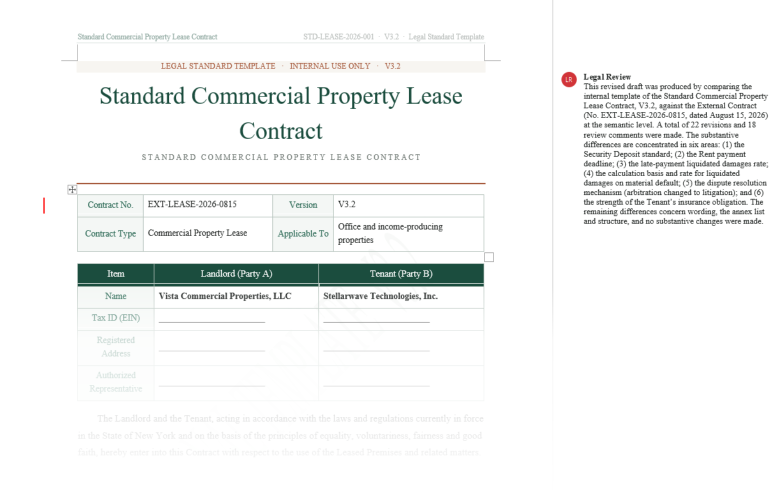
Note: The sample documents on the page are used solely to demonstrate product features,
and all related content does not correspond to real entities or business information.
and all related content does not correspond to real entities or business information.
Four steps, one review-ready draft
The same Agent pipeline you just watched, in a workflow view
01
02
03
04
Read both documents
Drop in the vendor PDF and the
internal Word template;
preserve paragraphs, clause numbers and tables.
Align clause structure
Match clauses across the
two documents;
treat same-meaning
wording as identical.
Compare &
classify
Spot substantive changes
and additions,
and rank each one
for review attention.
Generate the
review draft
Write a native Word draft with tracked changes and review notes — export and continue editing.
Embed the agent, not a black box
A contract-comparison agent you can drop into your legal or procurement system
Parse
Cross-format read
Spire.PDF vendor contract +
Spire.Doc internal template
Understand
Clause alignment
Semantic understanding
across formats
Reason
Compare & classify
Clause-level comparison,
changes ranked for review
Act
Tool calling
Function Calling triggers
redline and notes
Generate
Native output
Spire.Doc writes Word with tracked changes
// Natural language instruction
     string instruction = "Please follow the steps below:" +
     "1. Convert the attached PDF to a Word document" +
     "2. Formatting and normalization: Adjust the order of paragraphs to conform to the normal reading sequence; merge fragmented content into complete paragraphs;" +
     "   Clear irrelevant content such as page numbers, headers, and footers; apply fonts, font sizes, and alignments consistent with the template" +
     "3. Compare the content of the normalized document with the template, focusing on differences in text meaning rather than format" +
     "4. Export a Word document with revision marks (using Word's revision mode to mark new additions/deletions/modifications)";


// Create AIOptions configuration
AIOptions options = new AIOptions();

// Set SpireToken Key
options.SpireToken = key;

// Use the Document object to process Word documents
using (Spire.Doc.Document doc = new Spire.Doc.Document())
{

    // Load Word Template
    doc.LoadFromFile("Template.docx");

    // Create an AI document processor
    AIDocumentProcessor processor = doc.AI(options);

    // Execute AI instructions
    processor.ExecuteInstruction(doc, instruction, "Result.docx", new string[] { "Contract.pdf" });
}
Built for first-pass contract review
An agent shaped for legal and procurement review — not a black box

Cross-format parsing
Layout-aware PDF parsing preserves paragraph structure, clause numbers and tables — even scanned pages — while Word templates keep styles and existing revisions.

Semantic clause comparison
Beyond word-level diffing, the agent understands clause meaning. Different wording that means the same thing is classified as aligned, not as a change.

Native tracked changes
Changes are written as real Word tracked changes — deletions struck through in red, insertions underlined in green — fully compatible with Word's review workflow.

Review notes, not opinions
The agent writes suggested changes and review notes into Word margin comments — flagged for your team to confirm. It never claims to settle the contract for you.

Version management
Keep the original, the revision view and the clean view side by side, and get a change summary for every comparison run.

Batch contract review
Queue many contracts through the same pipeline — a 30-page agreement is typically compared and redlined in about 10 minutes.
Contract types you can compare
Covers the agreements legal and procurement teams see most

Leases
Commercial, equipment

Employment
Onboarding, renewal, exit

Procurement
Vendor, purchase orders

Partnerships
Strategic, joint venture

Services
SaaS, outsourcing

NDA
Confidentiality, non-solicit

Finance
Loans, guarantees, factoring

Custom
Bring your own template
Common questions
Which document formats are supported?

PDF (including scanned pages), Word (.doc/.docx), PowerPoint (.ppt/.pptx). Output is a native Word document fully compatible with Microsoft Word's tracked-changes and comment workflows. You can also export a PDF comparison report.
What's the difference between semantic comparison and word-level diffing?
Word-level diffing only sees changed characters. Semantic comparison understands what a clause means. "Liquidated damages of 10% of contract value" and "compensation for breach capped at 10% of the agreement amount" mean the same thing — a semantic comparison treats them as aligned, not changed.
Can the review draft be opened in Word directly?
Yes. The agent writes Word's native tracked-changes format, so the resulting .docx shows redlines and comments correctly in Microsoft Word, LibreOffice and Google Docs.
Are the review notes legal advice?
No. The agent produces a first-pass review: suggested changes and review notes flagging clauses for attention. Every output is explicitly review-required, and final decisions stay with your qualified legal team.
Can scanned PDFs be parsed accurately?
Yes. The Parse stage includes high-accuracy OCR and layout analysis, so scanned contracts — even at average scan quality — retain strong recognition accuracy and structure.
How are contract documents kept secure?
All transfers use TLS 1.3 and storage uses AES-256. With on-premises deployment, contract documents stay entirely inside your network. Original files can be configured to auto-delete after processing.
Ready to speed up contract review?
Get Your Free 1-Month Developer License