
Invoice PDF · contract Word · expense Excel · cross-record reconciliation
From three
financial records to
one reconciled result.
Reconcile invoices, contract terms, and expense records in one pass —
with every exception flagged for analyst review. The final call on each
variance stays with your finance team.
3
financial
record sources
record sources
$3,000
variance
flagged
flagged
8
exceptions for
analyst review
analyst review
Month-end close, before and after
Three-way matching exists in every finance function — most teams still do it by eye,
invoice by invoice, spreadsheet by spreadsheet.
The manual close
- 1 Open each invoice, find its PO and its expense entry
- 2 Compare amounts and tax rates by eye, across three documents
- 3 Chase vendors and colleagues when numbers disagree
- 4 Type the exceptions into a tracking list for the audit file
Typical cost per close:
days of staff time — and mismatches surface only when payment fails
With the agent
- 1 Drop in the whole period: invoices, POs, expense sheets
- 2 Amounts, tax rates, dates and suppliers extracted cell-precisely
- 3 Exact 3-way matching; every mismatch pinned to the field
- 4 Native Excel anomaly list + Word audit report, ERP-ready
With the agent:
100 documents reconciled in one pass, every anomaly traceable to its source field
Run the reconciliation
Three financial records in, one reconciled Excel ledger out

Tax Invoice.pdf

Purchase
Contract.docx

Expense
Reimbursement
Form.xlsx
Start
Delivery Document

Exception List.xlsx

Audit Report.docx
Multi-format parsing (1/4)
Analyze and complete 100 documents: 1 PDF invoice, 1 Word contract, and 1 Excel reimbursement form
Completed!
Result Preview
Check three documents · Generate two deliverables
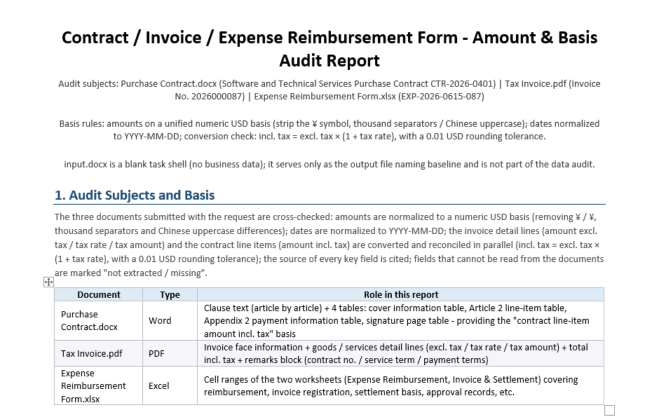
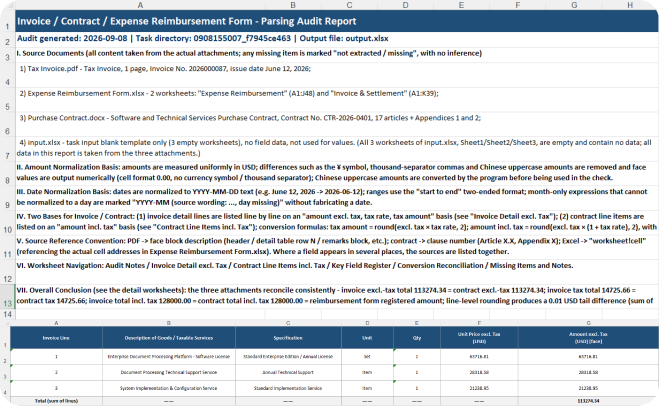
Note: The sample documents on the page are used solely to demonstrate product features,
and all related content does not correspond to real entities or business information.
and all related content does not correspond to real entities or business information.
Four steps, one reconciled ledger
AThe same Agent pipeline you just watched, in a workflow view
01
02
03
04
Import multi -
format records
Upload invoice PDFs, purchase-contract Word files and expense Excel records — scanned pages are handled by OCR automatically.
Extract key
fields
Pull amount, tax rate, date, invoice number and supplier with precision, and output them as structured data.
Reconcile across records
Cross-match invoice ↔ contract ↔ expense at value level, and flag mismatches down to the specific field.
Generate the deliverables
Write a native Excel exception list plus a Word audit report — ready to feed back into the finance system.
Embed the agent, not a black box
A reconciliation agent you can drop into your finance or ERP system
Parse
Multi-format read
Spire.PDF invoices + Spire.Doc contracts + Spire.XLS expenses
Understand
Field understanding
Amount / tax rate / date / invoice number structured
Reason
Reconciliation logic
Cross-record matching with configurable exception rules
Act
Tool calling
Function Calling reads cells and writes files
Generate
Native output
Spire.XLS exception list + Spire.Doc audit report
// Create AIOptions configuration options
AIOptions options = new AIOptions();

// Set SpireToken Key
options.SpireToken = "**************************";

// Using the Workbook object
using (Workbook workbook = new Workbook())
{
    // Create an AI document processor
    AIDocumentProcessor processor = workbook.AI(options);

    // Natural language instruction
    string instruction = "Read the content of the attached document, extract key fields such as amount, tax rate, date, and supplier, and perform audits on 'invoice', 'contract', and 'reimbursement form'. Finally, generate an exception list in Excel format";

    // Execute AI instructions to generate an Excel exception list
       processor.ExecuteInstruction(workbook, instruction, "Exception List.xlsx", new string[] { "Contract.docx", "Invoice.pdf", "Expense Report.xlsx" });
}

// Using the Document object
{
    // Create an AI document processor
    AIDocumentProcessor processor = doc.AI(options);

    // Natural language instruction
    string instruction = "Read the content of the attached document, extract key fields such as amount, tax rate, date, and supplier, and perform audits on 'invoice', 'contract', and 'reimbursement form'. Finally, generate an audit report in Word format";

    // Execute AI instructions to generate a Word audit report
       processor.ExecuteInstruction(doc, instruction, "Audit Report.docx", new string[] { "Contract.docx", "Invoice.pdf", "Expense Report.xlsx" });
}

Built for financial reconciliation
An agent shaped for finance and audit teams — not a black box

Multi-format parsing
Parse invoice PDFs (including scanned pages), purchase-contract Word files and expense Excel records at once, recognizing table and layout structure so results are ready for comparison.

Precise key-field extraction
Recognize amount (tax-inclusive and net), tax rate, invoice number, issue date and supplier with precision, output as structured data the agent can verify against.

Cross-record reconciliation
Match invoices, contract terms and expense records against configurable rules with value-precise comparison, and pinpoint mismatches to the exact field.

Native Excel exception list
Write the exception list in Excel's native format with formulas, filters and pivots intact — finance teams can use it the moment it opens.

Risk grading & flagging
Amount gaps, tax-rate anomalies, duplicate invoices and supplier mismatches are graded by risk — high-severity exceptions are surfaced first for analyst review.

Audit report generation
Summarize the exceptions into an auto-generated Word audit report with scope, key findings and recommended actions — ready to archive or share.
Common questions
Which source documents are supported?

Invoice PDFs (including scanned pages, with OCR), purchase contracts in Word, and expense records in Excel. You can batch-import a full accounting period, and the result exports as a native Excel exception list ready to feed back into your finance system.
Is the matching logic hard rules or AI?
Both. AI extracts and understands fields, while the Reason stage does value-precise comparison and exception judgment. Amount, tax rate and date rules are fully configurable to your company's finance policy.
How accurate is the amount reconciliation?
Value-precise, not semantic approximation — amounts to the cent and tax rates to 0.1%. A mismatch is pinpointed to the exact field, for example "invoice $128,000 vs expense $125,000". Extractions can also be spot-checked by a human.
What happens to the $3,000 variance?
It is flagged for analyst review, not auto-adjusted. The agent records it as a high-severity exception with the exact fields involved, and the ledger is only closed after an analyst confirms the resolution.
Can the exception list feed straight into our finance system?
Yes. It's a native Excel file that keeps filters, pivots and formulas — you can also export CSV or JSON, or write results back through the API, with no manual transcription.
How is data security handled?
TLS 1.3 in transit and AES-256 at rest, with on-premises deployment available so financial records and invoices stay entirely inside your network. Every Agent action is logged for audit.
Ready to reconcile financial records faster?
Get Your Free 1-Month Developer License