
Batch parsing · semantic match · native Excel talent pool
From 320 resumes to
a focused shortlist.
Parse and score 320 resumes against your job profile, then deliver a ranked
shortlist and a native Excel talent pool. AI-assisted screening
— the hiring decision stays with your team.
320
resumes screened
Top 8
focused shortlist
3
scorecards for review
Watch the agent screen 320 resumes
The same pipeline, step by step — parsing, scoring and delivery.
The manual screen
- 1 Open each resume, scan for skills and years of experience
- 2 Compare candidates against the JD from memory
- 3 Keep notes in a spreadsheet, hope the ranking is fair
- 4 Draft interview invitations one by one
Typical cost per requisition:
hours of reading — and strong candidates get lost in the pile
With the agent
- 1 Drop in the JD and a folder of 320 resumes
- 2 Every resume parsed; candidate profiles built with PII screened out
- 3 Weighted, explainable scores — matches and gaps per dimension
- 4 Native Excel talent pool + interview letters for the Top 8
With the agent:
minutes to a scored shortlist — interview the right eight, not the first eight
Screening, before and after
Every recruiter knows the pattern: hundreds of resumes, one job description,
and a long weekend of reading before the first interview is scheduled.

Job Description.pdf

Ryan Gu_
Resume.pdf

Daniel Lin_
Resume.pdf
Start
Kevin Shen_
Resume.pdf

Ethan Hsu_
Resume.docx

Andrew Zhou_
Resume.docx
Batch parsing resumes (1/4)
We are currently parsing the resume file, extracting key information,
and performing job matching. Please wait ..
Complete!
Result Preview
Candidate Screening Results.xlsx
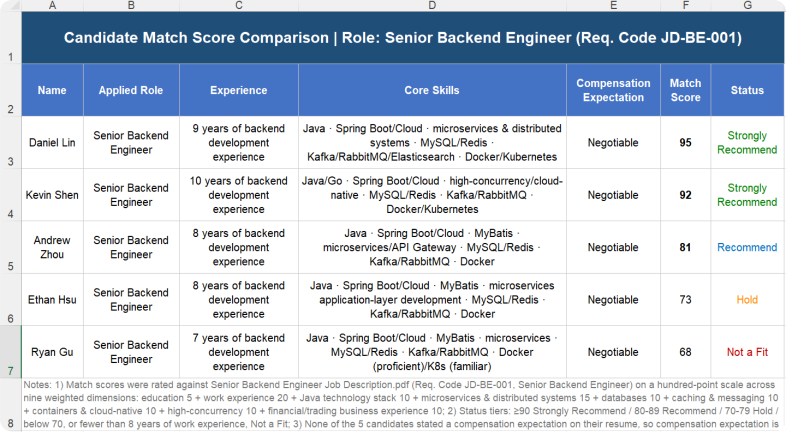
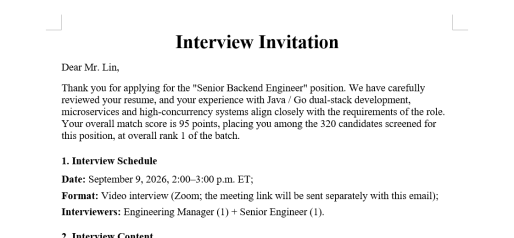
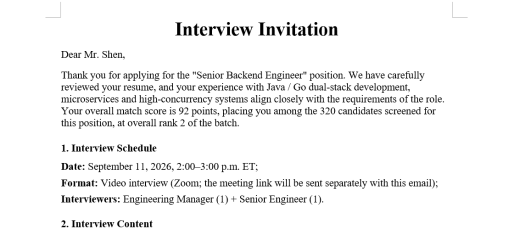
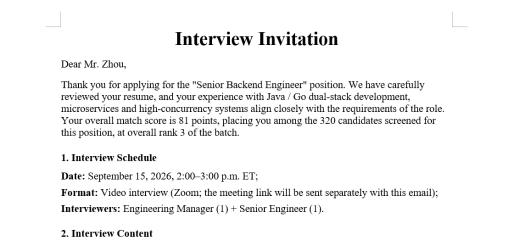
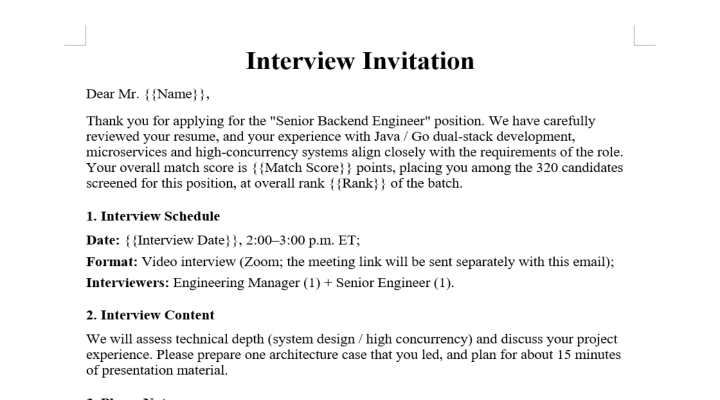
Note: The sample documents on the page are used solely to demonstrate product features,
and all related content does not correspond to real entities or business information.
and all related content does not correspond to real entities or business information.
Four steps from resume batch to shortlist
The same Agent pipeline you just watched, in a workflow view
01
02
03
04
Batch-parse resumes
Upload the job description and a resume folder (PDF / DOCX, scanned pages via OCR); process hundreds in one pass.
Understand
the role
Build a structured job profile and candidate snapshot — skills, years, education, salary expectations and project experience.
Score &
rank
Align JD and resume semantically, score with configurable weights, and cite the basis for every point.
Deliver the
shortlist
Native Excel talent pool, candidate comparison and interview invitations in Word — ready to drop back into your ATS.
Embed the agent, not a black box
A screening agent you can drop into your ATS, OA or ERP
Parse
Batch resume reading
Spire.PDF / Spire.Doc batch parsing, scanned pages via OCR
Understand
Candidate profiling
Understanding of skills, years, salary and project experience
Reason
JD ↔ resume scoring
Semantic reasoning, explainable weighted scores
Act
Tool calling
Function Calling drives PII screening and native APIs
Generate
Native output
Spire.XLS talent pool + Spire.Doc invitations
// Create AIOptions configuration
AIOptions options = new AIOptions();

// Set SpireToken Key
options.SpireToken = "sk-************************";

// Set timeout duration
options.TimeoutMs = 1000000;

// Set the working folder path
string OutputDir = "F:\\out";
options.WorkDir = OutputDir;

// Using the Workbook object
using (Workbook workbook = new Workbook())
{
    // Create an AI document processor
    AIDocumentProcessor processor = workbook.AI(options);

    // Natural language instruction
    string instruction = "Analyze resumes in PDF and DOCX formats, match them against the job requirements outlined in 'Job Description.pdf', and generate a 'Candidate Results.xlsx' file. The Excel file should include fields such as 'Name, Specific Score, Specific Rank, Interview Time'";

    // Execute AI instructions, filter and generate "candidate results.xlsx"
    processor.ExecuteInstruction(workbook, instruction, "Candidate Results.xlsx", new string[] { "Job Description.pdf", "Ryan Gu_Resume.pdf", "Daniel Lin_Resume.pdf", "Kevin Shen_Resume.pdf", "Ethan Hsu_Resume.docx", "Andrew Zhou_Resume.docx" });
}

// Using the Document object
using (Document doc = new Document())
{
    // Load template word
    doc.LoadFromFile("Template for interview invitation letter.docx");

    // Create an AI document processor
    AIDocumentProcessor processor = doc.AI(options);

    // Natural language instruction
    string instruction = "Replace the placeholders in the corresponding fields of the interview invitation template with the field values from 'Candidate Results.xlsx', specifically 'Name', 'Specific Score', 'Specific Rank', and 'Interview Time', to generate the Word document of the interview invitation";

    // Execute AI command to generate "product specification.docx"
    AIResult result=  processor.ExecuteInstruction(doc, instruction, null, new string[] { "Candidate Results.xlsx" });
}

Built for talent teams, not a black box
An agent shaped for recruiters and hiring managers — scores to inform, humans to decide

Multi-format resume parsing
Parse PDF and DOCX batches in one pass (scanned pages via automatic OCR), preserving text, tables and project sections, with extracted fields flowing straight into a structured talent pool.

Semantic role matching
JD and resume aligned at the semantic level — skills, years, project relevance — not just keyword hits, so implicit matches like "responsibilities vs. project experience" are captured.

Explainable, adjustable scoring
Match scores are weighted from the role requirements, and every score carries its source basis. Adjust weights and re-run, or apply hard filters on years, education and certifications.

Native Excel talent pool
A real .xlsx talent pool with filters, sorting and formulas intact — your team can slice it by department, role and score the moment it lands.

Side-by-side comparison
Top candidates compared across skills, experience highlights, match basis and points to verify — so interviewers focus on differences, not impressions.

Bulk invitation generation
Interview invitation Word documents generated per candidate from your template, with name, role and suggested times filled in automatically.
Common questions
Which resume formats are supported?

PDF, DOCX (scanned pages via automatic OCR) and image resumes, processed as a whole batch from any sourcing channel. Exports from applicant-tracking platforms, such as CSV attachments, can be imported directly.
What is a match score based on?
Scores are weighted from the role requirements across skills, years of experience, project relevance, education and image-based resumes. Every score cites its source basis — expand a card to see why it is a 92.
How do you avoid bias and stay compliant?
Scoring criteria are configurable, and a privacy mode keeps name, gender, photo and origin out of the evaluation entirely. Scoring is transparent and auditable, supports fairness spot-checks on shortlist outcomes, and every shortlist decision is reviewed by a human.
Does the agent make the hiring decision?
No. This is AI-assisted screening: the agent does the first pass, and the scorecards it produces are assistant output for human review. The final hiring decision stays with your team, at every decision point.
Can we integrate it with our own ATS?
Yes. The talent pool is a native Excel file, and the same results can be exported as JSON or CSV or written back through the API into your ATS, OA or ERP. Private deployment keeps candidate data entirely inside your network.
How is candidate data kept secure?
All transfers use TLS 1.3 and storage uses AES-256. With on-premises deployment, resumes stay inside your network, and original files can be configured to auto-delete after processing.
Ready to speed up candidate screening?
Get Your Free 1-Month Developer License