
Drawing (7)
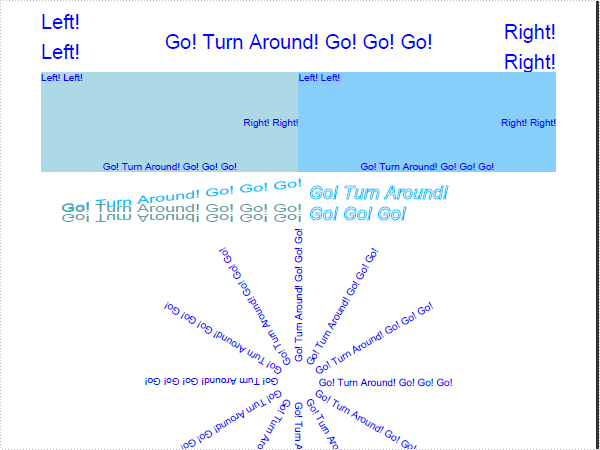
using System;
using System.Drawing;
using Spire.Pdf;
using Spire.Pdf.Graphics;

namespace DrawText
{
    class Program
    {
        static void Main(string[] args)
        {
            //Create a pdf document.
            PdfDocument doc = new PdfDocument();

            // Create one page
            PdfPageBase page = doc.Pages.Add();

            DrawText(page);
            AlignText(page);
            AlignTextInRectangle(page);
            TransformText(page);
            RotateText(page);

            //Save doc file.
            doc.SaveToFile("DrawText.pdf");
            doc.Close();

            //Launching the Pdf file.
            System.Diagnostics.Process.Start("DrawText.pdf");
        }

        private static void RotateText(PdfPageBase page)
        {
            //save graphics state
            PdfGraphicsState state = page.Canvas.Save();

            //Draw the text - transform
            PdfFont font = new PdfFont(PdfFontFamily.Helvetica, 10f);
            PdfSolidBrush brush = new PdfSolidBrush(Color.Blue);

            PdfStringFormat centerAlignment
                = new PdfStringFormat(PdfTextAlignment.Left, PdfVerticalAlignment.Middle);
            float x = page.Canvas.ClientSize.Width / 2;
            float y = 380;

            page.Canvas.TranslateTransform(x, y);
            for (int i = 0; i < 12; i++)
            {
                page.Canvas.RotateTransform(30);
                page.Canvas.DrawString("Go! Turn Around! Go! Go! Go!", font, brush, 20, 0, centerAlignment);
            }

            //restor graphics
            page.Canvas.Restore(state);
        }

        private static void TransformText(PdfPageBase page)
        {
            //save graphics state
            PdfGraphicsState state = page.Canvas.Save();

            //Draw the text - transform
            PdfFont font = new PdfFont(PdfFontFamily.Helvetica, 18f);
            PdfSolidBrush brush1 = new PdfSolidBrush(Color.DeepSkyBlue);
            PdfSolidBrush brush2 = new PdfSolidBrush(Color.CadetBlue);

            page.Canvas.TranslateTransform(20, 200);
            page.Canvas.ScaleTransform(1f, 0.6f);
            page.Canvas.SkewTransform(-10, 0);
            page.Canvas.DrawString("Go! Turn Around! Go! Go! Go!", font, brush1, 0, 0);

            page.Canvas.SkewTransform(10, 0);
            page.Canvas.DrawString("Go! Turn Around! Go! Go! Go!", font, brush2, 0, 0);

            page.Canvas.ScaleTransform(1f, -1f);
            page.Canvas.DrawString("Go! Turn Around! Go! Go! Go!", font, brush2, 0, -2 * 18);
            //restor graphics
            page.Canvas.Restore(state);
        }

        private static void AlignTextInRectangle(PdfPageBase page)
        {
            //Draw the text - align in rectangle
            PdfFont font = new PdfFont(PdfFontFamily.Helvetica, 10f);
            PdfSolidBrush brush = new PdfSolidBrush(Color.Blue);
            RectangleF rctg1 = new RectangleF(0, 70, page.Canvas.ClientSize.Width / 2, 100);
            RectangleF rctg2
                = new RectangleF(page.Canvas.ClientSize.Width / 2, 70, page.Canvas.ClientSize.Width / 2, 100);
            page.Canvas.DrawRectangle(new PdfSolidBrush(Color.LightBlue), rctg1);
            page.Canvas.DrawRectangle(new PdfSolidBrush(Color.LightSkyBlue), rctg2);

            PdfStringFormat leftAlignment
                = new PdfStringFormat(PdfTextAlignment.Left, PdfVerticalAlignment.Top);
            page.Canvas.DrawString("Left! Left!", font, brush, rctg1, leftAlignment);
            page.Canvas.DrawString("Left! Left!", font, brush, rctg2, leftAlignment);

            PdfStringFormat rightAlignment
                = new PdfStringFormat(PdfTextAlignment.Right, PdfVerticalAlignment.Middle);
            page.Canvas.DrawString("Right! Right!", font, brush, rctg1, rightAlignment);
            page.Canvas.DrawString("Right! Right!", font, brush, rctg2, rightAlignment);

            PdfStringFormat centerAlignment
                = new PdfStringFormat(PdfTextAlignment.Center, PdfVerticalAlignment.Bottom);
            page.Canvas.DrawString("Go! Turn Around! Go! Go! Go!", font, brush, rctg1, centerAlignment);
            page.Canvas.DrawString("Go! Turn Around! Go! Go! Go!", font, brush, rctg2, centerAlignment);
        }

        private static void AlignText(PdfPageBase page)
        {
            //Draw the text - alignment
            PdfFont font = new PdfFont(PdfFontFamily.Helvetica, 20f);
            PdfSolidBrush brush = new PdfSolidBrush(Color.Blue);

            PdfStringFormat leftAlignment = new PdfStringFormat(PdfTextAlignment.Left, PdfVerticalAlignment.Middle);
            page.Canvas.DrawString("Left!", font, brush, 0, 20, leftAlignment);
            page.Canvas.DrawString("Left!", font, brush, 0, 50, leftAlignment);

            PdfStringFormat rightAlignment = new PdfStringFormat(PdfTextAlignment.Right, PdfVerticalAlignment.Middle);
            page.Canvas.DrawString("Right!", font, brush, page.Canvas.ClientSize.Width, 30, rightAlignment);
            page.Canvas.DrawString("Right!", font, brush, page.Canvas.ClientSize.Width, 60, rightAlignment);

            PdfStringFormat centerAlignment
                = new PdfStringFormat(PdfTextAlignment.Center, PdfVerticalAlignment.Middle);
            page.Canvas.DrawString("Go! Turn Around! Go! Go! Go!",
                font, brush, page.Canvas.ClientSize.Width / 2, 40, centerAlignment);
        }

        private static void DrawText(PdfPageBase page)
        {
            //save graphics state
            PdfGraphicsState state = page.Canvas.Save();

            //Draw text - brush
            String text = "Go! Turn Around! Go! Go! Go!";
            PdfPen pen = PdfPens.DeepSkyBlue;
            PdfSolidBrush brush = new PdfSolidBrush(Color.White);
            PdfStringFormat format = new PdfStringFormat();
            PdfFont font = new PdfFont(PdfFontFamily.Helvetica, 18f, PdfFontStyle.Italic);
            SizeF size = font.MeasureString(text, format);
            RectangleF rctg
                = new RectangleF(page.Canvas.ClientSize.Width / 2 + 10, 180,
                size.Width / 3 * 2, size.Height * 2);
            page.Canvas.DrawString(text, font, pen, brush, rctg, format);

            //restor graphics
            page.Canvas.Restore(state);
        }
    }
}
Imports System.Drawing
Imports Spire.Pdf
Imports Spire.Pdf.Graphics

Namespace DrawText
    Friend Class Program
        Shared Sub Main(ByVal args() As String)
            'Create a pdf document.
            Dim doc As New PdfDocument()

            ' Create one page
            Dim page As PdfPageBase = doc.Pages.Add()

            DrawText(page)
            AlignText(page)
            AlignTextInRectangle(page)
            TransformText(page)
            RotateText(page)

            'Save doc file.
            doc.SaveToFile("DrawText.pdf")
            doc.Close()

            'Launching the Pdf file.
            Process.Start("DrawText.pdf")
        End Sub

        Private Shared Sub RotateText(ByVal page As PdfPageBase)
            'save graphics state
            Dim state As PdfGraphicsState = page.Canvas.Save()

            'Draw the text - transform
            Dim font As New PdfFont(PdfFontFamily.Helvetica, 10.0F)
            Dim brush As New PdfSolidBrush(Color.Blue)

            Dim centerAlignment As New PdfStringFormat(PdfTextAlignment.Left, PdfVerticalAlignment.Middle)
            Dim x As Single = page.Canvas.ClientSize.Width \ 2
            Dim y As Single = 380

            page.Canvas.TranslateTransform(x, y)
            For i As Integer = 0 To 11
                page.Canvas.RotateTransform(30)
                page.Canvas.DrawString("Go! Turn Around! Go! Go! Go!", font, brush, 20, 0, centerAlignment)
            Next i

            'restor graphics
            page.Canvas.Restore(state)
        End Sub

        Private Shared Sub TransformText(ByVal page As PdfPageBase)
            'save graphics state
            Dim state As PdfGraphicsState = page.Canvas.Save()

            'Draw the text - transform
            Dim font As New PdfFont(PdfFontFamily.Helvetica, 18.0F)
            Dim brush1 As New PdfSolidBrush(Color.DeepSkyBlue)
            Dim brush2 As New PdfSolidBrush(Color.CadetBlue)

            page.Canvas.TranslateTransform(20, 200)
            page.Canvas.ScaleTransform(1.0F, 0.6F)
            page.Canvas.SkewTransform(-10, 0)
            page.Canvas.DrawString("Go! Turn Around! Go! Go! Go!", font, brush1, 0, 0)

            page.Canvas.SkewTransform(10, 0)
            page.Canvas.DrawString("Go! Turn Around! Go! Go! Go!", font, brush2, 0, 0)

            page.Canvas.ScaleTransform(1.0F, -1.0F)
            page.Canvas.DrawString("Go! Turn Around! Go! Go! Go!", font, brush2, 0, -2 * 18)
            'restor graphics
            page.Canvas.Restore(state)
        End Sub

        Private Shared Sub AlignTextInRectangle(ByVal page As PdfPageBase)
            'Draw the text - align in rectangle
            Dim font As New PdfFont(PdfFontFamily.Helvetica, 10.0F)
            Dim brush As New PdfSolidBrush(Color.Blue)
            Dim rctg1 As New RectangleF(0, 70, page.Canvas.ClientSize.Width \ 2, 100)
            Dim rctg2 As New RectangleF(page.Canvas.ClientSize.Width \ 2, 70, page.Canvas.ClientSize.Width \ 2, 100)
            page.Canvas.DrawRectangle(New PdfSolidBrush(Color.LightBlue), rctg1)
            page.Canvas.DrawRectangle(New PdfSolidBrush(Color.LightSkyBlue), rctg2)

            Dim leftAlignment As New PdfStringFormat(PdfTextAlignment.Left, PdfVerticalAlignment.Top)
            page.Canvas.DrawString("Left! Left!", font, brush, rctg1, leftAlignment)
            page.Canvas.DrawString("Left! Left!", font, brush, rctg2, leftAlignment)

            Dim rightAlignment As New PdfStringFormat(PdfTextAlignment.Right, PdfVerticalAlignment.Middle)
            page.Canvas.DrawString("Right! Right!", font, brush, rctg1, rightAlignment)
            page.Canvas.DrawString("Right! Right!", font, brush, rctg2, rightAlignment)

            Dim centerAlignment As New PdfStringFormat(PdfTextAlignment.Center, PdfVerticalAlignment.Bottom)
            page.Canvas.DrawString("Go! Turn Around! Go! Go! Go!", font, brush, rctg1, centerAlignment)
            page.Canvas.DrawString("Go! Turn Around! Go! Go! Go!", font, brush, rctg2, centerAlignment)
        End Sub

        Private Shared Sub AlignText(ByVal page As PdfPageBase)
            'Draw the text - alignment
            Dim font As New PdfFont(PdfFontFamily.Helvetica, 20.0F)
            Dim brush As New PdfSolidBrush(Color.Blue)

            Dim leftAlignment As New PdfStringFormat(PdfTextAlignment.Left, PdfVerticalAlignment.Middle)
            page.Canvas.DrawString("Left!", font, brush, 0, 20, leftAlignment)
            page.Canvas.DrawString("Left!", font, brush, 0, 50, leftAlignment)

            Dim rightAlignment As New PdfStringFormat(PdfTextAlignment.Right, PdfVerticalAlignment.Middle)
            page.Canvas.DrawString("Right!", font, brush, page.Canvas.ClientSize.Width, 30, rightAlignment)
            page.Canvas.DrawString("Right!", font, brush, page.Canvas.ClientSize.Width, 60, rightAlignment)

            Dim centerAlignment As New PdfStringFormat(PdfTextAlignment.Center, PdfVerticalAlignment.Middle)
            page.Canvas.DrawString("Go! Turn Around! Go! Go! Go!", _
                                   font, brush, page.Canvas.ClientSize.Width \ 2, 40, centerAlignment)
        End Sub

        Private Shared Sub DrawText(ByVal page As PdfPageBase)
            'save graphics state
            Dim state As PdfGraphicsState = page.Canvas.Save()

            'Draw text - brush
            Dim text As String = "Go! Turn Around! Go! Go! Go!"
            Dim pen As PdfPen = PdfPens.DeepSkyBlue
            Dim brush As New PdfSolidBrush(Color.White)
            Dim format As New PdfStringFormat()
            Dim font As New PdfFont(PdfFontFamily.Helvetica, 18.0F, PdfFontStyle.Italic)
            Dim size As SizeF = font.MeasureString(text, format)
            Dim rctg As New RectangleF(page.Canvas.ClientSize.Width \ 2 + 10, 180, size.Width \ 3 * 2, size.Height * 2)
            page.Canvas.DrawString(text, font, pen, brush, rctg, format)

            'restor graphics
            page.Canvas.Restore(state)
        End Sub
    End Class
End Namespace
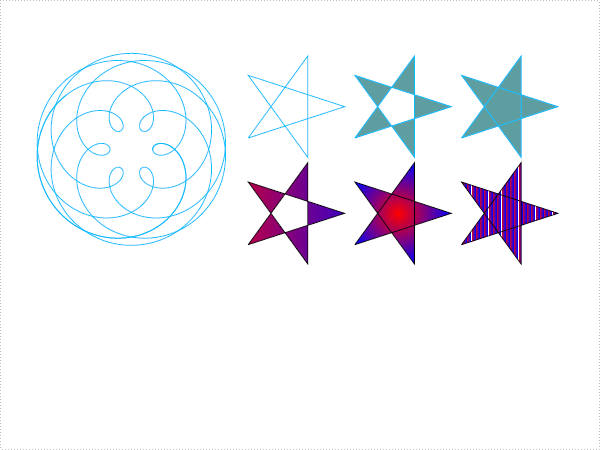
using System;
using System.Drawing;
using Spire.Pdf;
using Spire.Pdf.Graphics;

namespace DrawShape
{
    class Program
    {
        static void Main(string[] args)
        {
            //Create a pdf document.
            PdfDocument doc = new PdfDocument();

            // Create one page
            PdfPageBase page = doc.Pages.Add();

            DrawSpiro(page);
            DrawPath(page);

            //Save pdf file.
            doc.SaveToFile("DrawShape.pdf");
            doc.Close();

            //Launching the Pdf file.
            System.Diagnostics.Process.Start("DrawShape.pdf");
        }

        private static void DrawPath(PdfPageBase page)
        {
            PointF[] points = new PointF[5];
            for (int i = 0; i < points.Length; i++)
            {
                float x = (float)Math.Cos(i * 2 * Math.PI / 5);
                float y = (float)Math.Sin(i * 2 * Math.PI / 5);
                points[i] = new PointF(x, y);
            }
            PdfPath path = new PdfPath();
            path.AddLine(points[2], points[0]);
            path.AddLine(points[0], points[3]);
            path.AddLine(points[3], points[1]);
            path.AddLine(points[1], points[4]);
            path.AddLine(points[4], points[2]);

            //save graphics state
            PdfGraphicsState state = page.Canvas.Save();
            PdfPen pen = new PdfPen(Color.DeepSkyBlue, 0.02f);
            PdfBrush brush1 = new PdfSolidBrush(Color.CadetBlue);

            page.Canvas.ScaleTransform(50f, 50f);
            page.Canvas.TranslateTransform(5f, 1.2f);
            page.Canvas.DrawPath(pen, path);

            page.Canvas.TranslateTransform(2f, 0f);
            path.FillMode = PdfFillMode.Alternate;
            page.Canvas.DrawPath(pen, brush1, path);

            page.Canvas.TranslateTransform(2f, 0f);
            path.FillMode = PdfFillMode.Winding;
            page.Canvas.DrawPath(pen, brush1, path);

            PdfLinearGradientBrush brush2
                = new PdfLinearGradientBrush(new PointF(-2, 0), new PointF(2, 0), Color.Red, Color.Blue);
            page.Canvas.TranslateTransform(-4f, 2f);
            path.FillMode = PdfFillMode.Alternate;
            page.Canvas.DrawPath(pen, brush2, path);

            PdfRadialGradientBrush brush3
                = new PdfRadialGradientBrush(new PointF(0f, 0f), 0f, new PointF(0f, 0f), 1f, Color.Red, Color.Blue);
            page.Canvas.TranslateTransform(2f, 0f);
            path.FillMode = PdfFillMode.Winding;
            page.Canvas.DrawPath(pen, brush3, path);

            PdfTilingBrush brush4 = new PdfTilingBrush(new RectangleF(0, 0, 4f, 4f));
            brush4.Graphics.DrawRectangle(brush2, 0, 0, 4f, 4f);

            page.Canvas.TranslateTransform(2f, 0f);
            path.FillMode = PdfFillMode.Winding;
            page.Canvas.DrawPath(pen, brush4, path);

            //restor graphics
            page.Canvas.Restore(state);
        }

        private static void DrawSpiro(PdfPageBase page)
        {
            //save graphics state
            PdfGraphicsState state = page.Canvas.Save();

            //Draw shap - spiro
            PdfPen pen = PdfPens.DeepSkyBlue;

            int nPoints = 1000;
            double r1 = 30;
            double r2 = 25;
            double p = 35;
            double x1 = r1 + r2 - p;
            double y1 = 0;
            double x2 = 0;
            double y2 = 0;

            page.Canvas.TranslateTransform(100, 100);

            for (int i = 0; i < nPoints; i++)
            {
                double t = i * Math.PI / 90;
                x2 = (r1 + r2) * Math.Cos(t) - p * Math.Cos((r1 + r2) * t / r2);
                y2 = (r1 + r2) * Math.Sin(t) - p * Math.Sin((r1 + r2) * t / r2);
                page.Canvas.DrawLine(pen, (float)x1, (float)y1, (float)x2, (float)y2);
                x1 = x2;
                y1 = y2;
            }

            //restor graphics
            page.Canvas.Restore(state);
        }
    }
}
Imports System.Drawing
Imports Spire.Pdf
Imports Spire.Pdf.Graphics

Namespace DrawShape
    Friend Class Program
        Shared Sub Main(ByVal args() As String)
            'Create a pdf document.
            Dim doc As New PdfDocument()

            ' Create one page
            Dim page As PdfPageBase = doc.Pages.Add()

            DrawSpiro(page)
            DrawPath(page)

            'Save pdf file.
            doc.SaveToFile("DrawShape.pdf")
            doc.Close()

            'Launching the Pdf file.
            Process.Start("DrawShape.pdf")
        End Sub

        Private Shared Sub DrawPath(ByVal page As PdfPageBase)
            Dim points(4) As PointF
            For i As Integer = 0 To points.Length - 1
                Dim x As Single = CSng(Math.Cos(i * 2 * Math.PI / 5))
                Dim y As Single = CSng(Math.Sin(i * 2 * Math.PI / 5))
                points(i) = New PointF(x, y)
            Next i
            Dim path As New PdfPath()
            path.AddLine(points(2), points(0))
            path.AddLine(points(0), points(3))
            path.AddLine(points(3), points(1))
            path.AddLine(points(1), points(4))
            path.AddLine(points(4), points(2))

            'save graphics state
            Dim state As PdfGraphicsState = page.Canvas.Save()
            Dim pen As New PdfPen(Color.DeepSkyBlue, 0.02F)
            Dim brush1 As PdfBrush = New PdfSolidBrush(Color.CadetBlue)

            page.Canvas.ScaleTransform(50.0F, 50.0F)
            page.Canvas.TranslateTransform(5.0F, 1.2F)
            page.Canvas.DrawPath(pen, path)

            page.Canvas.TranslateTransform(2.0F, 0.0F)
            path.FillMode = PdfFillMode.Alternate
            page.Canvas.DrawPath(pen, brush1, path)

            page.Canvas.TranslateTransform(2.0F, 0.0F)
            path.FillMode = PdfFillMode.Winding
            page.Canvas.DrawPath(pen, brush1, path)

            Dim brush2 As New PdfLinearGradientBrush(New PointF(-2, 0), New PointF(2, 0), Color.Red, Color.Blue)
            page.Canvas.TranslateTransform(-4.0F, 2.0F)
            path.FillMode = PdfFillMode.Alternate
            page.Canvas.DrawPath(pen, brush2, path)

            Dim brush3 As New PdfRadialGradientBrush(New PointF(0.0F, 0.0F), _
                0.0F, New PointF(0.0F, 0.0F), 1.0F, Color.Red, Color.Blue)
            page.Canvas.TranslateTransform(2.0F, 0.0F)
            path.FillMode = PdfFillMode.Winding
            page.Canvas.DrawPath(pen, brush3, path)

            Dim brush4 As New PdfTilingBrush(New RectangleF(0, 0, 4.0F, 4.0F))
            brush4.Graphics.DrawRectangle(brush2, 0, 0, 4.0F, 4.0F)

            page.Canvas.TranslateTransform(2.0F, 0.0F)
            path.FillMode = PdfFillMode.Winding
            page.Canvas.DrawPath(pen, brush4, path)

            'restor graphics
            page.Canvas.Restore(state)
        End Sub

        Private Shared Sub DrawSpiro(ByVal page As PdfPageBase)
            'save graphics state
            Dim state As PdfGraphicsState = page.Canvas.Save()

            'Draw shap - spiro
            Dim pen As PdfPen = PdfPens.DeepSkyBlue

            Dim nPoints As Integer = 1000
            Dim r1 As Double = 30
            Dim r2 As Double = 25
            Dim p As Double = 35
            Dim x1 As Double = r1 + r2 - p
            Dim y1 As Double = 0
            Dim x2 As Double = 0
            Dim y2 As Double = 0

            page.Canvas.TranslateTransform(100, 100)

            For i As Integer = 0 To nPoints - 1
                Dim t As Double = i * Math.PI / 90
                x2 = (r1 + r2) * Math.Cos(t) - p * Math.Cos((r1 + r2) * t / r2)
                y2 = (r1 + r2) * Math.Sin(t) - p * Math.Sin((r1 + r2) * t / r2)
                page.Canvas.DrawLine(pen, CSng(x1), CSng(y1), CSng(x2), CSng(y2))
                x1 = x2
                y1 = y2
            Next i

            'restor graphics
            page.Canvas.Restore(state)
        End Sub
    End Class
End Namespace
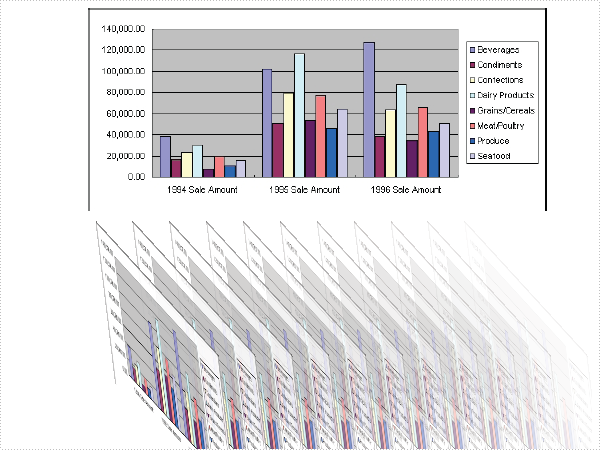
using System;
using System.Drawing;
using Spire.Pdf;
using Spire.Pdf.Graphics;

namespace DrawImage
{
    class Program
    {
        static void Main(string[] args)
        {
            //Create a pdf document.
            PdfDocument doc = new PdfDocument();

            // Create one page
            PdfPageBase page = doc.Pages.Add();

            TransformText(page);
            DrawImage(page);
            TransformImage(page);

            //Save pdf file.
            doc.SaveToFile("DrawImage.pdf");
            doc.Close();

            //Launching the Pdf file.
            System.Diagnostics.Process.Start("DrawImage.pdf");
        }

        private static void TransformImage(PdfPageBase page)
        {
            //save graphics state
            PdfGraphicsState state = page.Canvas.Save();

            //Draw the text - transform
            PdfFont font = new PdfFont(PdfFontFamily.Helvetica, 18f);
            PdfSolidBrush brush1 = new PdfSolidBrush(Color.Blue);
            PdfSolidBrush brush2 = new PdfSolidBrush(Color.CadetBlue);
            PdfStringFormat format = new PdfStringFormat(PdfTextAlignment.Center);

            page.Canvas.TranslateTransform(page.Canvas.ClientSize.Width / 2, 20);
            page.Canvas.DrawString("Sales Report Chart", font, brush1, 0, 0, format);

            page.Canvas.ScaleTransform(1f, -0.8f);
            page.Canvas.DrawString("Sales Report Chart", font, brush2, 0, -2 * 18 * 1.2f, format);
            //restor graphics
            page.Canvas.Restore(state);
        }

        private static void DrawImage(PdfPageBase page)
        {
            PdfImage image = PdfImage.FromFile(@"SalesReportChart.png");
            float width = image.Width * 0.75f;
            float height = image.Height * 0.75f;
            float x = (page.Canvas.ClientSize.Width - width) / 2;

            page.Canvas.DrawImage(image, x, 60, width, height);
        }

        private static void TransformText(PdfPageBase page)
        {
            PdfImage image = PdfImage.FromFile(@"SalesReportChart.png");
            int skewX = 20;
            int skewY = 20;
            float scaleX = 0.2f;
            float scaleY = 0.6f;
            int width = (int)((image.Width + image.Height * Math.Tan(Math.PI * skewX / 180)) * scaleX);
            int height = (int)((image.Height + image.Width * Math.Tan(Math.PI * skewY / 180)) * scaleY);
            PdfTemplate template = new PdfTemplate(width, height);
            template.Graphics.ScaleTransform(scaleX, scaleY);
            template.Graphics.SkewTransform(skewX, skewY);
            template.Graphics.DrawImage(image, 0, 0);

            //save graphics state
            PdfGraphicsState state = page.Canvas.Save();
            page.Canvas.TranslateTransform(page.Canvas.ClientSize.Width - 50, 260);
            float offset = (page.Canvas.ClientSize.Width - 100) / 12;
            for (int i = 0; i < 12; i++)
            {
                page.Canvas.TranslateTransform(-offset, 0);
                page.Canvas.SetTransparency(i / 12.0f);
                page.Canvas.DrawTemplate(template, new PointF(0, 0));
            }

            //restor graphics
            page.Canvas.Restore(state);
        }
    }
}
Imports System.Drawing
Imports Spire.Pdf
Imports Spire.Pdf.Graphics

Namespace DrawImage
    Friend Class Program
        Shared Sub Main(ByVal args() As String)
            'Create a pdf document.
            Dim doc As New PdfDocument()

            ' Create one page
            Dim page As PdfPageBase = doc.Pages.Add()

            TransformText(page)
            DrawImage(page)
            TransformImage(page)

            'Save pdf file.
            doc.SaveToFile("DrawImage.pdf")
            doc.Close()

            'Launching the Pdf file.
            Process.Start("DrawImage.pdf")
        End Sub

        Private Shared Sub TransformImage(ByVal page As PdfPageBase)
            'save graphics state
            Dim state As PdfGraphicsState = page.Canvas.Save()

            'Draw the text - transform
            Dim font As New PdfFont(PdfFontFamily.Helvetica, 18.0F)
            Dim brush1 As New PdfSolidBrush(Color.Blue)
            Dim brush2 As New PdfSolidBrush(Color.CadetBlue)
            Dim format As New PdfStringFormat(PdfTextAlignment.Center)

            page.Canvas.TranslateTransform(page.Canvas.ClientSize.Width \ 2, 20)
            page.Canvas.DrawString("Sales Report Chart", font, brush1, 0, 0, format)

            page.Canvas.ScaleTransform(1.0F, -0.8F)
            page.Canvas.DrawString("Sales Report Chart", font, brush2, 0, -2 * 18 * 1.2F, format)
            'restor graphics
            page.Canvas.Restore(state)
        End Sub

        Private Shared Sub DrawImage(ByVal page As PdfPageBase)
            Dim image As PdfImage = PdfImage.FromFile("SalesReportChart.png")
            Dim width As Single = image.Width * 0.75F
            Dim height As Single = image.Height * 0.75F
            Dim x As Single = (page.Canvas.ClientSize.Width - width) / 2

            page.Canvas.DrawImage(image, x, 60, width, height)
        End Sub

        Private Shared Sub TransformText(ByVal page As PdfPageBase)
            Dim image As PdfImage = PdfImage.FromFile("SalesReportChart.png")
            Dim skewX As Integer = 20
            Dim skewY As Integer = 20
            Dim scaleX As Single = 0.2F
            Dim scaleY As Single = 0.6F
            Dim width As Integer = CInt(Fix((image.Width + image.Height * Math.Tan(Math.PI * skewX \ 180)) * scaleX))
            Dim height As Integer = CInt(Fix((image.Height + image.Width * Math.Tan(Math.PI * skewY \ 180)) * scaleY))
            Dim template As New PdfTemplate(width, height)
            template.Graphics.ScaleTransform(scaleX, scaleY)
            template.Graphics.SkewTransform(skewX, skewY)
            template.Graphics.DrawImage(image, 0, 0)

            'save graphics state
            Dim state As PdfGraphicsState = page.Canvas.Save()
            page.Canvas.TranslateTransform(page.Canvas.ClientSize.Width - 50, 260)
            Dim offset As Single = (page.Canvas.ClientSize.Width - 100) / 12
            For i As Integer = 0 To 11
                page.Canvas.TranslateTransform(-offset, 0)
                page.Canvas.SetTransparency(i / 12.0F)
                page.Canvas.DrawTemplate(template, New PointF(0, 0))
            Next i

            'restor graphics
            page.Canvas.Restore(state)
        End Sub
    End Class
End Namespace
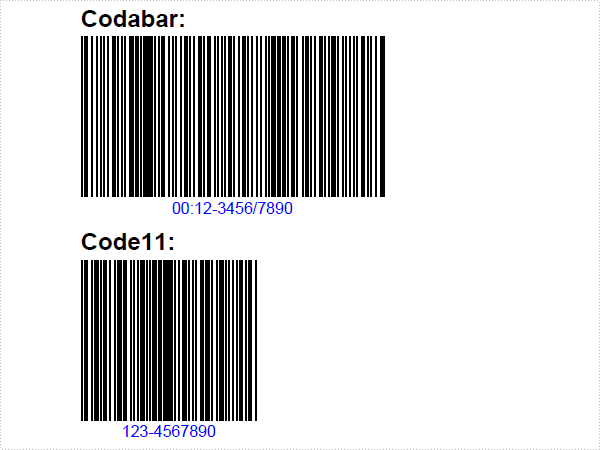
using System.Drawing;
using Spire.Pdf;
using Spire.Pdf.Graphics;
using Spire.Pdf.Barcode;

namespace Barcode
{
    class Program
    {
        static void Main(string[] args)
        {
            //Create a pdf document.
            PdfDocument doc = new PdfDocument();

            //margin
            PdfUnitConvertor unitCvtr = new PdfUnitConvertor();
            PdfMargins margin = new PdfMargins();
            margin.Top = unitCvtr.ConvertUnits(2.54f, PdfGraphicsUnit.Centimeter, PdfGraphicsUnit.Point);
            margin.Bottom = margin.Top;
            margin.Left = unitCvtr.ConvertUnits(3.17f, PdfGraphicsUnit.Centimeter, PdfGraphicsUnit.Point);
            margin.Right = margin.Left;

            PdfSection section = doc.Sections.Add();
            section.PageSettings.Margins = margin;
            section.PageSettings.Size = PdfPageSize.A4;

            // Create one page
            PdfPageBase page = section.Pages.Add();
            float y = 10;

            PdfBrush brush1 = PdfBrushes.Black;
            PdfTrueTypeFont font1 = new PdfTrueTypeFont(new Font("Arial", 12f, FontStyle.Bold), true);
            RectangleF rctg = new RectangleF(new PointF(0, 0), page.Canvas.ClientSize);
            PdfLinearGradientBrush brush2
                = new PdfLinearGradientBrush(rctg, Color.Navy, Color.OrangeRed, PdfLinearGradientMode.Vertical);

            //draw Codabar
            PdfTextWidget text = new PdfTextWidget();
            text.Font = font1;
            text.Text = "Codabar:";
            PdfLayoutResult result = text.Draw(page, 0, y);
            page = result.Page;
            y = result.Bounds.Bottom + 2;

            PdfCodabarBarcode barcode1 = new PdfCodabarBarcode("00:12-3456/7890");
            barcode1.BarcodeToTextGapHeight = 1f;
            barcode1.EnableCheckDigit = true;
            barcode1.ShowCheckDigit = true;
            barcode1.TextDisplayLocation = TextLocation.Bottom;
            barcode1.TextColor = Color.Blue;
            barcode1.Draw(page, new PointF(0, y));
            y = barcode1.Bounds.Bottom + 5;


            //draw Code11Barcode
            text.Text = "Code11:";
            result = text.Draw(page, 0, y);
            page = result.Page;
            y = result.Bounds.Bottom + 2;

            PdfCode11Barcode barcode2 = new PdfCode11Barcode("123-4567890");
            barcode2.BarcodeToTextGapHeight = 1f;
            barcode2.TextDisplayLocation = TextLocation.Bottom;
            barcode2.TextColor = Color.Blue;
            barcode2.Draw(page, new PointF(0, y));
            y = barcode2.Bounds.Bottom + 5;


            //draw Code128-A
            text.Text = "Code128-A:";
            result = text.Draw(page, 0, y);
            page = result.Page;
            y = result.Bounds.Bottom + 2;

            PdfCode128ABarcode barcode3 = new PdfCode128ABarcode("HELLO 00-123");
            barcode3.BarcodeToTextGapHeight = 1f;
            barcode3.TextDisplayLocation = TextLocation.Bottom;
            barcode3.TextColor = Color.Blue;
            barcode3.Draw(page, new PointF(0, y));
            y = barcode3.Bounds.Bottom + 5;


            //draw Code128-B
            text.Text = "Code128-B:";
            result = text.Draw(page, 0, y);
            page = result.Page;
            y = result.Bounds.Bottom + 2;

            PdfCode128BBarcode barcode4 = new PdfCode128BBarcode("Hello 00-123");
            barcode4.BarcodeToTextGapHeight = 1f;
            barcode4.TextDisplayLocation = TextLocation.Bottom;
            barcode4.TextColor = Color.Blue;
            barcode4.Draw(page, new PointF(0, y));
            y = barcode4.Bounds.Bottom + 5;


            //draw Code32
            text.Text = "Code32:";
            result = text.Draw(page, 0, y);
            page = result.Page;
            y = result.Bounds.Bottom + 2;

            PdfCode32Barcode barcode5 = new PdfCode32Barcode("16273849");
            barcode5.BarcodeToTextGapHeight = 1f;
            barcode5.TextDisplayLocation = TextLocation.Bottom;
            barcode5.TextColor = Color.Blue;
            barcode5.Draw(page, new PointF(0, y));
            y = barcode5.Bounds.Bottom + 5;

            page = section.Pages.Add();
            y = 10;


            //draw Code39
            text.Text = "Code39:";
            result = text.Draw(page, 0, y);
            page = result.Page;
            y = result.Bounds.Bottom + 2;

            PdfCode39Barcode barcode6 = new PdfCode39Barcode("16-273849");
            barcode6.BarcodeToTextGapHeight = 1f;
            barcode6.TextDisplayLocation = TextLocation.Bottom;
            barcode6.TextColor = Color.Blue;
            barcode6.Draw(page, new PointF(0, y));
            y = barcode6.Bounds.Bottom + 5;


            //draw Code39-E
            text.Text = "Code39-E:";
            result = text.Draw(page, 0, y);
            page = result.Page;
            y = result.Bounds.Bottom + 2;

            PdfCode39ExtendedBarcode barcode7 = new PdfCode39ExtendedBarcode("16-273849");
            barcode7.BarcodeToTextGapHeight = 1f;
            barcode7.TextDisplayLocation = TextLocation.Bottom;
            barcode7.TextColor = Color.Blue;
            barcode7.Draw(page, new PointF(0, y));
            y = barcode7.Bounds.Bottom + 5;


            //draw Code93
            text.Text = "Code93:";
            result = text.Draw(page, 0, y);
            page = result.Page;
            y = result.Bounds.Bottom + 2;

            PdfCode93Barcode barcode8 = new PdfCode93Barcode("16-273849");
            barcode8.BarcodeToTextGapHeight = 1f;
            barcode8.TextDisplayLocation = TextLocation.Bottom;
            barcode8.TextColor = Color.Blue;
            barcode8.QuietZone.Bottom = 5;
            barcode8.Draw(page, new PointF(0, y));
            y = barcode8.Bounds.Bottom + 5;


            //draw Code93-E
            text.Text = "Code93-E:";
            result = text.Draw(page, 0, y);
            page = result.Page;
            y = result.Bounds.Bottom + 2;

            PdfCode93ExtendedBarcode barcode9 = new PdfCode93ExtendedBarcode("16-273849");
            barcode9.BarcodeToTextGapHeight = 1f;
            barcode9.TextDisplayLocation = TextLocation.Bottom;
            barcode9.TextColor = Color.Blue;
            barcode9.Draw(page, new PointF(0, y));
            y = barcode9.Bounds.Bottom + 5;


            //Save pdf file.
            doc.SaveToFile("Barcode.pdf");
            doc.Close();

            //Launching the Pdf file.
            System.Diagnostics.Process.Start("Barcode.pdf");
        }
    }
}
Imports System.Drawing
Imports Spire.Pdf
Imports Spire.Pdf.Graphics
Imports Spire.Pdf.Barcode

Namespace Barcode
    Friend Class Program
        Shared Sub Main(ByVal args() As String)
            'Create a pdf document.
            Dim doc As New PdfDocument()

            'margin
            Dim unitCvtr As New PdfUnitConvertor()
            Dim margin As New PdfMargins()
            margin.Top = unitCvtr.ConvertUnits(2.54F, PdfGraphicsUnit.Centimeter, PdfGraphicsUnit.Point)
            margin.Bottom = margin.Top
            margin.Left = unitCvtr.ConvertUnits(3.17F, PdfGraphicsUnit.Centimeter, PdfGraphicsUnit.Point)
            margin.Right = margin.Left

            Dim section As PdfSection = doc.Sections.Add()
            section.PageSettings.Margins = margin
            section.PageSettings.Size = PdfPageSize.A4

            ' Create one page
            Dim page As PdfPageBase = section.Pages.Add()
            Dim y As Single = 10

            Dim brush1 As PdfBrush = PdfBrushes.Black
            Dim font1 As New PdfTrueTypeFont(New Font("Arial", 12.0F, FontStyle.Bold), True)
            Dim rctg As New RectangleF(New PointF(0, 0), page.Canvas.ClientSize)
            Dim brush2 As New PdfLinearGradientBrush(rctg, Color.Navy, Color.OrangeRed, PdfLinearGradientMode.Vertical)

            'draw Codabar
            Dim text As New PdfTextWidget()
            text.Font = font1
            text.Text = "Codabar:"
            Dim result As PdfLayoutResult = text.Draw(page, 0, y)
            page = result.Page
            y = result.Bounds.Bottom + 2

            Dim barcode1 As New PdfCodabarBarcode("00:12-3456/7890")
            barcode1.BarcodeToTextGapHeight = 1.0F
            barcode1.EnableCheckDigit = True
            barcode1.ShowCheckDigit = True
            barcode1.TextDisplayLocation = TextLocation.Bottom
            barcode1.TextColor = Color.Blue
            barcode1.Draw(page, New PointF(0, y))
            y = barcode1.Bounds.Bottom + 5


            'draw Code11Barcode
            text.Text = "Code11:"
            result = text.Draw(page, 0, y)
            page = result.Page
            y = result.Bounds.Bottom + 2

            Dim barcode2 As New PdfCode11Barcode("123-4567890")
            barcode2.BarcodeToTextGapHeight = 1.0F
            barcode2.TextDisplayLocation = TextLocation.Bottom
            barcode2.TextColor = Color.Blue
            barcode2.Draw(page, New PointF(0, y))
            y = barcode2.Bounds.Bottom + 5


            'draw Code128-A
            text.Text = "Code128-A:"
            result = text.Draw(page, 0, y)
            page = result.Page
            y = result.Bounds.Bottom + 2

            Dim barcode3 As New PdfCode128ABarcode("HELLO 00-123")
            barcode3.BarcodeToTextGapHeight = 1.0F
            barcode3.TextDisplayLocation = TextLocation.Bottom
            barcode3.TextColor = Color.Blue
            barcode3.Draw(page, New PointF(0, y))
            y = barcode3.Bounds.Bottom + 5


            'draw Code128-B
            text.Text = "Code128-B:"
            result = text.Draw(page, 0, y)
            page = result.Page
            y = result.Bounds.Bottom + 2

            Dim barcode4 As New PdfCode128BBarcode("Hello 00-123")
            barcode4.BarcodeToTextGapHeight = 1.0F
            barcode4.TextDisplayLocation = TextLocation.Bottom
            barcode4.TextColor = Color.Blue
            barcode4.Draw(page, New PointF(0, y))
            y = barcode4.Bounds.Bottom + 5


            'draw Code32
            text.Text = "Code32:"
            result = text.Draw(page, 0, y)
            page = result.Page
            y = result.Bounds.Bottom + 2

            Dim barcode5 As New PdfCode32Barcode("16273849")
            barcode5.BarcodeToTextGapHeight = 1.0F
            barcode5.TextDisplayLocation = TextLocation.Bottom
            barcode5.TextColor = Color.Blue
            barcode5.Draw(page, New PointF(0, y))
            y = barcode5.Bounds.Bottom + 5

            page = section.Pages.Add()
            y = 10


            'draw Code39
            text.Text = "Code39:"
            result = text.Draw(page, 0, y)
            page = result.Page
            y = result.Bounds.Bottom + 2

            Dim barcode6 As New PdfCode39Barcode("16-273849")
            barcode6.BarcodeToTextGapHeight = 1.0F
            barcode6.TextDisplayLocation = TextLocation.Bottom
            barcode6.TextColor = Color.Blue
            barcode6.Draw(page, New PointF(0, y))
            y = barcode6.Bounds.Bottom + 5


            'draw Code39-E
            text.Text = "Code39-E:"
            result = text.Draw(page, 0, y)
            page = result.Page
            y = result.Bounds.Bottom + 2

            Dim barcode7 As New PdfCode39ExtendedBarcode("16-273849")
            barcode7.BarcodeToTextGapHeight = 1.0F
            barcode7.TextDisplayLocation = TextLocation.Bottom
            barcode7.TextColor = Color.Blue
            barcode7.Draw(page, New PointF(0, y))
            y = barcode7.Bounds.Bottom + 5


            'draw Code93
            text.Text = "Code93:"
            result = text.Draw(page, 0, y)
            page = result.Page
            y = result.Bounds.Bottom + 2

            Dim barcode8 As New PdfCode93Barcode("16-273849")
            barcode8.BarcodeToTextGapHeight = 1.0F
            barcode8.TextDisplayLocation = TextLocation.Bottom
            barcode8.TextColor = Color.Blue
            barcode8.QuietZone.Bottom = 5
            barcode8.Draw(page, New PointF(0, y))
            y = barcode8.Bounds.Bottom + 5


            'draw Code93-E
            text.Text = "Code93-E:"
            result = text.Draw(page, 0, y)
            page = result.Page
            y = result.Bounds.Bottom + 2

            Dim barcode9 As New PdfCode93ExtendedBarcode("16-273849")
            barcode9.BarcodeToTextGapHeight = 1.0F
            barcode9.TextDisplayLocation = TextLocation.Bottom
            barcode9.TextColor = Color.Blue
            barcode9.Draw(page, New PointF(0, y))
            y = barcode9.Bounds.Bottom + 5


            'Save pdf file.
            doc.SaveToFile("Barcode.pdf")
            doc.Close()

            'Launching the Pdf file.
            Process.Start("Barcode.pdf")
        End Sub
    End Class
End Namespace
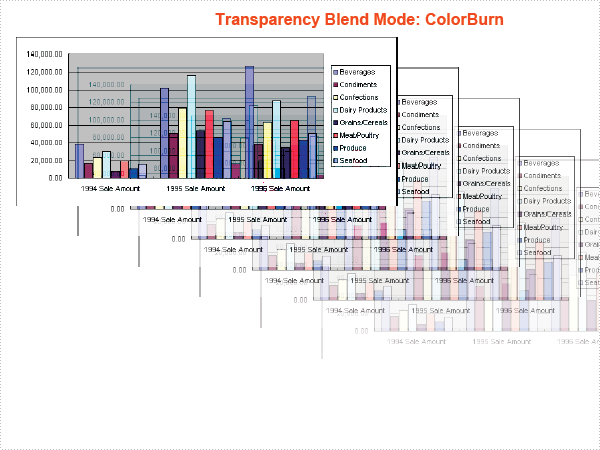
using System;
using System.Drawing;
using Spire.Pdf;
using Spire.Pdf.Graphics;

namespace Transparency
{
    class Program
    {
        static void Main(string[] args)
        {

            //Create a pdf document.
            PdfDocument doc = new PdfDocument();

            // Create one section
            PdfSection section = doc.Sections.Add();

            //Load image
            PdfImage image = PdfImage.FromFile("SalesReportChart.png");
            float imageWidth = image.PhysicalDimension.Width / 2;
            float imageHeight = image.PhysicalDimension.Height / 2;
            foreach (PdfBlendMode mode in Enum.GetValues(typeof(PdfBlendMode)))
            {
                PdfPageBase page = section.Pages.Add();
                float pageWidth = page.Canvas.ClientSize.Width;
                float y = 0;

                //title
                y = y + 5;
                PdfBrush brush = new PdfSolidBrush(Color.OrangeRed);
                PdfTrueTypeFont font = new PdfTrueTypeFont(new Font("Arial", 12f, FontStyle.Bold));
                PdfStringFormat format = new PdfStringFormat(PdfTextAlignment.Center);
                String text = String.Format("Transparency Blend Mode: {0}", mode);
                page.Canvas.DrawString(text, font, brush, pageWidth / 2, y, format);
                SizeF size = font.MeasureString(text, format);
                y = y + size.Height + 6;

                page.Canvas.DrawImage(image, 0, y, imageWidth, imageHeight);
                page.Canvas.Save();
                float d = (page.Canvas.ClientSize.Width - imageWidth) / 5;
                float x = d;
                y = y + d / 2;
                for (int i = 0; i < 5; i++)
                {
                    float alpha = 1.0f / 6 * (5 - i);
                    page.Canvas.SetTransparency(alpha, alpha, mode);
                    page.Canvas.DrawImage(image, x, y, imageWidth, imageHeight);
                    x = x + d;
                    y = y + d / 2;
                }
                page.Canvas.Restore();
            }

            //Save pdf file.
            doc.SaveToFile("Transparency.pdf");
            doc.Close();

            //Launching the Pdf file.
            System.Diagnostics.Process.Start("Transparency.pdf");
        }
    }
}
Imports System.Drawing
Imports Spire.Pdf
Imports Spire.Pdf.Graphics

Namespace Transparency
    Friend Class Program
        Shared Sub Main(ByVal args() As String)

            'Create a pdf document.
            Dim doc As New PdfDocument()

            ' Create one section
            Dim section As PdfSection = doc.Sections.Add()

            'Load image
            Dim image As PdfImage = PdfImage.FromFile("SalesReportChart.png")
            Dim imageWidth As Single = image.PhysicalDimension.Width \ 2
            Dim imageHeight As Single = image.PhysicalDimension.Height \ 2
            For Each mode As PdfBlendMode In System.Enum.GetValues(GetType(PdfBlendMode))
                Dim page As PdfPageBase = section.Pages.Add()
                Dim pageWidth As Single = page.Canvas.ClientSize.Width
                Dim y As Single = 0

                'title
                y = y + 5
                Dim brush As PdfBrush = New PdfSolidBrush(Color.OrangeRed)
                Dim font As New PdfTrueTypeFont(New Font("Arial", 12.0F, FontStyle.Bold))
                Dim format As New PdfStringFormat(PdfTextAlignment.Center)
                Dim text As String = String.Format("Transparency Blend Mode: {0}", mode)
                page.Canvas.DrawString(text, font, brush, pageWidth / 2, y, format)
                Dim size As SizeF = font.MeasureString(text, format)
                y = y + size.Height + 6

                page.Canvas.DrawImage(image, 0, y, imageWidth, imageHeight)
                page.Canvas.Save()
                Dim d As Single = (page.Canvas.ClientSize.Width - imageWidth) / 5
                Dim x As Single = d
                y = y + d / 2
                For i As Integer = 0 To 4
                    Dim alpha As Single = 1.0F / 6 * (5 - i)
                    page.Canvas.SetTransparency(alpha, alpha, mode)
                    page.Canvas.DrawImage(image, x, y, imageWidth, imageHeight)
                    x = x + d
                    y = y + d / 2
                Next i
                page.Canvas.Restore()
            Next mode

            'Save pdf file.
            doc.SaveToFile("Transparency.pdf")
            doc.Close()

            'Launching the Pdf file.
            Process.Start("Transparency.pdf")
        End Sub
    End Class
End Namespace
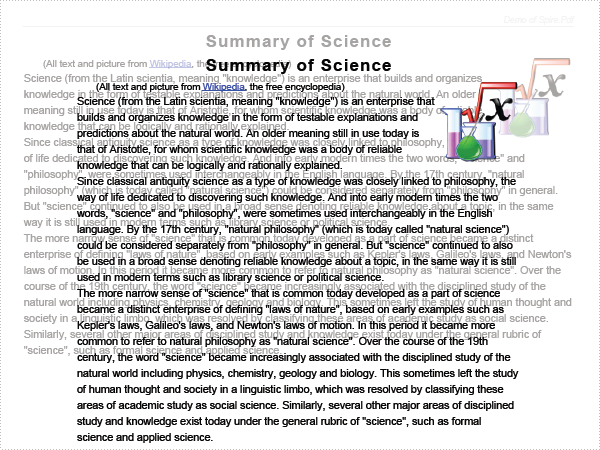
The sample demonstrates how to overlay one page on another and set transparency mode.
using System.Drawing;
using Spire.Pdf;
using Spire.Pdf.Graphics;

namespace Overlay
{
    class Program
    {
        static void Main(string[] args)
        {
            //load two document
            PdfDocument doc1 = new PdfDocument();
            doc1.LoadFromFile("Sample1.pdf");

            PdfDocument doc2 = new PdfDocument();
            doc2.LoadFromFile("Sample3.pdf");

            //Create page template
            PdfTemplate template = doc1.Pages[0].CreateTemplate();

            foreach (PdfPageBase page in doc2.Pages)
            {
                page.Canvas.SetTransparency(0.25f, 0.25f, PdfBlendMode.Overlay);
                page.Canvas.DrawTemplate(template, PointF.Empty);
            }

            //Save pdf file.
            doc2.SaveToFile("Overlay.pdf");
            doc1.Close();
            doc2.Close();

            //Launching the Pdf file.
            System.Diagnostics.Process.Start("Overlay.pdf");
        }
    }
}
Imports System.Drawing
Imports Spire.Pdf
Imports Spire.Pdf.Graphics

Namespace Overlay
    Friend Class Program
        Shared Sub Main(ByVal args() As String)
            'load two document
            Dim doc1 As New PdfDocument()
            doc1.LoadFromFile("Sample1.pdf")

            Dim doc2 As New PdfDocument()
            doc2.LoadFromFile("Sample3.pdf")

            'Create page template
            Dim template As PdfTemplate = doc1.Pages(0).CreateTemplate()

            For Each page As PdfPageBase In doc2.Pages
                page.Canvas.SetTransparency(0.25F, 0.25F, PdfBlendMode.Overlay)
                page.Canvas.DrawTemplate(template, PointF.Empty)
            Next page

            'Save pdf file.
            doc2.SaveToFile("Overlay.pdf")
            doc1.Close()
            doc2.Close()

            'Launching the Pdf file.
            Process.Start("Overlay.pdf")
        End Sub
    End Class
End Namespace
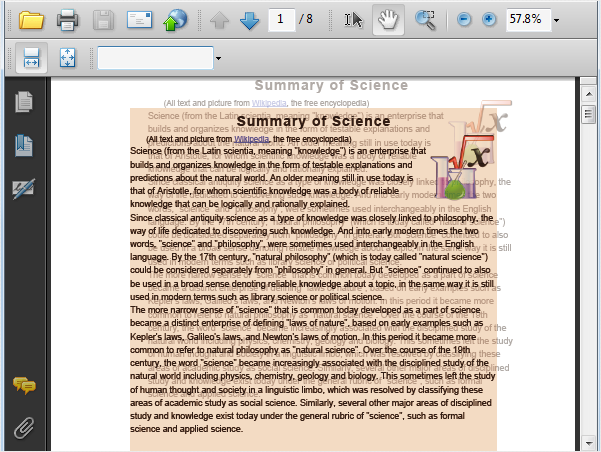
The sample demonstrates how to make PDF overlay effect in Silverlight via Spire.PDF.
<Application xmlns="http://schemas.microsoft.com/winfx/2006/xaml/presentation"
             xmlns:x="http://schemas.microsoft.com/winfx/2006/xaml"
             x:Class="Overlay.App">

    <Application.Resources>

    </Application.Resources>
</Application>
using System;
using System.Windows;

namespace Overlay
{
    public partial class App : Application
    {

        public App()
        {
            this.Startup += this.Application_Startup;
            this.Exit += this.Application_Exit;
            this.UnhandledException += this.Application_UnhandledException;

            InitializeComponent();
        }

        private void Application_Startup(object sender, StartupEventArgs e)
        {
            this.RootVisual = new MainPage();
        }

        private void Application_Exit(object sender, EventArgs e)
        {

        }

        private void Application_UnhandledException(object sender, ApplicationUnhandledExceptionEventArgs e)
        {
            // If the app is running outside of the debugger then report the exception using
            // the browser's exception mechanism. On IE this will display it a yellow alert
            // icon in the status bar and Firefox will display a script error.
            if (!System.Diagnostics.Debugger.IsAttached)
            {

                // NOTE: This will allow the application to continue running after an exception has been thrown
                // but not handled.
                // For production applications this error handling should be replaced with something that will
                // report the error to the website and stop the application.
                e.Handled = true;
                Deployment.Current.Dispatcher.BeginInvoke(delegate { ReportErrorToDOM(e); });
            }
        }

        private void ReportErrorToDOM(ApplicationUnhandledExceptionEventArgs e)
        {
            try
            {
                string errorMsg = e.ExceptionObject.Message + e.ExceptionObject.StackTrace;
                errorMsg = errorMsg.Replace('"', '\'').Replace("\r\n", @"\n");

                System.Windows.Browser.HtmlPage.Window.Eval("throw new Error(\"Unhandled Error in Silverlight Application " + errorMsg + "\");");
            }
            catch (Exception)
            {
            }
        }
    }
}
Imports System.Windows

Namespace Overlay
	Partial Public Class App
		Inherits Application

		Public Sub New()
			AddHandler Me.Startup, AddressOf Application_Startup
			AddHandler Me.Exit, AddressOf Application_Exit
			AddHandler Me.UnhandledException, AddressOf Application_UnhandledException

			InitializeComponent()
		End Sub

		Private Sub Application_Startup(ByVal sender As Object, ByVal e As StartupEventArgs)
			Me.RootVisual = New MainPage()
		End Sub

		Private Sub Application_Exit(ByVal sender As Object, ByVal e As EventArgs)

		End Sub

		Private Sub Application_UnhandledException(ByVal sender As Object, ByVal e As ApplicationUnhandledExceptionEventArgs)
			' If the app is running outside of the debugger then report the exception using
			' the browser's exception mechanism. On IE this will display it a yellow alert
			' icon in the status bar and Firefox will display a script error.
			If Not Debugger.IsAttached Then

				' NOTE: This will allow the application to continue running after an exception has been thrown
				' but not handled.
				' For production applications this error handling should be replaced with something that will
				' report the error to the website and stop the application.
				e.Handled = True
				Deployment.Current.Dispatcher.BeginInvoke(Sub() ReportErrorToDOM(e))
			End If
		End Sub

		Private Sub ReportErrorToDOM(ByVal e As ApplicationUnhandledExceptionEventArgs)
			Try
				Dim errorMsg As String = e.ExceptionObject.Message + e.ExceptionObject.StackTrace
				errorMsg = errorMsg.Replace(""""c, "'"c).Replace(vbCrLf, vbLf)

				System.Windows.Browser.HtmlPage.Window.Eval("throw new Error(""Unhandled Error in Silverlight Application " & errorMsg & """);")
			Catch e1 As Exception
			End Try
		End Sub
	End Class
End Namespace
<UserControl x:Class="Overlay.MainPage"
    xmlns="http://schemas.microsoft.com/winfx/2006/xaml/presentation"
    xmlns:x="http://schemas.microsoft.com/winfx/2006/xaml"
    xmlns:d="http://schemas.microsoft.com/expression/blend/2008"
    xmlns:mc="http://schemas.openxmlformats.org/markup-compatibility/2006"
    mc:Ignorable="d"
    d:DesignHeight="300" d:DesignWidth="400" Loaded="UserControl_Loaded">

    <Grid x:Name="LayoutRoot" Background="White">
        <Button Content="Run" Height="23" HorizontalAlignment="Left" Margin="295,254,0,0" Name="button1" VerticalAlignment="Top" Width="75" Click="button1_Click" />
    </Grid>
</UserControl>
using System.Windows;
using System.Windows.Controls;
using System.IO;
using System.Reflection;
using System.Drawing;

using Spire.Pdf;
using Spire.Pdf.Graphics;

namespace Overlay
{
    public partial class MainPage : UserControl
    {
        private SaveFileDialog saveFileDialog = null;
        private PdfDocument pdfDoc = null;
        public MainPage()
        {
            InitializeComponent();
            this.saveFileDialog = new SaveFileDialog();
            this.saveFileDialog.Filter = "PDF Document(*.pdf)|*.pdf";
        }

        private void button1_Click(object sender, RoutedEventArgs e)
        {
            //create a page template
            PdfTemplate template = this.pdfDoc.Pages[3].CreateTemplate();
            PointF location = new PointF(20, -40);
            //overlay the pdfDoc
            foreach (PdfPageBase page in this.pdfDoc.Pages)
            {
                page.Canvas.SetTransparency(0.25f, 0.25f, PdfBlendMode.Overlay);
                page.Canvas.DrawTemplate(template, location);
            }

            //save the pdfDoc
            bool? result = this.saveFileDialog.ShowDialog();
            if (result.HasValue && result.Value)
            {
                using (Stream stream = this.saveFileDialog.OpenFile())
                {
                    this.pdfDoc.SaveToStream(stream);
                }
            }
        }

        private void UserControl_Loaded(object sender, RoutedEventArgs e)
        {
            //load the pdf templates
            Assembly assembly = this.GetType().Assembly;

            foreach (string name in assembly.GetManifestResourceNames())
            {
                if (name.EndsWith("Sample3.pdf"))
                {
                    this.pdfDoc = new PdfDocument(assembly.GetManifestResourceStream(name));
                }
            }
        }
    }
}
Imports System.Windows
Imports System.Windows.Controls
Imports System.IO
Imports System.Reflection
Imports System.Drawing

Imports Spire.Pdf
Imports Spire.Pdf.Graphics

Namespace Overlay
	Partial Public Class MainPage
		Inherits UserControl
		Private saveFileDialog As SaveFileDialog = Nothing
		Private pdfDoc As PdfDocument = Nothing
		Public Sub New()
			InitializeComponent()
			Me.saveFileDialog = New SaveFileDialog()
			Me.saveFileDialog.Filter = "PDF Document(*.pdf)|*.pdf"
		End Sub

		Private Sub button1_Click(ByVal sender As Object, ByVal e As RoutedEventArgs)
			'create a page template
			Dim template As PdfTemplate = Me.pdfDoc.Pages(3).CreateTemplate()
                        Dim location As PointF=New PointF(20,-40);
                        'overlay the pdfDoc
			For Each page As PdfPageBase In Me.pdfDoc.Pages
				page.Canvas.SetTransparency(0.25f, 0.25f, PdfBlendMode.Overlay)
				page.Canvas.DrawTemplate(template, location)
			Next page

			'save the pdfDoc
			Dim result? As Boolean = Me.saveFileDialog.ShowDialog()
			If result.HasValue AndAlso result.Value Then
				Using stream As Stream = Me.saveFileDialog.OpenFile()
					Me.pdfDoc.SaveToStream(stream)
				End Using
			End If
		End Sub

		Private Sub UserControl_Loaded(ByVal sender As Object, ByVal e As RoutedEventArgs)
			'load the pdf templates
			Dim [assembly] As System.Reflection.Assembly = Me.GetType().Assembly

			For Each name As String In [assembly].GetManifestResourceNames()
				If name.EndsWith("Sample3.pdf") Then
					Me.pdfDoc = New PdfDocument([assembly].GetManifestResourceStream(name))
				End If
			Next name
		End Sub
	End Class
End Namespace
Published in
Drawing
page
