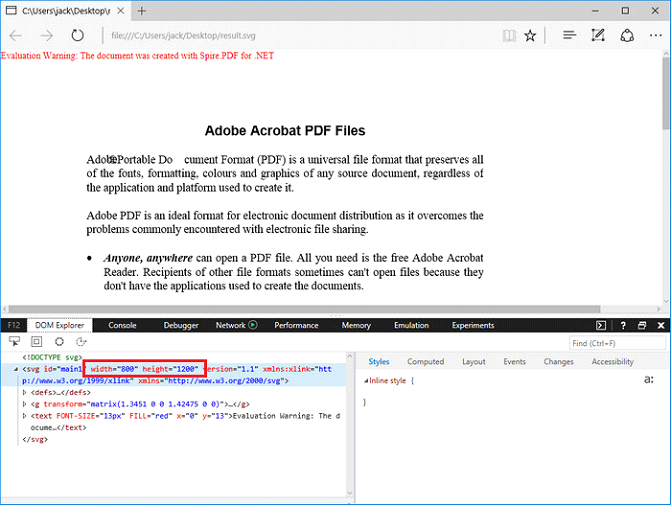
We've have demonstrated how to convert PDF page to SVG file format in the previous post. This guidance shows you how we can specify the width and height of output file using the latest version of Spire.PDF with C# and VB.NET.
Step 1: Load a sample PDF document to PdfDocument instance.
PdfDocument document = new PdfDocument();
document.LoadFromFile("pdf-sample.pdf");
Step 2: Specify the output file size through ConvertOptions.SetPdfToSvgOptions() method.
PdfToSvgConverter converter = new PdfToSvgConverter(inputFile);
    converter.SvgOptions.ScaleX = (float)0.5;
    converter.SvgOptions.ScaleY = (float)0.5;
    converter.Convert(outputFile);
Step 3: Save PDF to SVG file format.
document.SaveToFile("result.svg", FileFormat.SVG);
Output:
Full Code:
[C#]
using Spire.Pdf;
using Spire.Pdf.Conversion;

namespace ConvertPDFtoSVG
{
    class Program
    {
        static void Main(string[] args)
        {
            PdfDocument document = new PdfDocument();
            PdfToSvgConverter converter = new PdfToSvgConverter(inputFile);
            converter.SvgOptions.ScaleX = (float)0.5;
            converter.SvgOptions.ScaleY = (float)0.5;
            converter.Convert(outputFile);
        }
    }
}
[VB.NET]
Imports Spire.Pdf
Imports Spire.Pdf.Conversion

Namespace ConvertPDFtoSVG
    Class Program
        Private Shared Sub Main(args As String())
            Dim document As New PdfDocument()
            document.LoadFromFile("pdf-sample.pdf")
            ' Specify the width And height of output SVG file
            Dim Converter As New PdfToSvgConverter(inputFile)
            Converter.SvgOptions.ScaleX = CSng(0.5)
            Converter.SvgOptions.ScaleY = CSng(0.5)
            Converter.Convert(outputFile)
            document.SaveToFile("result.svg", FileFormat.SVG)
        End Sub
    End Class
End Namespace
