XMP is a file labeling technology that lets you embed metadata into files themselves during the content creation process. With an XMP enabled application, your workgroup can capture meaningful information about a project (such as titles and descriptions, searchable keywords, and up-to-date author and copyright information) in a format that is easily understood by your team as well as by software applications, hardware devices, and even file formats.
In the Spire.PDF Version 3.6.135 and above, we add a new feature to read, set and load an existing XMP data from XML documents. This article presents how to set XMP Metadata while creating a PDF document.
Code Snippet:
Step 1: Initialize a new instance of PdfDocument class.
string input = "..\\..\\..\\..\\..\\..\\Data\\SetXMPMetadata.pdf";

// Open a PDF document.
PdfDocument doc = new PdfDocument();
doc.LoadFromFile(input);

// Set XMP metadata for the document.
doc.DocumentInformation.Author = "E-iceblue";
doc.DocumentInformation.Creator = "Spire.PDF";
doc.DocumentInformation.Keywords = "XMP";
doc.DocumentInformation.Producer = "E-icenlue Co,.Ltd";
doc.DocumentInformation.Subject = "XMP Metadata";
doc.DocumentInformation.Title = "Set XMP Metadata in PDF";

// Specify the output file name for the modified PDF.
string output = "SetXMPMetadata.pdf";

// Save the PDF document with the updated XMP metadata.
doc.SaveToFile(output);
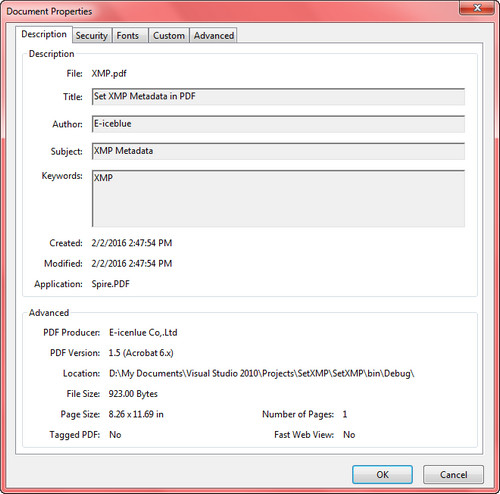
Output:
To view metadata in a PDF document, open it with Acrobat or Acrobat Reader and select ‘Document Properties’ in the File menu.
Full Code:
using Spire.Pdf;
using Spire.Pdf.Xmp;
using System;

namespace SetXMPMetadata
{
    class Program
    {
        static void Main(string[] args)
        {
            string input = "..\\..\\..\\..\\..\\..\\Data\\SetXMPMetadata.pdf";

            // Open a PDF document.
            PdfDocument doc = new PdfDocument();
            doc.LoadFromFile(input);

            // Set XMP metadata for the document.
            doc.DocumentInformation.Author = "E-iceblue";
            doc.DocumentInformation.Creator = "Spire.PDF";
            doc.DocumentInformation.Keywords = "XMP";
            doc.DocumentInformation.Producer = "E-icenlue Co,.Ltd";
            doc.DocumentInformation.Subject = "XMP Metadata";
            doc.DocumentInformation.Title = "Set XMP Metadata in PDF";

            // Specify the output file name for the modified PDF.
            string output = "SetXMPMetadata.pdf";

            // Save the PDF document with the updated XMP metadata.
            doc.SaveToFile(output);
        }
    }
}
Imports Spire.Pdf
Imports Spire.Pdf.Xmp

Namespace SetXMPMetadata
	Class Program
		Private Shared Sub Main(args As String())
            Load the input PDF file
            Dim input As String = "..\..\..\..\..\..\Data\SetXMPMetadata.pdf"

            ' Create a new PdfDocument object
            Dim doc As New PdfDocument()

            ' Load the PDF document from the input file
            doc.LoadFromFile(input)

            ' Set the author information in the document properties
            doc.DocumentInformation.Author = "E-iceblue"

            ' Set the creator information in the document properties
            doc.DocumentInformation.Creator = "Spire.PDF"

            ' Set the keywords information in the document properties
            doc.DocumentInformation.Keywords = "XMP"

            ' Set the producer information in the document properties
            doc.DocumentInformation.Producer = "E-icenlue Co,.Ltd"

            ' Set the subject information in the document properties
            doc.DocumentInformation.Subject = "XMP Metadata"

            ' Set the title information in the document properties
            doc.DocumentInformation.Title = "Set XMP Metadata in PDF"

            ' Specify the output file name
            Dim output As String = "SetXMPMetadata.pdf"

            ' Save the modified document to the output file
            doc.SaveToFile(output)
	   End Sub
	End Class
End Namespace
