Modifying passwords of PDF file is really a rational choice especially when the passwords are known by someone and your PDF file is no longer safe. Spire.PDF for .NET enables you to modify passwords of your encrypted PDF file in C#, VB.NET. You can modify your owner password as well as user password and set user restrictions when access the PDF file. Now please see the process of modifying encrypted PDF passwords as below picture:
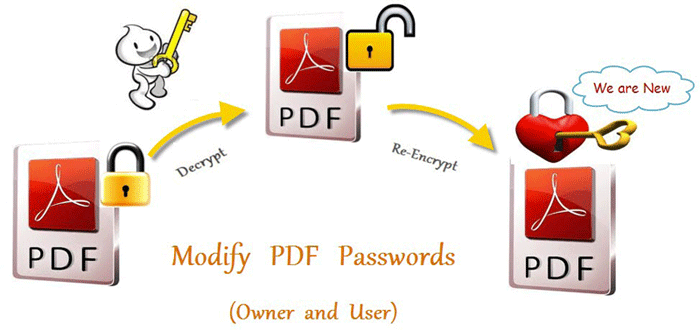
From above picture, you can easily find that the first step is to decrypt PDF file by owner password. So the original owner password is necessary. You can decrypt it by this method: Spire.Pdf.PdfDocument(string filename, string password)
Then, modify passwords by resetting owner password and user password. PDFSecurity class which is in the namespace Spire.PDFDocument.Security can help you not only to set owner password and user password, but also can set user permissions to restrict user access.
Below shows the whole code of modifying passwords of encrypted PDF file, please download Spire.PDF for .NET and install it on system before following the code:
using Spire.Pdf;
using Spire.Pdf.Security;

namespace modify_PDF_passwords
{
    class Program
    {
        static void Main(string[] args)
        {

            //load a encrypted file and decrypt it
            String encryptedPdf = @""..\Encrypt.pdf"";
            PdfDocument doc = new PdfDocument(encryptedPdf, ""e-iceblue"");

            // Define user and owner passwords
            string userPassword = ""user"";
            string ownerPassword = ""owner"";

            // Create a security policy with the specified passwords
            PdfSecurityPolicy securityPolicy = new PdfPasswordSecurityPolicy(userPassword, ownerPassword);

            // Set the encryption algorithm to AES 128-bit
            securityPolicy.EncryptionAlgorithm = PdfEncryptionAlgorithm.AES_128;

            // Allow printing of the document
            securityPolicy.DocumentPrivilege.AllowPrint = true;

            // Allow filling form fields in the document
            securityPolicy.DocumentPrivilege.AllowFillFormFields = true;

            // Allow copying content from the document
            securityPolicy.DocumentPrivilege.AllowContentCopying = true;

            // Encrypt the PDF document using the specified security policy
            doc.Encrypt(securityPolicy);

            // Save the encrypted PDF document to a file named ""SecurityPermission.pdf""
           doc.SaveToFile(""Encryption-result.pdf"");

        }
    }
}
Imports Spire.Pdf
Imports Spire.Pdf.Security

Namespace modify_PDF_passwords
	Class Program
		Private Shared Sub Main(args As String())

		  load a encrypted file and decrypt it
		  Dim encryptedPdf As String = ""..\Encrypt.pdf""
		  Dim doc As New PdfDocument(encryptedPdf, ""e-iceblue"")

		  ' Define user and owner passwords
		  Dim userPassword As String = ""user""
		  Dim ownerPassword As String = ""owner""

		  ' Create a security policy with the specified passwords
		  Dim securityPolicy As PdfSecurityPolicy = New PdfPasswordSecurityPolicy(userPassword, ownerPassword)

		  ' Set the encryption algorithm to AES 128-bit
		  securityPolicy.EncryptionAlgorithm = PdfEncryptionAlgorithm.AES_128

		  ' Allow printing of the document
		  securityPolicy.DocumentPrivilege.AllowPrint = True

		  ' Allow filling form fields in the document
		  securityPolicy.DocumentPrivilege.AllowFillFormFields = True

		  ' Allow copying content from the document
		  securityPolicy.DocumentPrivilege.AllowContentCopying = True

		  ' Encrypt the PDF document using the specified security policy
		  doc.Encrypt(securityPolicy)

		  ' Save the encrypted PDF document to a file named ""SecurityPermission.pdf""
		  doc.SaveToFile(""Encryption-result.pdf"")

		End Sub
	End Class
End Namespace
Spire.PDF for .NET is a .NET PDF component that enables you to generate, read, edit and manipulate PDF files in C#, VB.NET.
