Contracts, technical specifications and academic manuscripts tend to place term definitions at the bottom of the page and gather reference entries at the end of the document. Neither footnotes nor endnotes belong to the body flow; walking the paragraphs returns only the main text, and GetText() does not include them either. Archiving content, checking clauses or organising references requires entering the note containers separately.
This article uses Spire.Doc for JavaScript to read the footnotes and endnotes of a Word document in the browser. The sample uses a procurement and acceptance specification for smart warehouse equipment whose body contains 4 footnotes and 4 endnotes, enough to cover the reading approach for both kinds of note. The whole process runs on WebAssembly in the browser, with no Office installation and no backend dependency; the document is read locally and is not uploaded to a server through the use of this library.
This article covers two features:
Footnotes and endnotes share one object type and differ in FootnoteType: Footnote for footnotes and Endnote for endnotes. The text of both is stored in TextBody; the reading approach is the same, the entry point differs.
| Note Type | Reading Entry | Text Container | Default Numbering |
|---|---|---|---|
| Footnote | document.Footnotes |
footnote.TextBody |
Arabic numerals 1, 2, 3 |
| Endnote | The Footnote child object of a body paragraph (FootnoteType.Endnote) |
child.TextBody |
Lowercase Roman numerals i, ii, iii |
For installation and project setup, refer to Integrating Spire.Doc for JavaScript in a React Project. The examples below assume that Spire.Doc is installed and the WebAssembly module is initialized.
Read Footnote Content
document.Footnotes gathers all footnotes in the document; Count gives the number and get(index) returns an item. The collection does not include the separator entries that divide the footnote area, so an index plus one gives the reading number of the footnote. The text of each footnote sits in footnote.TextBody, whose paragraph objects are walked in the same way as body objects.
The specific steps are as follows:
- Get the Spire.Doc WASM module and confirm that it is ready.
- Load the
Specification.docxto be read into the VFS, create aDocumentobject and load that file. - Take out the footnotes one by one with
get(index), up todocument.Footnotes.Count. - Walk
footnote.TextBody.ChildObjects, join the paragraph text and remove the numbering placeholder character. - Write the result to
Footnotes.json, read it from the VFS and trigger a download.
The code for reading footnote content is as follows:
function App() {
  const readFootnotes = async () => {
    // Get the Spire.Doc WASM module
    const docModule = window.wasmModule?.spiredoc;

    if (!docModule) {
      alert('Spire.Doc is not ready yet');
      return;
    }

    await window.spire.FetchFileToVFS('Specification.docx', '', `${process.env.PUBLIC_URL}/data/`);

    const doc = new docModule.Document();
    doc.LoadFromFile('Specification.docx');

    const footnotes = [];
    const total = doc.Footnotes.Count;

    for (let i = 0; i < total; i++) {
      const footnote = doc.Footnotes.get(i);
      let text = '';

      for (let k = 0; k < footnote.TextBody.ChildObjects.Count; k++) {
        const obj = footnote.TextBody.ChildObjects.get_Item(k);
        if (obj.DocumentObjectType === docModule.DocumentObjectType.Paragraph) {
          text += obj.Text;
        }
      }

      footnotes.push({
        index: i + 1,
        text: text.replace(/\u0002/g, '').trim(),
      });
    }

    const json = JSON.stringify({ footnotes }, null, 2);
    window.dotnetRuntime.Module.FS.writeFile('Footnotes.json', json);
    doc.Dispose();

    // Read the generated file from the VFS and trigger the download
    const fileArray = window.dotnetRuntime.Module.FS.readFile('Footnotes.json');
    const blob = new Blob([fileArray], { type: 'application/json;charset=utf-8' });
    const url = URL.createObjectURL(blob);
    const a = document.createElement('a');
    a.href = url;
    a.download = 'Footnotes.json';
    a.click();
    URL.revokeObjectURL(url);
  };

  return (
    <div style={{ textAlign: 'center', height: '300px' }}>
      <h1>Read Footnotes</h1>
      <button onClick={readFootnotes}>Start Reading</button>
    </div>
  );
}

export default App;
The result is shown below; the first page of the input document is on the left and the exported Footnotes.json on the right:
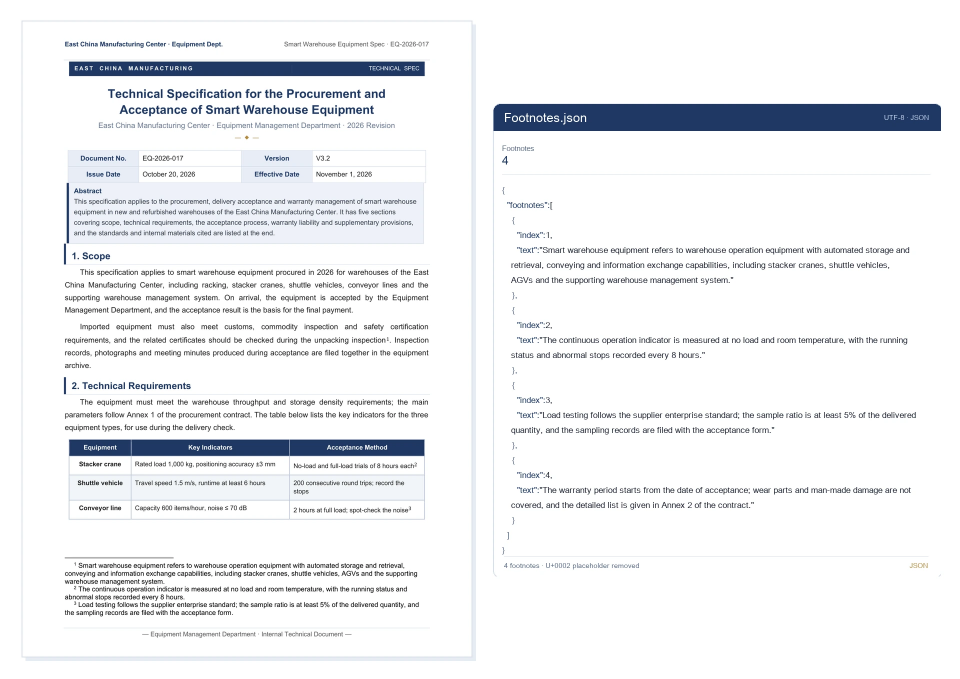
All 4 footnotes of the sample document are taken out, and index matches the numbering at the bottom of the page one to one. The text of each paragraph is joined in paragraph order without an extra separator between paragraphs; pictures inside a footnote are child objects of the paragraph and are not counted in this text.
Counting and Retrieving Items from the Footnote Collection
Footnotes counts with Count and retrieves with get(index). This differs from the body container's ChildObjects, which uses get_Item(index). Mixing the two throws an error such as "get_Item is not a function" and the loop stops at once. On first use, print Count and confirm that the number matches the document before reading the items one by one.
The Numbering Placeholder Character and Numbering Rules
An automatically numbered footnote begins with an invisible placeholder character (code point U+0002) that marks the number as generated by Word. Outputting it directly puts a control character into the JSON; filter it first, then apply trim() to the result. The number itself is not part of the text and is decided by FootnoteOptions: NumberFormat is the numbering format, StartNumber the starting value, RestartRule the rule for restarting numbering and Position the note position. In the sample document these values are Arabic numerals, start 1, no restart and page bottom.
Read Endnote Content
Endnotes and footnotes share the Footnote object, with FootnoteType set to Endnote. The reference mark sits in a body paragraph and the note content is gathered at the end of the document. In the current version the objects returned by the document.Endnotes collection keep only the separator-related members, and TextBody cannot be accessed directly; the reliable approach is to walk the body paragraphs, take the Footnote object behind each reference mark and read its text.
The sample collects endnotes and footnotes together and exports them as Notes.json for unified archiving. The specific steps are as follows:
- Get the Spire.Doc WASM module and confirm that it is ready.
- Load
Specification.docxinto the VFS, create aDocumentobject and load that file. - Walk the
Body.ChildObjectsof each section and locate the paragraph objects. - Walk the child objects of the paragraph, take the reference objects of type
DocumentObjectType.Footnote, filter the endnotes byFootnoteType.Endnoteand readTextBody. - Merge the result with the footnote result, write
Notes.json, read it from the VFS and trigger a download.
The code for reading endnote content is as follows:
function App() {
  const readEndnotes = async () => {
    // Get the Spire.Doc WASM module
    const docModule = window.wasmModule?.spiredoc;

    if (!docModule) {
      alert('Spire.Doc is not ready yet');
      return;
    }

    await window.spire.FetchFileToVFS('Specification.docx', '', `${process.env.PUBLIC_URL}/data/`);

    const doc = new docModule.Document();
    doc.LoadFromFile('Specification.docx');

    // Read the paragraph text from a note body container
    const readTextBody = (textBody) => {
      let text = '';
      for (let k = 0; k < textBody.ChildObjects.Count; k++) {
        const obj = textBody.ChildObjects.get_Item(k);
        if (obj.DocumentObjectType === docModule.DocumentObjectType.Paragraph) {
          text += obj.Text;
        }
      }
      return text.replace(/\u0002/g, '').trim();
    };

    const footnotes = [];
    for (let i = 0; i < doc.Footnotes.Count; i++) {
      footnotes.push({
        index: i + 1,
        text: readTextBody(doc.Footnotes.get(i).TextBody),
      });
    }

    // Collect the endnotes from the body reference objects
    const endnotes = [];
    for (let s = 0; s < doc.Sections.Count; s++) {
      const body = doc.Sections.get_Item(s).Body;
      for (let i = 0; i < body.ChildObjects.Count; i++) {
        const obj = body.ChildObjects.get_Item(i);
        if (obj.DocumentObjectType !== docModule.DocumentObjectType.Paragraph) continue;

        for (let k = 0; k < obj.ChildObjects.Count; k++) {
          const child = obj.ChildObjects.get_Item(k);
          if (child.DocumentObjectType !== docModule.DocumentObjectType.Footnote) continue;
          if (child.FootnoteType !== docModule.FootnoteType.Endnote) continue;

          endnotes.push({
            index: endnotes.length + 1,
            text: readTextBody(child.TextBody),
          });
        }
      }
    }

    const json = JSON.stringify({ footnotes, endnotes }, null, 2);
    window.dotnetRuntime.Module.FS.writeFile('Notes.json', json);
    doc.Dispose();

    // Read the generated file from the VFS and trigger the download
    const fileArray = window.dotnetRuntime.Module.FS.readFile('Notes.json');
    const blob = new Blob([fileArray], { type: 'application/json;charset=utf-8' });
    const url = URL.createObjectURL(blob);
    const a = document.createElement('a');
    a.href = url;
    a.download = 'Notes.json';
    a.click();
    URL.revokeObjectURL(url);
  };

  return (
    <div style={{ textAlign: 'center', height: '300px' }}>
      <h1>Read Endnotes</h1>
      <button onClick={readEndnotes}>Start Reading</button>
    </div>
  );
}

export default App;
The merged result is shown below; the last page of the input document is on the left and the exported Notes.json on the right:
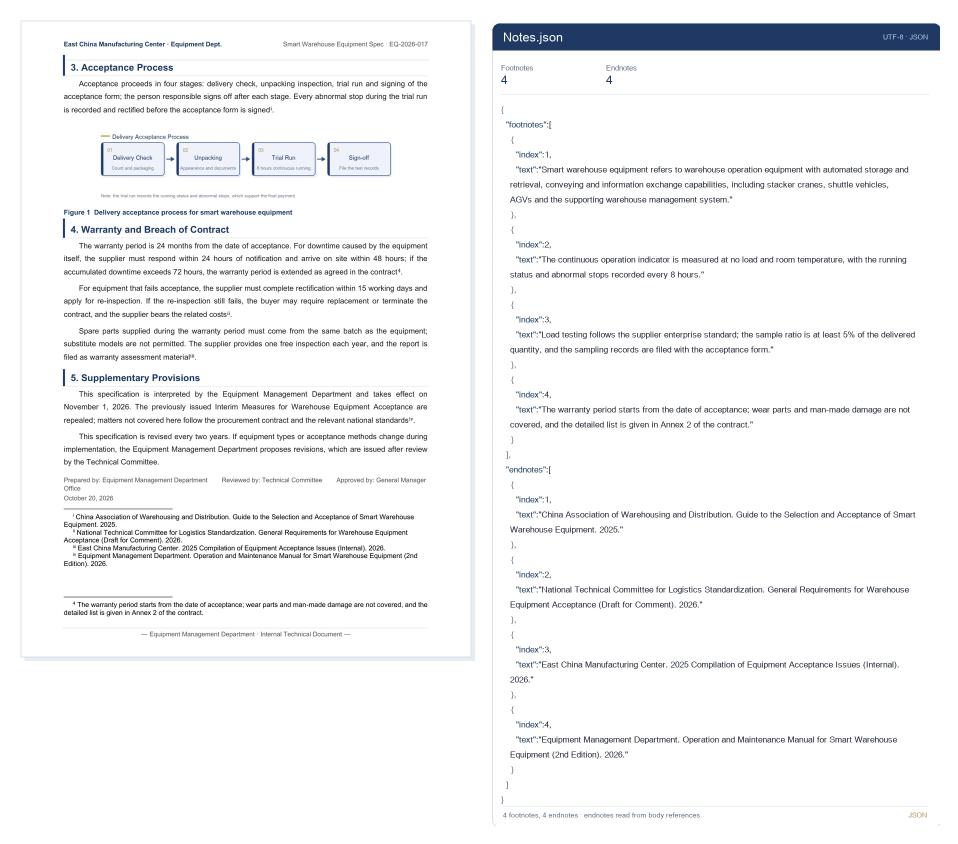
The endnotes array follows the order in which the reference marks appear in the body, and index matches i, ii, iii and iv at the end of the document one to one; the footnotes array is the same as the output of the previous section. The two arrays are independent and each starts numbering at 1.
Why Endnotes Are Read from the Body References
document.Endnotes and document.Footnotes look symmetrical, but in the current version the objects returned by the Endnotes collection expose only the separator and continuation-separator members and have no TextBody, so the note text cannot be read directly. The reference object in the body, by contrast, is a complete Footnote with FootnoteType set to Endnote, and the text in TextBody matches the entry at the end of the document. Walking the body reference objects does not depend on the collection's type declaration and holds for both kinds of note.
Numbering of Footnotes and Endnotes
Footnotes and endnotes are numbered separately and do not consume each other's numbers. The numbering rules come from FootnoteOptions and EndnoteOptions respectively, and both objects provide NumberFormat, StartNumber and RestartRule. In the sample document the footnotes use Arabic numerals and the endnotes lowercase Roman numerals, both starting at 1 and never restarting. If a document restarts numbering on each page or section, the numbers shown in the body change from page to page, while the reading order still follows document order.
FAQ
Does GetText() Include Footnote and Endnote Text
No. GetText() joins text in body object order; footnotes and endnotes are stored in separate containers and are not part of the join. When note text is needed, read Footnotes and the endnote reference objects in the body separately, as this article does; a call to GetText() alone returns the main text.
Why Does the Note Text Start with an Invisible Character
An automatically numbered note carries a placeholder character (U+0002) before the text to mark the number as generated by Word. Remove it with replace(/\u0002/g, '') during reading and apply trim() to the result, and the exported JSON contains no control characters. The number itself is not part of this text; derive it from the numbering rules of FootnoteOptions or EndnoteOptions when needed.
The Number on the Page Does Not Match the Reading Index
The number on the page is affected by the numbering rules: if the document restarts numbering on each page or section, the same number appears on different pages, while the reading index increases in document order. Check against the reference order; to restore the displayed value, derive it from NumberFormat, StartNumber and RestartRule.
Do Fonts Have to Be Loaded Before Reading Footnotes and Endnotes
Not for reading text. The sample completes loading, walking and export without loading fonts, and the paragraph text in TextBody is returned normally. Fonts need to be loaded into /Library/Fonts/ only when the document is later rendered as an image or exported to PDF, as in the corresponding samples.
Why Are Footnotes and Endnotes Numbered Separately
Footnotes and endnotes are two independent note systems, each maintaining its own numbering. In the same document the first footnote and the first endnote do not affect each other and are shown as 1 and i respectively. Collect and store them separately; when they are merged, mark the source so that the corresponding position in the body can be traced.
Get a Free License
Spire.Doc for JavaScript offers a 30-day full-featured free trial license with no functional limitations. Apply here to evaluate before purchasing.
