Laying out a report, a form or a set of notes and exporting it as a PDF often starts from a blank page. Headers and footers belong at the moment the document is built: going back to add them after the body is finished leaves positions and pagination awkward to manage. Doing it by hand page after page is tedious, and handing the job to a server means the data leaves the user's device.
This article uses Spire.PDF for JavaScript to create a PDF from scratch and add a header and a footer. The page margins are set to 0, and the surrounding white space comes from the Left, Top, Right and Bottom template elements of the document template (PdfDocumentTemplate) instead; the header and footer are drawn inside the top and bottom templates and appear on every new page at render time. The footer can fill in page numbers dynamically with PdfCompositeField. The library creates, draws and saves documents in the browser on top of WebAssembly, reading and writing files through a virtual file system (VFS), with no backend involved.
Two core features are covered:
For installation and project setup, see Integrating Spire.PDF for JavaScript into a React project. The examples below assume Spire.PDF is installed and the WebAssembly module is initialized.
Add a header when creating a new PDF
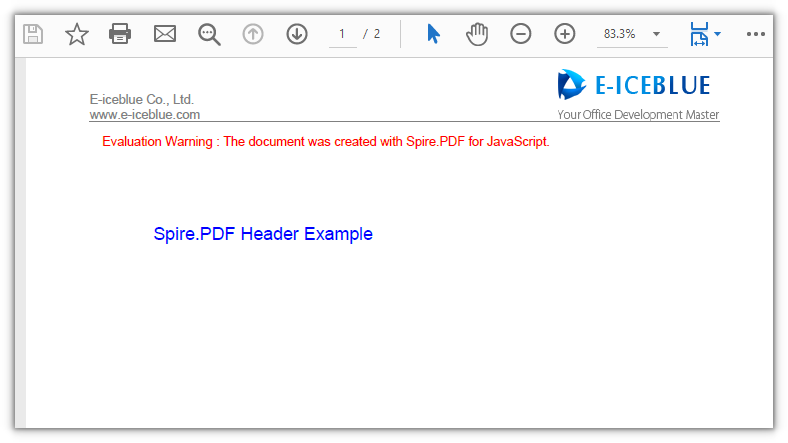
Spire.PDF for JavaScript provides PdfPageTemplateElement for reserving a content area on a page that you can draw into independently and that travels with the page. Assign it to PdfDocumentTemplate.Top and every new page carries this header template inside its top margin. The template element's height is the top margin; inside it, coordinates for lines, text and images start at the page's top-left corner, with x to the right and y downward.
function App() {
  const addHeaderToNewPdf = async () => {
    // Get the Spire.PDF WASM module
    const pdfModule = window.wasmModule?.spirepdf;

    // Check that the module is ready
    if (!pdfModule) {
      alert('Spire.PDF is not ready yet');
      return;
    }

    // Load the font and the header image into the VFS
    await window.spire.FetchFileToVFS('ARIAL.TTF', '/Library/Fonts/', `${process.env.PUBLIC_URL}/font/`);
    const imageFileName = 'E-iceblue.png';
    await window.spire.FetchFileToVFS(imageFileName, "", `${process.env.PUBLIC_URL}/data/`);

    // Create a new PDF document with an A4 page size
    const doc = new pdfModule.PdfDocument();
    const pageSize = pdfModule.PdfPageSize.A4();
    doc.PageSettings.Size = pageSize;

    // Set the page margins to 0; the white space comes from the document template's edge elements (50 points each)
    doc.PageSettings.Margins = new pdfModule.PdfMargins({ margin: 0 });
    const margins = new pdfModule.PdfMargins({ margin: 50 });

    // Reserve the left, right and bottom edges with blank templates so the body area is inset
    doc.Template.Left = new pdfModule.PdfPageTemplateElement({ width: margins.Left, height: pageSize.Height - margins.Top - margins.Bottom });
    doc.Template.Right = new pdfModule.PdfPageTemplateElement({ width: margins.Right, height: pageSize.Height - margins.Top - margins.Bottom });
    doc.Template.Bottom = new pdfModule.PdfPageTemplateElement({ width: pageSize.Width, height: margins.Bottom });

    // Header template: its height is the top margin; Foreground = true draws it above the body
    const headerSpace = new pdfModule.PdfPageTemplateElement({ width: pageSize.Width, height: margins.Top });
    headerSpace.Foreground = true;
    doc.Template.Top = headerSpace;

    // Font, brush, pen and alignment for the header
    const font = new pdfModule.PdfTrueTypeFont({ fontFile: '/Library/Fonts/ARIAL.TTF', size: 10, style: pdfModule.PdfFontStyle.Italic });
    const brush = pdfModule.PdfBrushes.get_Gray();
    const pen = new pdfModule.PdfPen({ brush: pdfModule.PdfBrushes.get_Gray(), width: 1.0 });
    const leftAlign = new pdfModule.PdfStringFormat({ alignment: pdfModule.PdfTextAlignment.Left });

    // Read the header image and convert its pixel size to points
    const headerImage = pdfModule.PdfImage.FromFile(imageFileName);
    const unitCvtr = new pdfModule.PdfUnitConvertor();
    const pointWidth = unitCvtr.ConvertUnits(headerImage.Width, pdfModule.PdfGraphicsUnit.Pixel, pdfModule.PdfGraphicsUnit.Point);
    const pointHeight = unitCvtr.ConvertUnits(headerImage.Height, pdfModule.PdfGraphicsUnit.Pixel, pdfModule.PdfGraphicsUnit.Point);

    // Put the logo on the right of the header, two lines of text on the left, and a divider line at the bottom
    headerSpace.Graphics.DrawImage({
      image: headerImage,
      x: headerSpace.Width - margins.Left - pointWidth,
      y: headerSpace.Height - pointHeight
    });
    headerSpace.Graphics.DrawString({
      s: 'E-iceblue Co., Ltd.\nwww.e-iceblue.com',
      font: font,
      brush: brush,
      x: margins.Left,
      y: headerSpace.Height - font.Height * 2,
      format: leftAlign
    });
    headerSpace.Graphics.DrawLine({
      pen: pen,
      x1: margins.Left,
      y1: margins.Top,
      x2: pageSize.Width - margins.Left,
      y2: margins.Top
    });

    // Add pages and write the body text; the header is applied by the template at render time
    const bodyFont = new pdfModule.PdfTrueTypeFont({ fontFile: '/Library/Fonts/ARIAL.TTF', size: 14 });
    const bodyBrush = pdfModule.PdfBrushes.get_Blue();
    const texts = ['Spire.PDF Header Example', 'Second page body text'];
    for (let i = 0; i < texts.length; i++) {
      const page = doc.Pages.Add();
      page.Canvas.DrawString({ s: texts[i], font: bodyFont, brush: bodyBrush, x: margins.Left, y: margins.Top + 30 });
    }

    const outputFileName = 'Header_Example.pdf';
    doc.SaveToFile(outputFileName);
    doc.Close();

    // Read the generated file from the VFS and trigger a download
    const fileArray = window.dotnetRuntime.Module.FS.readFile(outputFileName);
    const blob = new Blob([fileArray], { type: 'application/pdf' });
    const url = URL.createObjectURL(blob);
    const a = document.createElement('a');
    a.href = url;
    a.download = outputFileName;
    a.click();
    URL.revokeObjectURL(url);
  };

  return (
    <div style={{ textAlign: 'center', height: '300px' }}>
      <h1>Add a header when creating a new PDF</h1>
      <button onClick={addHeaderToNewPdf}>
        Generate
      </button>
    </div>
  );
}

export default App;
Every new page carries the header at the top:
Add a footer when creating a new PDF
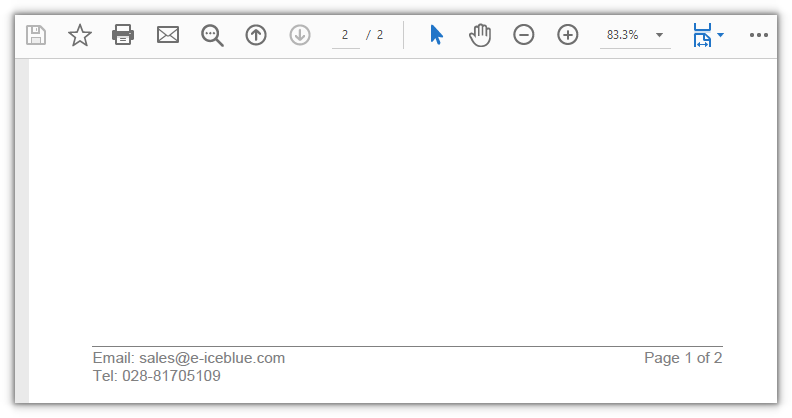
The footer hangs off PdfDocumentTemplate.Bottom; the approach matches the header, only the template height changes to the bottom margin. A footer often carries a page number: PdfPageNumberField and PdfPageCountField combine into a PdfCompositeField, and the number resolves to whichever page it is on.
function App() {
  const addFooterToNewPdf = async () => {
    // Get the Spire.PDF WASM module
    const pdfModule = window.wasmModule?.spirepdf;

    // Check that the module is ready
    if (!pdfModule) {
      alert('Spire.PDF is not ready yet');
      return;
    }

    // Load the font into the VFS for the footer text and page numbers
    await window.spire.FetchFileToVFS('ARIAL.TTF', '/Library/Fonts/', `${process.env.PUBLIC_URL}/font/`);

    // Create a new PDF document with an A4 page size
    const doc = new pdfModule.PdfDocument();
    const pageSize = pdfModule.PdfPageSize.A4();
    doc.PageSettings.Size = pageSize;

    // Set the page margins to 0; the white space comes from the document template's edge elements (50 points each)
    doc.PageSettings.Margins = new pdfModule.PdfMargins({ margin: 0 });
    const margins = new pdfModule.PdfMargins({ margin: 50 });

    // Reserve the left, right and top edges with blank templates so the body area is inset
    doc.Template.Left = new pdfModule.PdfPageTemplateElement({ width: margins.Left, height: pageSize.Height - margins.Top - margins.Bottom });
    doc.Template.Right = new pdfModule.PdfPageTemplateElement({ width: margins.Right, height: pageSize.Height - margins.Top - margins.Bottom });
    doc.Template.Top = new pdfModule.PdfPageTemplateElement({ width: pageSize.Width, height: margins.Top });

    // Footer template: its height is the bottom margin; Foreground = true draws it above the body
    const footerSpace = new pdfModule.PdfPageTemplateElement({ width: pageSize.Width, height: margins.Bottom });
    footerSpace.Foreground = true;
    doc.Template.Bottom = footerSpace;

    // Font, brush, pen and alignment for the footer
    const font = new pdfModule.PdfTrueTypeFont({ fontFile: '/Library/Fonts/ARIAL.TTF', size: 12, style: pdfModule.PdfFontStyle.Italic });
    const brush = pdfModule.PdfBrushes.get_Gray();
    const pen = new pdfModule.PdfPen({ brush: pdfModule.PdfBrushes.get_Gray(), width: 1.0 });
    const leftAlign = new pdfModule.PdfStringFormat({ alignment: pdfModule.PdfTextAlignment.Left });

    // Draw a divider line at the top of the footer, with two lines of contact details left-aligned below it
    footerSpace.Graphics.DrawLine({ pen: pen, x1: margins.Left, y1: 0, x2: pageSize.Width - margins.Left, y2: 0 });
    footerSpace.Graphics.DrawString({
      s: 'Email: sales@e-iceblue.com\nTel: 028-81705109',
      font: font,
      brush: brush,
      x: margins.Left,
      y: 2,
      format: leftAlign
    });

    // Two dynamic fields: the current page number and the total page count
    const number = new pdfModule.PdfPageNumberField();
    const count = new pdfModule.PdfPageCountField();

    // Combine them into "Page {0} of {1}" in placeholder order; the list order must match {0} and {1}
    const compositeField = new pdfModule.PdfCompositeField({
      font: font,
      brush: brush,
      text: 'Page {0} of {1}',
      list: [number, count]
    });
    compositeField.StringFormat = new pdfModule.PdfStringFormat({
      alignment: pdfModule.PdfTextAlignment.Right,
      lineAlignment: pdfModule.PdfVerticalAlignment.Top
    });

    // Measure the page-number text so it sits right-aligned at the end of the footer line
    const size = font.MeasureString({ text: compositeField.Text });
    compositeField.Bounds = new pdfModule.RectangleF({
      x: pageSize.Width - margins.Left - size.Width,
      y: 2,
      width: size.Width,
      height: size.Height
    });
    compositeField.Draw({ graphics: footerSpace.Graphics });

    // Add pages and write the body text; the footer is applied by the template at render time
    const bodyFont = new pdfModule.PdfTrueTypeFont({ fontFile: '/Library/Fonts/ARIAL.TTF', size: 14 });
    const bodyBrush = pdfModule.PdfBrushes.get_Blue();
    const texts = ['Spire.PDF Footer Example', 'Second page body text'];
    for (let i = 0; i < texts.length; i++) {
      const page = doc.Pages.Add();
      page.Canvas.DrawString({ s: texts[i], font: bodyFont, brush: bodyBrush, x: margins.Left, y: margins.Top + 30 });
    }

    const outputFileName = 'Footer_Example.pdf';
    doc.SaveToFile(outputFileName);
    doc.Close();

    // Read the generated file from the VFS and trigger a download
    const fileArray = window.dotnetRuntime.Module.FS.readFile(outputFileName);
    const blob = new Blob([fileArray], { type: 'application/pdf' });
    const url = URL.createObjectURL(blob);
    const a = document.createElement('a');
    a.href = url;
    a.download = outputFileName;
    a.click();
    URL.revokeObjectURL(url);
  };

  return (
    <div style={{ textAlign: 'center', height: '300px' }}>
      <h1>Add a footer when creating a new PDF</h1>
      <button onClick={addFooterToNewPdf}>
        Generate
      </button>
    </div>
  );
}

export default App;
Every new page carries the footer at the bottom:
FAQ
The body text touches the page edge and overlaps the header or footer
Cause: the page margins are set to 0, so the body area's white space comes entirely from the Left, Top, Right and Bottom template elements of doc.Template. Attach a template only on the header or footer side and leave the other sides empty, and the body runs right up to that page edge.
Solution: attach a template element on all four sides; use a blank template where there is no content to place:
doc.Template.Left = new pdfModule.PdfPageTemplateElement({ width: margins.Left, height: pageSize.Height - margins.Top - margins.Bottom });
doc.Template.Right = new pdfModule.PdfPageTemplateElement({ width: margins.Right, height: pageSize.Height - margins.Top - margins.Bottom });
doc.Template.Top = new pdfModule.PdfPageTemplateElement({ width: pageSize.Width, height: margins.Top });
doc.Template.Bottom = new pdfModule.PdfPageTemplateElement({ width: pageSize.Width, height: margins.Bottom });
Chinese characters in the header or footer show up as boxes
Cause: the template text uses a Western font without Chinese glyphs (such as ARIAL.TTF), so no matching glyph is found at render time and each character becomes a hollow box.
Solution: switch to a font that includes Chinese, and load it into the virtual file system's /Library/Fonts/ first:
// Load the Chinese font first, then hand it to PdfTrueTypeFont
await window.spire.FetchFileToVFS('SIMSUN.TTF', '/Library/Fonts/', `${process.env.PUBLIC_URL}/font/`);
const font = new pdfModule.PdfTrueTypeFont({ fontFile: '/Library/Fonts/SIMSUN.TTF', size: 10 });
The header or footer is hidden behind the body text
Cause: PdfPageTemplateElement.Foreground defaults to false, so the template is drawn beneath the body. If the body reaches the same position, it covers the header or footer.
Solution: set the template element's Foreground to true so it is drawn above the body:
const headerSpace = new pdfModule.PdfPageTemplateElement({ width: pageSize.Width, height: margins.Top });
headerSpace.Foreground = true;
doc.Template.Top = headerSpace;
Get a Free License
If you want to remove the evaluation message from the result document, or lift the feature limits, contact sales for a temporary license valid for 30 days.
