
Knowledgebase (2417)
Children categories
This article demonstrates how to mail merge image in Word document in Java using Spire.Doc for Java.
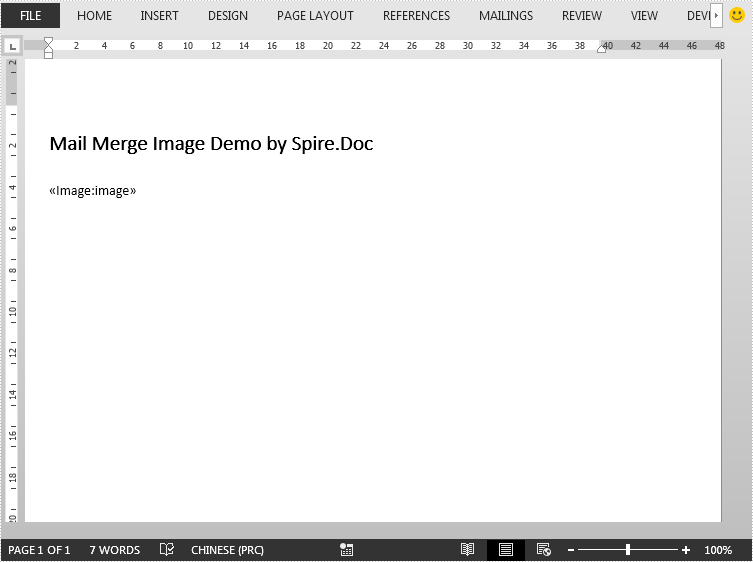
The template document:
import com.spire.doc.Document;
import com.spire.doc.FileFormat;
import com.spire.doc.reporting.MergeImageFieldEventArgs;
import com.spire.doc.reporting.MergeImageFieldEventHandler;

import java.text.SimpleDateFormat;
import java.util.Date;

public class SimpleMailMerge {
    public static void main(String[] args) throws Exception {
        //create a Document instance
        Document document = new Document();
        //load the template document
        document.loadFromFile("template - Copy.docx");

        //specify the merge field name
        String[] filedNames = new String[]{"image"};
        //specify the path of image
        String[] filedValues = new String[]{"logo.png"};
        //invoke the mail merge event to load image
        document.getMailMerge().MergeImageField = new MergeImageFieldEventHandler() {
            public void invoke(Object sender, MergeImageFieldEventArgs args) {
                mailMerge_MergeImageField(sender, args);
            }
        };
        //execute mail merge
        document.getMailMerge().execute(filedNames, filedValues);

        //save file
        document.saveToFile("MailMergeImage.docx", FileFormat.Docx_2013);
    }
    //create a mail merge event to load image
    private static void mailMerge_MergeImageField(Object sender, MergeImageFieldEventArgs field) {
        String filePath = field.getImageFileName();
        if (filePath != null && !"".equals(filePath)) {
            try {
                field.setImage(filePath);
            } catch (Exception e) {
                e.printStackTrace();
            }
        }
    }
}
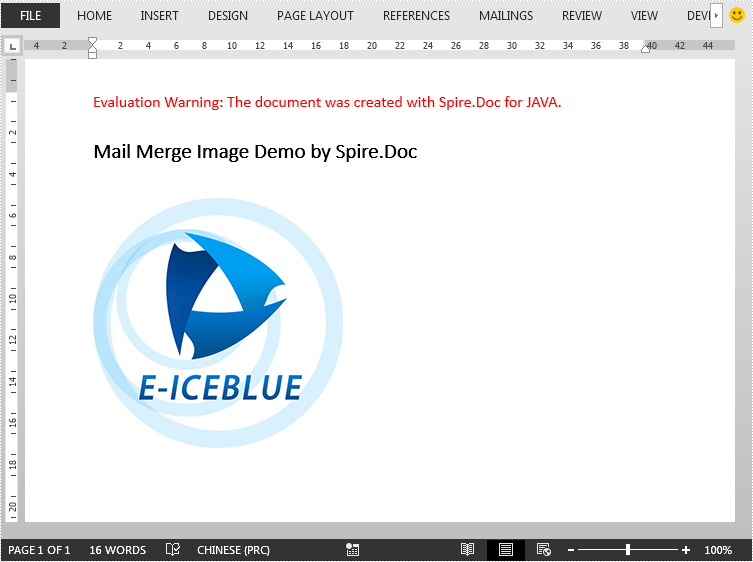
The output document:
If you have a lot of data in Excel, finding the special values can be challenging. In this situation, you can use the conditional formatting to automatically highlight the cells that contain the value that meets certain criteria. This article introduces how to highlight values that are above or below the average using conditional formatting in Java, using Spire.XLS for Java.
Install Spire.XLS for Java
First, you're required to add the Spire.Xls.jar file as a dependency in your Java program. The JAR file can be downloaded from this link. If you use Maven, you can easily import the JAR file in your application by adding the following code to your project's pom.xml file.
<repositories>
    <repository>
        <id>com.e-iceblue</id>
        <name>e-iceblue</name>
        <url>https://repo.e-iceblue.com/nexus/content/groups/public/</url>
    </repository>
</repositories>
<dependencies>
    <dependency>
        <groupId>e-iceblue</groupId>
        <artifactId>spire.xls</artifactId>
        <version>16.8.4</version>
    </dependency>
</dependencies>
Highlight Values Above or Below Average Excel in Java
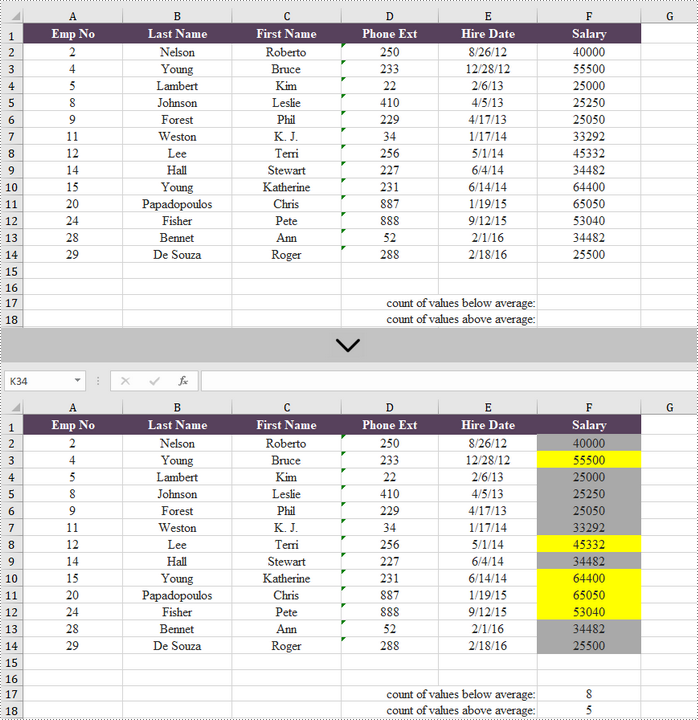
Below are the steps to highlight values above or below average in Excel using Spire.XLS for Java.
- Create a Workbook object.
- Load an Excel file using Workbook.loadFromFile() method.
- Get a specific worksheet from the workbook using Workbook.getWorksheets.get(index) method.
- Add a conditional formatting to the worksheet using Worksheet.getConditionalFormats().add() method and return an object of XlsConditionalFormats class.
- Set the cell range where the conditional formatting will be applied using XlsConditionalFormats.AddRange() method.
- Add an average condition using XlsConditionalFormats.addAverageCondition() method, specify the average type to above and change the background color of the cells that meet the condition to yellow.
- Add another average condition to change the background color of the cells that contain the value below average to light gray.
- Save the workbook to an Excel file using Workbook.saveToFile() method.
- Java
import com.spire.xls.AverageType;
import com.spire.xls.ExcelVersion;
import com.spire.xls.Workbook;
import com.spire.xls.Worksheet;
import com.spire.xls.core.IConditionalFormat;
import com.spire.xls.core.spreadsheet.collections.XlsConditionalFormats;

import java.awt.*;

public class HighlightValuesAboveAndBelowAverage {

    public static void main(String[] args) {

        //Create a Workbook object
        Workbook workbook = new Workbook();

        //Load an Excel file
        workbook.loadFromFile("C:\\Users\\Administrator\\Desktop\\sample.xlsx");

        //Get the first worksheet
        Worksheet sheet = workbook.getWorksheets().get(0);

        //Add a conditional format to the worksheet
        XlsConditionalFormats format = sheet.getConditionalFormats().add();

        //Set the range where the conditional format will be applied
        format.addRange(sheet.getRange().get("F2:F14"));

        //Add a condition to highlight values above average with yellow
        IConditionalFormat condition1 = format.addAverageCondition(AverageType.Above);
        condition1.setBackColor(Color.yellow);

        //Add a condition to highlight values below average with light gray
        IConditionalFormat condition2 = format.addAverageCondition(AverageType.Below);
        condition2.setBackColor(Color.lightGray);

        //Get the count of values below average
        sheet.getRange().get("F17").setFormula("=COUNTIF(F2:F14,\"<\"&AVERAGE(F2:F14))");

        //Get the count of values above average
        sheet.getRange().get("F18").setFormula("=COUNTIF(F2:F14,\">\"&AVERAGE(F2:F14))");

        //Save the workbook to an Excel file
        workbook.saveToFile("output/HighlightValues.xlsx", ExcelVersion.Version2016);
    }
}
Apply for a Temporary License
If you'd like to remove the evaluation message from the generated documents, or to get rid of the function limitations, please request a 30-day trial license for yourself.
Java: Set, Retrieve, or Delete Document Properties in PowerPoint
2023-08-10 07:54:00 Written by KoohjiDocument properties of PowerPoint presentations hold immense value in managing and organizing presentations. The information in properties, including title, author, keywords, etc., provides a concise summary, aids in categorization and searchability, and contributes to maintaining a comprehensive presentation history. However, some useless document properties need to be deleted to prevent them from affecting document management. This article is going to show how to add, retrieve, or delete document properties in PowerPoint presentations using Spire.Presentation for Java.
- Add Document Properties to a PowerPoint Presentation
- Retrieve Document Properties from a PowerPoint Presentation
- Delete Document Properties of a PowerPoint Presentation
Install Spire.Presentation for Java
First of all, you're required to add the Spire.Presentation.jar file as a dependency in your Java program. The JAR file can be downloaded from this link. If you use Maven, you can easily import the JAR file in your application by adding the following code to your project's pom.xml file.
<repositories>
    <repository>
        <id>com.e-iceblue</id>
        <name>e-iceblue</name>
        <url>https://repo.e-iceblue.com/nexus/content/groups/public/</url>
    </repository>
</repositories>
<dependencies>
    <dependency>
        <groupId>e-iceblue</groupId>
        <artifactId>spire.presentation</artifactId>
        <version>11.8.3</version>
    </dependency>
</dependencies>
Add Document Properties to a PowerPoint Presentation
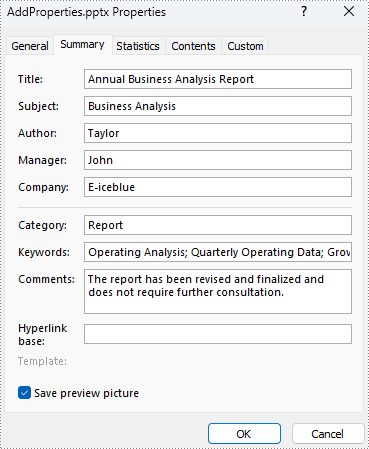
Spire.Presentation for Java provides a set of methods under IDocumentProperty class to enable users to set and retrieve document properties of a presentation after getting the properties using the Presentation.getDocumentProperty() method. The detailed steps for adding document properties to a PowerPoint presentation are as follows:
- Create an object of Presentation class.
- Load a presentation file using Presentation.loadFromFile() method.
- Get the document properties of the presentation using Presentation.getDocumentProperty() method.
- Set the document properties using methods under IDocumentProperty class.
- Save the presentation using Presentation.saveToFile() method.
- Java
import com.spire.presentation.FileFormat;
import com.spire.presentation.IDocumentProperty;
import com.spire.presentation.Presentation;

public class addPresentationProperties {
    public static void main(String[] args) throws Exception {
        //Create an object of Presentation class
        Presentation presentation = new Presentation();

        //Load a PowerPoint presentation
        presentation.loadFromFile("Sample.pptx");

        //Get the properties of the presentation and add items
        IDocumentProperty property = presentation.getDocumentProperty();
        property.setTitle("Annual Business Analysis Report");
        property.setSubject("Business Analysis");
        property.setAuthor("Taylor");
        property.setManager("John");
        property.setCompany("E-iceblue");
        property.setCategory("Report");
        property.setKeywords("Operating Analysis; Quarterly Operating Data; Growth");
        property.setComments("The report has been revised and finalized and does not require further consultation.");

        //Save the presentation file
        presentation.saveToFile("AddProperties.pptx", FileFormat.AUTO);
        presentation.dispose();
    }
}
Retrieve Document Properties from a PowerPoint Presentation
The detailed steps for retrieving document properties from a PowerPoint presentation are as follows:
- Create an object of Presentation class.
- Load a presentation file using Presentation.loadFromFile() method.
- Get the properties of the presentation using Presentation.getDocumentProperty() method.
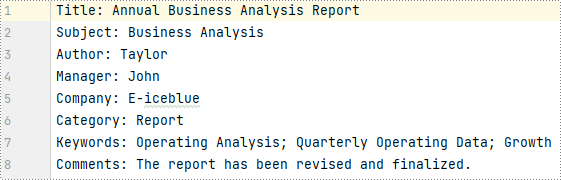
- Retrieve property information using methods under IDocumentProperty class and write it to a text file.
- Java
import com.spire.presentation.IDocumentProperty;
import com.spire.presentation.Presentation;

import java.io.FileWriter;

public class retrievePresentationProperties {
    public static void main(String[] args) throws Exception {
        //Create an object of Presentation class
        Presentation presentation = new Presentation();

        //Load a presentation file
        presentation.loadFromFile("AddProperties.pptx");

        //Get the properties of the presentation
        IDocumentProperty property = presentation.getDocumentProperty();

        //Get the properties and write them to a text file
        String properties = "Title: " + property.getTitle() + "\r\n"
                + "Subject: " + property.getSubject() + "\r\n"
                + "Author: " + property.getAuthor() + "\r\n"
                + "Manager: " + property.getManager() + "\r\n"
                + "Company: " + property.getCompany() + "\r\n"
                + "Category: " + property.getCategory() + "\r\n"
                + "Keywords: " + property.getKeywords() + "\r\n"
                + "Comments: " + property.getComments();
        FileWriter presentationProperties = new FileWriter("PresentationProperties.txt");
        presentationProperties.write(properties);
        presentationProperties.close();
    }
}
Delete Document Properties of a PowerPoint Presentation
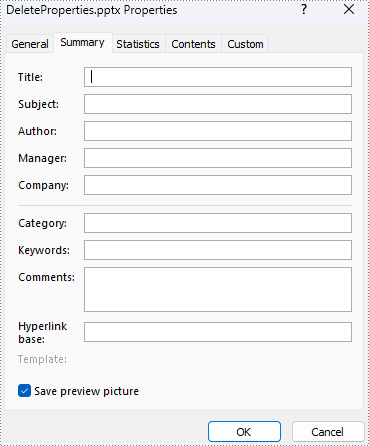
Removing document properties from a presentation is similar to adding properties. Just set the property data to null and the document properties can be removed. The details are as follows:
- Create an object of Presentation class.
- Load a presentation file using Presentation.loadFromFile() method.
- Get the document properties of the presentation using Presentation.getDocumentProperty() method.
- Set the document properties to null using methods under IDocumentProperty class.
- Save the presentation using Presentation.saveToFile() method.
- Java
import com.spire.presentation.FileFormat;
import com.spire.presentation.IDocumentProperty;
import com.spire.presentation.Presentation;

public class deletePresentationProperties {
    public static void main(String[] args) throws Exception {
        //Create an object of Presentation class
        Presentation presentation = new Presentation();

        //Load a PowerPoint presentation
        presentation.loadFromFile("AddProperties.pptx");

        //Get the properties of the presentation and set the properties to null
        IDocumentProperty property = presentation.getDocumentProperty();
        property.setTitle("");
        property.setSubject("");
        property.setAuthor("");
        property.setManager("");
        property.setCompany("");
        property.setCategory("");
        property.setKeywords("");
        property.setComments("");

        //Save the presentation file
        presentation.saveToFile("DeleteProperties.pptx", FileFormat.AUTO);
        presentation.dispose();
    }
}
Apply for a Temporary License
If you'd like to remove the evaluation message from the generated documents, or to get rid of the function limitations, please request a 30-day trial license for yourself.
