
Knowledgebase (2417)
Children categories
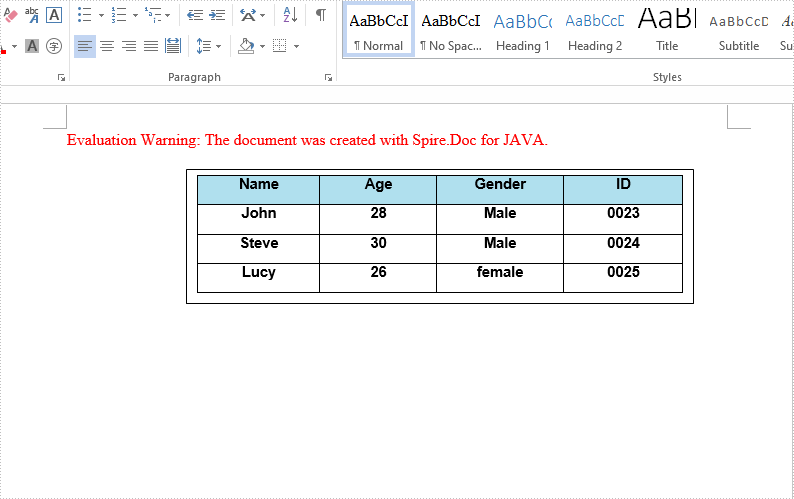
We have demonstrated how to insert text and image to textbox in a Word document by using Spire.Doc for Java. This article will demonstrate how to insert table to textbox in Word.
import com.spire.doc.*;
import com.spire.doc.documents.*;
import com.spire.doc.fields.*;

import java.awt.*;

public class insertTableIntoTextBox {
    public static void main(String[] args) throws Exception{
        //Create a new document; add a section and paragraph
        Document doc = new Document();
        Section section = doc.addSection();
        Paragraph paragraph = section.addParagraph();
        //Add a textbox to the paragraph
        TextBox textbox = paragraph.appendTextBox(380, 100);
        //Set the position of the textbox
        textbox.getFormat().setHorizontalOrigin(HorizontalOrigin.Page);
        textbox.getFormat().setHorizontalPosition(140);
        textbox.getFormat().setVerticalOrigin(VerticalOrigin.Page);
        textbox.getFormat().setVerticalPosition(50);
        //Insert table to the textbox
        Table table = textbox.getBody().addTable(true);
        //Specify the number of rows and columns of the table
        table.resetCells(4, 4);
        //Define the data
        String[][] data = new String[][]
                {
                        {"Name", "Age", "Gender", "ID"},
                        {"John", "28", "Male", "0023"},
                        {"Steve", "30", "Male", "0024"},
                        {"Lucy", "26", "female", "0025"}
                };
        //Add data to the table
        for (int i = 0; i < 4; i++) {
            TableRow dataRow = table.getRows().get(i);
            dataRow.getCells().get(i).setCellWidth(70,CellWidthType.Point);
            dataRow.setHeight(22);
            dataRow.setHeightType(TableRowHeightType.Exactly);
            for (int j = 0; j < 4; j++) {
                TextRange tableRange = table.getRows().get(i).getCells().get(j).addParagraph().appendText(data[i][j]);
                tableRange.getCharacterFormat().setFontName("Arial");
                tableRange.getCharacterFormat().setFontSize(11f);
                tableRange.getOwnerParagraph().getFormat().setHorizontalAlignment(HorizontalAlignment.Center);
                tableRange.getCharacterFormat().setBold(true);
            }
        }
        //Set the background color for the first row
        TableRow row = table.getRows().get(0);
        for (int z = 0; z < row.getCells().getCount(); z++) {
            row.getCells().get(z).getCellFormat().getShading().setBackgroundPatternColor(new Color(176,224,238));
        }
        //Apply style to the table
        table.applyStyle(DefaultTableStyle.Table_Grid_5);
        //Save the document
        String output = "output/insertTableIntoTextBox1.docx";
        doc.saveToFile(output, FileFormat.Docx_2013);
    }
}
The effective screenshot after insert table to Textbox in Word:
Published in
Textbox
Tagged under
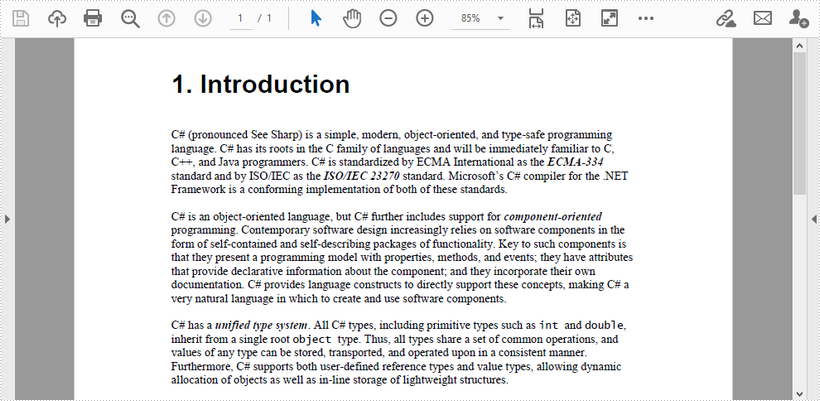
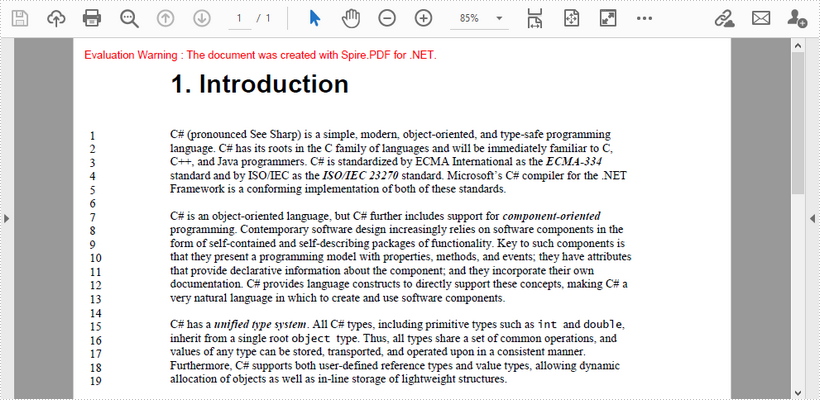
This article demonstrates how to add line numbers before chunks of text in a PDF page by using Spire.PDF for .NET.
Below is a screenshot of the input document.
C#
using Spire.Pdf;
using Spire.Pdf.General.Find;
using Spire.Pdf.Graphics;
using System.Drawing;

namespace AddLineNumber
{
    class Program
    {
        static void Main(string[] args)
        {
     //Create a PdfDocument object
     PdfDocument doc = new PdfDocument();

     //Load PDF document
     doc.LoadFromFile(@"C:\Users\Administrator\Desktop\input.pdf");

     //Get the first page
     PdfPageBase page = doc.Pages[0];

     //Find specified text in the first line
     PdfTextFinder finder = new PdfTextFinder(page);
     finder.Options.Parameter = Spire.Pdf.Texts.TextFindParameter.WholeWord;
     PdfTextFragment topLine = finder.Find("C# (pronounced See Sharp)")[0];

     //Get line height
     float lineHeight = topLine.Bounds[0].Height;

     //Get a Y coordinate for the starting position of line numbers
     float y = topLine.Bounds[0].Location.Y - 2;

     //Find specified text in the second line
     PdfTextFinder secondfinder = new PdfTextFinder(page);
     secondfinder.Options.Parameter = Spire.Pdf.Texts.TextFindParameter.WholeWord;
     PdfTextFragment secondLine = secondfinder.Find("language. C#")[0];

     //Calculate line spacing
     float lineSpacing = secondLine.Bounds[0].Top - topLine.Bounds[0].Bottom;

     //Find specified text in the last line
     PdfTextFinder bottomfinder = new PdfTextFinder(page);
     bottomfinder.Options.Parameter = Spire.Pdf.Texts.TextFindParameter.WholeWord;
     PdfTextFragment bottomLine = bottomfinder.Find("allocation of objects")[0];

     //Get the bottom Y coordinate of the last line, which is the height of the line number area
     float height = bottomLine.Bounds[0].Bottom;

     //Create a font with the same size as the text in the PDF
     PdfFont font = new PdfFont(PdfFontFamily.TimesRoman, 11f);

     int i = 1;
     while (y < height)
     {
         //Draw line numbers at the beginning of each line
         page.Canvas.DrawString(i.ToString(), font, PdfBrushes.Black, new PointF(15, y));
         y += lineHeight + lineSpacing;
         i++;
     }

     //Save the document
     doc.SaveToFile("result.pdf");
        }
    }
}
VB.NET
Imports Spire.Pdf
Imports Spire.Pdf.General.Find
Imports Spire.Pdf.Graphics
Imports System.Drawing

Namespace AddLineNumber
    Class Program
        Shared  Sub Main(ByVal args() As String)
        'Create a PdfDocument object
        Dim doc As New PdfDocument()

        'Load PDF document
        doc.LoadFromFile("C:\Users\Administrator\Desktop\input.pdf")

        'Get the first page
        Dim page As PdfPageBase = doc.Pages(0)

        'Find specified text in the first line
        Dim finder As New PdfTextFinder(page)
        finder.Options.Parameter = Spire.Pdf.Texts.TextFindParameter.WholeWord
        Dim topLine As PdfTextFragment = finder.Find("C# (pronounced See Sharp)")(0)

        'Get line height
        Dim lineHeight As Single = topLine.Bounds(0).Height

        'Get a Y coordinate for the starting position of line numbers
        Dim y As Single = topLine.Bounds(0).Location.Y - 2

        'Find specified text in the second line
        Dim secondfinder As New PdfTextFinder(page)
        secondfinder.Options.Parameter = Spire.Pdf.Texts.TextFindParameter.WholeWord
        Dim secondLine As PdfTextFragment = secondfinder.Find("language. C#")(0)

        'Calculate line spacing
        Dim lineSpacing As Single = secondLine.Bounds(0).Top - topLine.Bounds(0).Bottom

        'Find specified text in the last line
        Dim bottomfinder As New PdfTextFinder(page)
        bottomfinder.Options.Parameter = Spire.Pdf.Texts.TextFindParameter.WholeWord
        Dim bottomLine As PdfTextFragment = bottomfinder.Find("allocation of objects")(0)

        'Get the bottom Y coordinate of the last line, which is the height of the line number area
        Dim height As Single = bottomLine.Bounds(0).Bottom

        'Create a font with the same size as the text in the PDF
        Dim font As PdfFont = New PdfFont(PdfFontFamily.TimesRoman, 11.0F)

        Dim i As Integer = 1
        While y < height
            'Draw line numbers at the beginning of each line
            page.Canvas.DrawString(i.ToString(), font, PdfBrushes.Black, New PointF(15, y))
            y += lineHeight + lineSpacing
            i += 1
        End While

        'Save the document
        doc.SaveToFile("result.pdf")

        End Sub
    End Class
End Namespace
Output
Published in
Text
Tagged under
Get the differences by comparing two Word documents in C#/VB.NET
2021-01-04 07:37:21 Written by AdministratorWe have introduced how to compare two Word documents in C# and VB.NET. From Spire.Doc V8.12.14, it supports to get the differences between two Word documents in a structure list. This article will show you how to use Spire.Doc to get the differences by comparing two Word documents.
C#
using Spire.Doc;
using Spire.Doc.Documents;
using Spire.Doc.Fields;
using Spire.Doc.Formatting.Revisions;
using System;

namespace GetWordDifferences
    {
    class Program
    {
        static void Main(string[] args)

        {
            //Load the first Word document
            Document doc1 = new Document();
            doc1.LoadFromFile("Sample1.docx");

            //Load the second Word document
            Document doc2 = new Document();
            doc2.LoadFromFile("Sample2.docx");

            //Compare the two Word documents
            doc1.Compare(doc2, "Author");

            foreach (Section sec in doc1.Sections)
            {
                foreach (DocumentObject docItem in sec.Body.ChildObjects)
                {
                    if (docItem is Paragraph)
{
                        Paragraph para = docItem as Paragraph;
                        if (para.IsInsertRevision)
                        {
                            EditRevision insRevison = para.InsertRevision;
                            EditRevisionType insType = insRevison.Type;
                            string insAuthor = insRevison.Author;
                            DateTime insDateTime = insRevison.DateTime;
                        }

                        else if (para.IsDeleteRevision)
                        {
                            EditRevision delRevison = para.DeleteRevision;
                            EditRevisionType delType = delRevison.Type;
                            string delAuthor = delRevison.Author;
                            DateTime delDateTime = delRevison.DateTime;
                        }

                        foreach (ParagraphBase paraItem in para.ChildObjects)
                        {
                            if (paraItem.IsInsertRevision)
                            {
                                EditRevision insRevison = paraItem.InsertRevision;
                                EditRevisionType insType = insRevison.Type;
                                string insAuthor = insRevison.Author;
                                DateTime insDateTime = insRevison.DateTime;
                            }

                            else if (paraItem.IsDeleteRevision)
                            {
                                EditRevision delRevison = paraItem.DeleteRevision;
                                EditRevisionType delType = delRevison.Type;
                                string delAuthor = delRevison.Author;
                                DateTime delDateTime = delRevison.DateTime;
                            }

                        }
                    }
                }
            }

            //Get the difference about revisions
            DifferRevisions differRevisions = new DifferRevisions(doc1);
            var insetRevisionsList = differRevisions.InsertRevisions;
            var deletRevisionsList = differRevisions.DeleteRevisions;
        }
    }
 }
VB.NET
Imports Spire.Doc
Imports Spire.Doc.Documents
Imports Spire.Doc.Fields
Imports Spire.Doc.Formatting.Revisions
Imports System

Namespace GetWordDifferences

    Class Program

        Private Shared Sub Main(ByVal args() As String)
            'Load the first Word document
            Dim doc1 As Document = New Document
            doc1.LoadFromFile("Sample1.docx")
            'Load the second Word document
            Dim doc2 As Document = New Document
            doc2.LoadFromFile("Sample2.docx")
            'Compare the two Word documents
            doc1.Compare(doc2, "Author")
            For Each sec As Section In doc1.Sections
                For Each docItem As DocumentObject In sec.Body.ChildObjects
                    If (TypeOf docItem Is Paragraph) Then
                        Dim para As Paragraph = CType(docItem,Paragraph)
                        If para.IsInsertRevision Then
                            Dim insRevison As EditRevision = para.InsertRevision
                            Dim insType As EditRevisionType = insRevison.Type
                            Dim insAuthor As String = insRevison.Author
                            Dim insDateTime As DateTime = insRevison.DateTime
                        ElseIf para.IsDeleteRevision Then
                            Dim delRevison As EditRevision = para.DeleteRevision
                            Dim delType As EditRevisionType = delRevison.Type
                            Dim delAuthor As String = delRevison.Author
                            Dim delDateTime As DateTime = delRevison.DateTime
                        End If

                        For Each paraItem As ParagraphBase In para.ChildObjects
                            If paraItem.IsInsertRevision Then
                                Dim insRevison As EditRevision = paraItem.InsertRevision
                                Dim insType As EditRevisionType = insRevison.Type
                                Dim insAuthor As String = insRevison.Author
                                Dim insDateTime As DateTime = insRevison.DateTime
                            ElseIf paraItem.IsDeleteRevision Then
                                Dim delRevison As EditRevision = paraItem.DeleteRevision
                                Dim delType As EditRevisionType = delRevison.Type
                                Dim delAuthor As String = delRevison.Author
                                Dim delDateTime As DateTime = delRevison.DateTime
                            End If

                        Next
                    End If

                Next
            Next
            'Get the difference about revisions
            Dim differRevisions As DifferRevisions = New DifferRevisions(doc1)
            Dim insetRevisionsList = differRevisions.InsertRevisions
            Dim deletRevisionsList = differRevisions.DeleteRevisions
        End Sub
    End Class
End Namespace
Published in
Document Operation
Tagged under
