
Knowledgebase (2417)
Children categories
Invisiblize Textual Data When Creating Barcode&QR code in Java
2021-07-02 02:27:06 Written by KoohjiIn this tutorial, we are going to introduce how to invisiblize the textual data in the middle of creating a Barcode&QR code using Spire.Barcode for Java and its settings.setShowText(false); method.
Invisiblize the Textual Data When Creating a Barcode
import com.spire.barcode.BarCodeGenerator;
import com.spire.barcode.BarCodeType;
import com.spire.barcode.BarcodeSettings;

import javax.imageio.ImageIO;
import java.awt.*;
import java.awt.image.BufferedImage;
import java.io.File;
import java.io.IOException;

public class CreateBarcode {
    public static void main(String[] args) throws IOException {
        BarcodeSettings settings = new BarcodeSettings();//Instantiate BarcodeSettings object
        settings.setType(BarCodeType.Codabar);//Set the Barcode type
        settings.setData("123456789");//Set the Barcode data
        settings.setShowText(false);//Make the textual data invisible
        settings.setShowTextOnBottom(true);//Make the textual data visible at the bottom of the Barcode
        settings.setX(0.8f);//Set width for the black and white stripes
        settings.setImageHeight(50);//Set height for the created Barcode image
        settings.setImageWidth(70);//Set width for the created Barcode image
        settings.hasBorder(true);//Make the border visible
        settings.setBorderColor(new Color(135,206,250));//Set the border color
        settings.setBorderWidth(1);//Set the border width
        settings.setBackColor(new Color(240,255,255));//Set background color for the Barcode

        BarCodeGenerator barCodeGenerator = new BarCodeGenerator(settings);//Instantiage BarCodeGenerator object
        BufferedImage bufferedImage = barCodeGenerator.generateImage();//Generate image data based on settings and save it to BufferedImage instance
        ImageIO.write(bufferedImage, "png", new File("Codabar.png"));//Save the Barcode as PNG
    }
}
Output

Invisiblize the Textual Data When Creating a QR code
import com.spire.barcode.*;

import javax.imageio.ImageIO;
import java.awt.image.BufferedImage;
import java.io.File;
import java.io.IOException;

public class CreateQR {
    public static void main(String[] args) throws IOException {

               BarcodeSettings settings = new BarcodeSettings();//Instantiate BarcodeSettings object
        settings.setType(BarCodeType.QR_Code);//Set Barcode type as QR code
        settings.setData("Hello 123456789");//Set the data
        settings.setShowText(false);// Make the textual data invisible
        settings.setQRCodeDataMode(QRCodeDataMode.Alpha_Number);//Set data mode
        settings.setImageWidth(50);// Set widthfor the created QR code image
        settings.setImageHeight(50);// Set height for the created QR code image
        settings.setX(3.0f);//Set width for QR code model
        settings.setQRCodeECL(QRCodeECL.H);//Set QR code ECL
        settings.hasBorder(false);//make the border invisible

        BarCodeGenerator barCodeGenerator = new BarCodeGenerator(settings);//Instantiage BarCodeGenerator object

        BufferedImage bufferedImage = barCodeGenerator.generateImage();//Generate image data based on settings and save it to BufferedImage instance
        ImageIO.write(bufferedImage, "png", new File("QRCode.png"));//Save the QR code as PNG
    }
}
Output

Published in
Getting Started
Tagged under
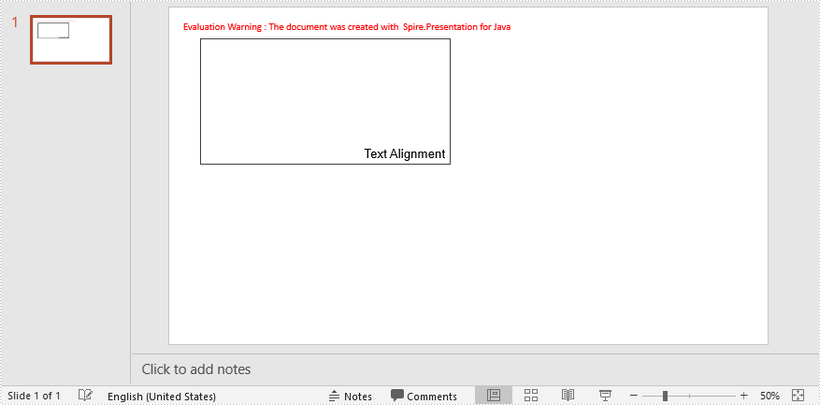
This article demonstrates how to set text horizontal and vertical alignment within a shape using Spire.Presentation for Java.
import com.spire.presentation.*;
import com.spire.presentation.drawing.FillFormatType;

import java.awt.*;
import java.awt.geom.Rectangle2D;

public class SetTextAlignment {
    public static void main(String[] args) throws Exception {

        //Create a Presentation object
        Presentation presentation = new Presentation();
        presentation.getSlideSize().setType(SlideSizeType.SCREEN_16_X_9);

        //Add a shape
        IAutoShape textShape = presentation.getSlides().get(0).getShapes().appendShape(ShapeType.RECTANGLE, new Rectangle2D.Float(50, 50, 400, 200));
        textShape.getShapeStyle().getLineColor().setColor(Color.DARK_GRAY);
        textShape.getFill().setFillType(FillFormatType.NONE);

        //Remove the default paragraphs
        textShape.getTextFrame().getParagraphs().clear();

        //Add a paragraph and append some text to it
        textShape.getTextFrame().getParagraphs().append(new ParagraphEx());
        textShape.getTextFrame().getParagraphs().get(0).getTextRanges().append(new PortionEx("Text Alignment"));
        textShape.getTextFrame().getParagraphs().get(0).getTextRanges().get(0).setFontHeight(20f);
        textShape.getTextFrame().getParagraphs().get(0).getTextRanges().get(0).setLatinFont(new TextFont("Arial"));
        textShape.getTextFrame().getParagraphs().get(0).getTextRanges().get(0).getFill().setFillType(FillFormatType.SOLID);
        textShape.getTextFrame().getParagraphs().get(0).getTextRanges().get(0).getFill().getSolidColor().setColor(Color.BLACK);

        //Set text horizontal alignment to right
        textShape.getTextFrame().getParagraphs().get(0).setAlignment(TextAlignmentType.RIGHT);

        //Set text vertical alignment to bottom
        textShape.getTextFrame().setAnchoringType(TextAnchorType.BOTTOM);

        //Save to file
        presentation.saveToFile("output/TextAlignment.pptx",FileFormat.PPTX_2013);
    }
}
Published in
Paragraph and Text
Tagged under
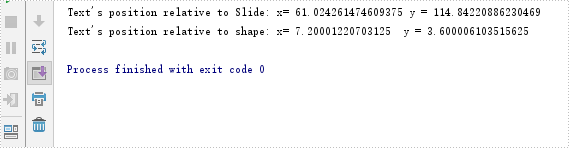
This article demonstrates how to get the position of text in PowerPoint in Java using Spire.Presentation for Java.
import com.spire.presentation.IAutoShape;
import com.spire.presentation.ISlide;
import com.spire.presentation.Presentation;

import java.awt.geom.Point2D;

public class GetPositionOfText {
    public static void main(String []args) throws Exception {
        //Create a Presentation instance
        Presentation ppt = new Presentation();
        //Load a PowerPoint document
        ppt.loadFromFile("Sample.pptx");

        //Get the first slide
        ISlide slide = ppt.getSlides().get(0);
        //Get the first shape
        IAutoShape shape = (IAutoShape)slide.getShapes().get(0);
        //Get location of text in the shape
        Point2D location =shape.getTextFrame().getTextLocation();

        //Print out the x and y coordinates of the location relative to slide
        String  point1="Text's position relative to Slide: x= "+location.getX()+" y = "+location.getY();
        System.out.println(point1);

        //Print out the x and y coordinates of the location relative to shape
        String point2 = "Text's position relative to shape: x= " + (location.getX() - shape.getLeft()) + "  y = " + (location.getY() - shape.getTop());
        System.out.println(point2);
    }
}
Output:
Published in
Paragraph and Text
Tagged under
