
Knowledgebase (2417)
Children categories
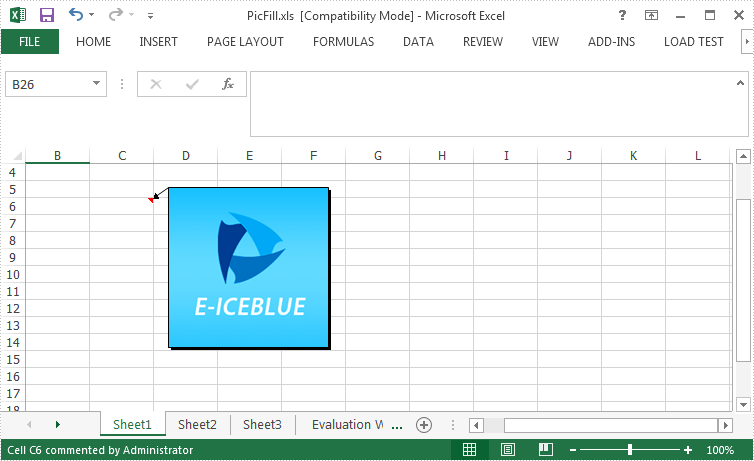
Spire.XLS enable programmers to insert, modify as well as format comments in Excel. Also, it allows users to fill a comment with solid color, gradient, pattern or a picture to change the look of the comment. This article is going to introduce how to set background image for a comment in Excel using Spire.XLS.
Code Snippet:
Step 1: Initialize an instance of Wordbook and get the first worksheet.
Workbook wb = new Workbook();
Worksheet sheet = wb.Worksheets[0];
Step 2: Fill the comment with a customized background picture.
Image image = Image.FromFile(@"C: \Users\Administrator\Desktop\logo.png");
sheet.Range["C6"].Comment.Fill.CustomPicture(image, "logo.png");
Step 3: Re-set the size of comment box.
sheet.Range["C6"].Comment.Height = image.Height;
sheet.Range["C6"].Comment.Width = image.Width;
Step 4: Save the file.
wb.SaveToFile("PicFillComment.xls", ExcelVersion.Version97to2003);
Output:
Full Code:
using Spire.Xls;
using System.Drawing;
namespace SetPictureFill
{
    class Program
    {

        static void Main(string[] args)
        {
            {

                Workbook wb = new Workbook();
                Worksheet sheet = wb.Worksheets[0];

                Image image = Image.FromFile(@"C: \Users\Administrator\Desktop\logo.png");
                sheet.Range["C6"].Comment.Fill.CustomPicture(image, "logo.png");
                sheet.Range["C6"].Comment.Height = image.Height;
                sheet.Range["C6"].Comment.Width = image.Width;

                wb.SaveToFile("PicFill.xls", ExcelVersion.Version97to2003);

            }

        }
    }
}
Imports Spire.Xls
Imports System.Drawing
Namespace SetPictureFill
	Class Program

		Private Shared Sub Main(args As String())
			If True Then

				Dim wb As New Workbook()
				Dim sheet As Worksheet = wb.Worksheets(0)

				Dim image__1 As Image = Image.FromFile("C: \Users\Administrator\Desktop\logo.png")
				sheet.Range("C6").Comment.Fill.CustomPicture(image__1, "logo.png")
				sheet.Range("C6").Comment.Height = image__1.Height
				sheet.Range("C6").Comment.Width = image__1.Width

				wb.SaveToFile("PicFill.xls", ExcelVersion.Version97to2003)

			End If

		End Sub
	End Class
End Namespace
Apart from creating chart with continuous data range, Spire.XLS also supports to create chart with discontinuous data range by calling the XlsRange.AddCombinedRange(CellRange cr) method. This example explains a quick solution of how to achieve this task in C# with the help of Spire.XLS.
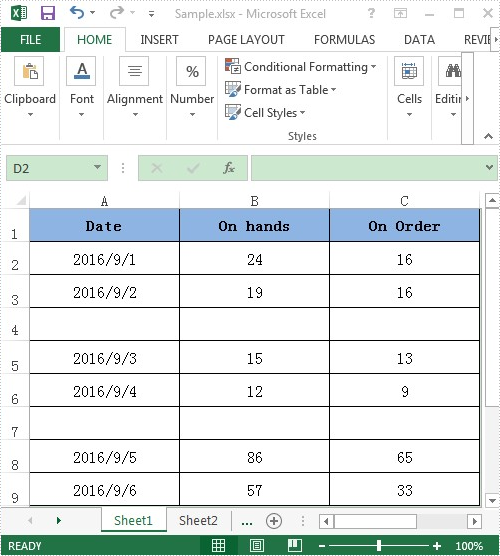
For demonstration, here we used a template excel document, in which you can see there are some blank rows among the data, in other words, the data range is discontinuous.
Here comes to the detail steps:
Step 1: Instantiate a Wordbook object, load the excel document and get its first worksheet.
Workbook book = new Workbook();
book.LoadFromFile("Sample.xlsx");
Worksheet sheet = book.Worksheets[0];
Step 2: Add a column chart to the first worksheet and set the position of the chart.
Chart chart = sheet.Charts.Add(ExcelChartType.ColumnClustered);
chart.SeriesDataFromRange = false;
//Set chart position
chart.LeftColumn = 5;
chart.TopRow = 1;
chart.RightColumn = 13;
chart.BottomRow = 10;
Step 3: Add two series to the chart, set data source for category labels and values of the series with discontinuous data range.
//Add the first series
var cs1 = (ChartSerie)chart.Series.Add();
//Set name of the serie
cs1.Name = sheet.Range["B1"].Value;
//Set data source for Category Labels and Values of the serie with discontinuous data range
cs1.CategoryLabels = sheet.Range["A2:A3"].AddCombinedRange(sheet.Range["A5:A6"]).AddCombinedRange(sheet.Range["A8:A9"]);
cs1.Values = sheet.Range["B2:B3"].AddCombinedRange(sheet.Range["B5:B6"]).AddCombinedRange(sheet.Range["B8:B9"]);
//Specify the serie type
cs1.SerieType = ExcelChartType.ColumnClustered;

//Add the second series
var cs2 = (ChartSerie)chart.Series.Add();
cs2.Name = sheet.Range["C1"].Value;
cs2.CategoryLabels = cs2.CategoryLabels = sheet.Range["A2:A3"].AddCombinedRange(sheet.Range["A5:A6"]).AddCombinedRange(sheet.Range["A8:A9"]);
cs2.Values = sheet.Range["C2:C3"].AddCombinedRange(sheet.Range["C5:C6"]).AddCombinedRange(sheet.Range["C8:C9"]);
cs2.SerieType = ExcelChartType.ColumnClustered;
Step 4: Save the excel document.
book.SaveToFile("Result.xlsx", FileFormat.Version2010);
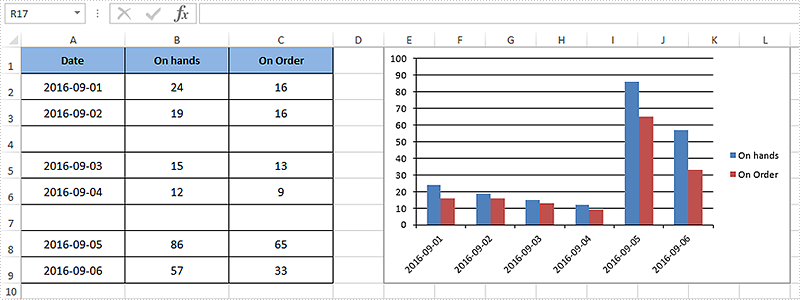
After executing the above example code, a column chart with discontinuous data range was added to the worksheet as shown below.
Full code:
using Spire.Xls;
using Spire.Xls.Charts;

namespace Assign_discontinuous_range_for_chart
{
    class Program
    {
        static void Main(string[] args)
        {
            Workbook book = new Workbook();
            book.LoadFromFile("Sample.xlsx");
            Worksheet sheet = book.Worksheets[0];

            Chart chart = sheet.Charts.Add(ExcelChartType.ColumnClustered);
            chart.SeriesDataFromRange = false;
            chart.LeftColumn = 5;
            chart.TopRow = 1;
            chart.RightColumn = 13;
            chart.BottomRow = 10;

            var cs1 = (ChartSerie)chart.Series.Add();
            cs1.Name = sheet.Range["B1"].Value;
            cs1.CategoryLabels = sheet.Range["A2:A3"].AddCombinedRange(sheet.Range["A5:A6"]).AddCombinedRange(sheet.Range["A8:A9"]);
            cs1.Values = sheet.Range["B2:B3"].AddCombinedRange(sheet.Range["B5:B6"]).AddCombinedRange(sheet.Range["B8:B9"]);
            cs1.SerieType = ExcelChartType.ColumnClustered;

            var cs2 = (ChartSerie)chart.Series.Add();
            cs2.Name = sheet.Range["C1"].Value;
            cs2.CategoryLabels = sheet.Range["A2:A3"].AddCombinedRange(sheet.Range["A5:A6"]).AddCombinedRange(sheet.Range["A8:A9"]);
            cs2.Values = sheet.Range["C2:C3"].AddCombinedRange(sheet.Range["C5:C6"]).AddCombinedRange(sheet.Range["C8:C9"]);
            cs2.SerieType = ExcelChartType.ColumnClustered;

            chart.ChartTitle = string.Empty;

            book.SaveToFile("Result.xlsx", FileFormat.Version2010);
            System.Diagnostics.Process.Start("Result.xlsx");
        }
    }
}
Set Different Header or Footer for Odd and Even Pages in Excel in C#, VB.NET
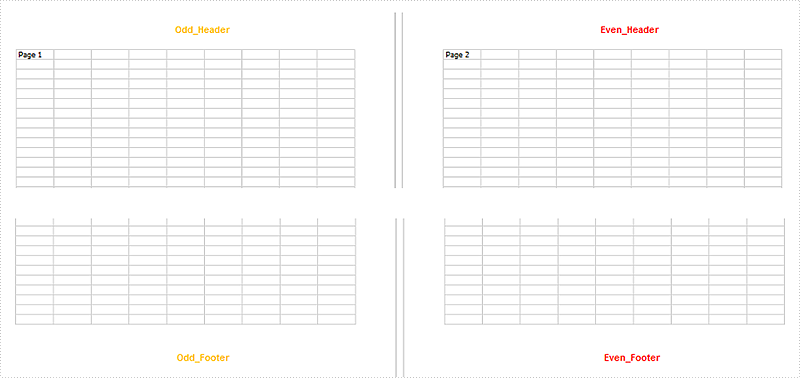
2016-09-22 00:59:10 Written by KoohjiHeaders or footers are added to a worksheet to deliver some extra information about each page. By default, the headers or footers on odd and even pages are the same. However, we are able to set different headers or footers for odd and even pages to display different information.
Following sections demonstrate how to create different odd and even page headers/footers using Spire.XLS.
Code Snippet:
Step 1: Initialize an instance of Workbook and get the first worksheet.
Workbook wb = new Workbook();
Worksheet sheet = wb.Worksheets[0];
Step 2: Set the value of DifferentOddEven as 1, which indicates that headers/footers for odd and even pages are different.
sheet.PageSetup.DifferentOddEven = 1;
Step 3: Set header and footer string for odd pages, and format the string.
sheet.PageSetup.OddHeaderString = "&\"Arial\"&12&B&KFFC000Odd_Header";
sheet.PageSetup.OddFooterString = "&\"Arial\"&12&B&KFFC000Odd_Footer";
Step 4: Set different header and footer string for even pages, and format the string with different color.
sheet.PageSetup.EvenHeaderString = "&\"Arial\"&12&B&KFF0000Even_Header";
sheet.PageSetup.EvenFooterString = "&\"Arial\"&12&B&KFF0000Even_Footer";
Step 5: Save the file.
wb.SaveToFile("OddEvenHeaderFooter.xlsx", ExcelVersion.Version2013);
Output:
Full Code:
using Spire.Xls;
namespace SetDifferentHeaderorFooter
{
    class Program
    {
        static void Main(string[] args)
        {
            Workbook wb = new Workbook();
            Worksheet sheet = wb.Worksheets[0];

            sheet.Range["A1"].Text = "Page 1";
            sheet.Range["J1"].Text = "Page 2";

            sheet.PageSetup.DifferentOddEven = 1;
            sheet.PageSetup.OddHeaderString = "&\"Arial\"&12&B&KFFC000Odd_Header";
            sheet.PageSetup.OddFooterString = "&\"Arial\"&12&B&KFFC000Odd_Footer";
            sheet.PageSetup.EvenHeaderString = "&\"Arial\"&12&B&KFF0000Even_Header";
            sheet.PageSetup.EvenFooterString = "&\"Arial\"&12&B&KFF0000Even_Footer";

            wb.SaveToFile("OddEvenHeaderFooter.xlsx", ExcelVersion.Version2013);
        }
    }
}
Imports Spire.Xls
Namespace SetDifferentHeaderorFooter
	Class Program
		Private Shared Sub Main(args As String())
			Dim wb As New Workbook()
			Dim sheet As Worksheet = wb.Worksheets(0)

			sheet.Range("A1").Text = "Page 1"
			sheet.Range("J1").Text = "Page 2"

			sheet.PageSetup.DifferentOddEven = 1
			sheet.PageSetup.OddHeaderString = "&""Arial""&12&B&KFFC000Odd_Header"
			sheet.PageSetup.OddFooterString = "&""Arial""&12&B&KFFC000Odd_Footer"
			sheet.PageSetup.EvenHeaderString = "&""Arial""&12&B&KFF0000Even_Header"
			sheet.PageSetup.EvenFooterString = "&""Arial""&12&B&KFF0000Even_Footer"

			wb.SaveToFile("OddEvenHeaderFooter.xlsx", ExcelVersion.Version2013)
		End Sub
	End Class
End Namespace
