
Knowledgebase (2417)
Children categories
When sharing an excel worksheet, we may want to protect some valuable or important data from being changed by others. With Spire.XLS, we can easily achieve this by locking excel cells. Once locked, we will not be able to modify data from the protected cells until we unlock them. This article will explain how to lock or unlock excel cells in WPF using Spire.XLS for WPF.
Generally, there are two main steps when locking cells in an excel worksheet:
- Locking specific cells.
- Applying sheet protection – locking cells has no effect until we protect the worksheet.
Detail steps and code snippets are as following:
Step 1: Initialize a new instance of Workbook class, load the sample excel file and get its first worksheet.
Workbook workbook = new Workbook();
workbook.LoadFromFile("Sample.xlsx");
Worksheet sheet = workbook.Worksheets[0];
Step 2: Lock or unlock specified cells.
By default, all cells in an Excel worksheet are locked, so we need to unlock them first, next lock the specified cells and protect the worksheet with password.
sheet.Range.Style.Locked = false;
sheet.Range["A1:B3"].Style.Locked = true;
sheet.Protect("123", SheetProtectionType.All);
If you want to unlock excel cells, please use the following line of code:
sheet.Range["A1:B3"].Style.Locked = false;
Step 3: Save the changes and launch the file.
workbook.SaveToFile("locked.xlsx");
System.Diagnostics.Process.Start("locked.xlsx");
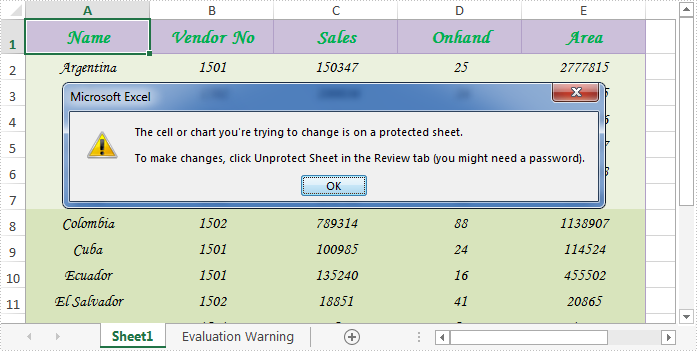
Effective screenshot after locking excel cells:
Full codes:
using Spire.Xls;
using System.Windows;

namespace WpfApplication1
{
    public partial class MainWindow : Window
    {
        public MainWindow()
        {
            InitializeComponent();
        }
        private void button1_Click(object sender, RoutedEventArgs e)
        {
            Workbook workbook = new Workbook();
            workbook.LoadFromFile("Sample.xlsx");
            Worksheet sheet = workbook.Worksheets[0];

            //Lock excel cells
            sheet.Range.Style.Locked = false;
            sheet.Range["A1:B3"].Style.Locked = true;
            sheet.Protect("123", SheetProtectionType.All);

            //Unlock excel cells
            // sheet.Range["A1:B3"].Style.Locked = false;

            workbook.SaveToFile("locked.xlsx");
            System.Diagnostics.Process.Start("locked.xlsx");
        }

    }
}
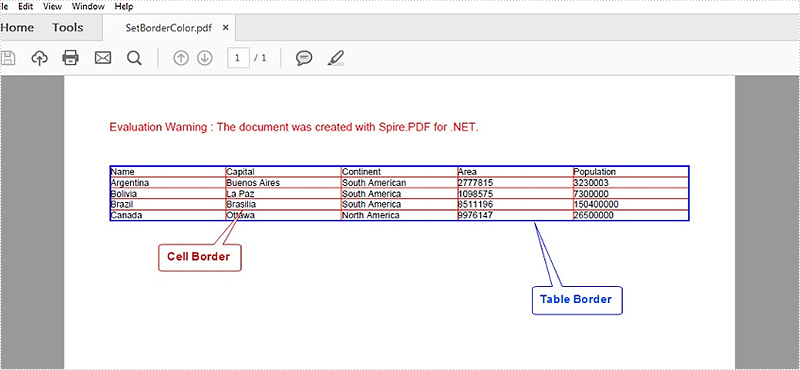
In order to format a table in PDF, Spire.PDF provides a PdfTableStyle class that represents parameters of PDF light table and a PdfCellStyle class that represents information about cell style. This article will introduce how to set the border color of a table including table border and cell border by using the two classes mentioned above.
Code Snippets:
Step 1: Define a multidimensional array of string.
string[][] dataSource =new string[5][] {new string[] {"Name", "Capital", "Continent", "Area", "Population"},
  new string[] {"Argentina","Buenos Aires", "South American", "2777815", "3230003"},
  new string[] {"Bolivia","La Paz","South America","1098575","7300000"},
  new string[] {"Brazil","Brasilia","South America","8511196","150400000"},
  new string[] {"Canada","Ottawa","North America","9976147","26500000"}
};
Step 2: Initialize a new instance of PdfDocument class and add a page to it.
PdfDocument pdf = new PdfDocument();
PdfPageBase page = pdf.Pages.Add();
Step 3: Initialize a new instance of PdfTbale class, filling the table with the data predefined.
PdfTable table = new PdfTable();
table.DataSource = dataSource;
Step 4: Initialize an instance of PdfTableStyle class, and set the color of table border as Blue, then apply the style to PdfTable.Style.
PdfTableStyle style = new PdfTableStyle();
style.BorderPen = new PdfPen(Color.Blue, 1f);
table.Style = style;
Step 5: The syntax to set style of cell border is much different from setting table border style, since PdfTable class doesn't contain a property of CellStyle. Instead, CellStyle is a property included in BeginRowLayoutEventArgs class, which is an argument of StratRowLayout event. Therefore we customize a method as below to set the color of cell border.
public static void table_BeginRowLayout(object sender, BeginRowLayoutEventArgs args)
{
    PdfCellStyle cellStyle = new PdfCellStyle();
    cellStyle.BorderPen = new PdfPen(Color.Red, 0.5f);
    args.CellStyle = cellStyle;
}
In the Main method, "table_BeginRowLayout" must be added to BeginRowLayout event to ensure the custom method will be invoked when the event occurs.
table.BeginRowLayout += new BeginRowLayoutEventHandler(table_BeginRowLayout);
Step 6: Draw the table on PDF page and save to file.
table.Draw(page, new PointF(0,40));
pdf.SaveToFile(@"SetBorderColor.pdf");
Output:
Full Code:
using Spire.Pdf;
using Spire.Pdf.Tables;
using Spire.Pdf.Graphics;
using System.Drawing;

namespace SetBorderColorOfTable
{
    class Program
    {
        static void Main(string[] args)
        {
            //input data
            string[][] dataSource =new string[5][] {new string[] {"Name", "Capital", "Continent", "Area", "Population"},
              new string[] {"Argentina","Buenos Aires", "South American", "2777815", "3230003"},
              new string[] {"Bolivia","La Paz","South America","1098575","7300000"},
              new string[] {"Brazil","Brasilia","South America","8511196","150400000"},
              new string[] {"Canada","Ottawa","North America","9976147","26500000"}
            };

            //initialize an instance of PdfDocument
            PdfDocument pdf = new PdfDocument();
            PdfPageBase page = pdf.Pages.Add();

            //initialize an instance of PdfTable
            PdfTable table = new PdfTable();
            table.DataSource = dataSource;

            //set the color of table border
            PdfTableStyle style = new PdfTableStyle();
            style.BorderPen = new PdfPen(Color.Blue, 1f);
            table.Style = style;

            //add custom method to BeginRowLayout event
            table.BeginRowLayout += new BeginRowLayoutEventHandler(table_BeginRowLayout);

            //draw table on PDF and save file
            table.Draw(page, new PointF(0,40));
            pdf.SaveToFile(@"SetBorderColor.pdf");
            System.Diagnostics.Process.Start(@"SetBorderColor.pdf");
        }
        //customize a method to set color of cell border
        public static void table_BeginRowLayout(object sender, BeginRowLayoutEventArgs args)
        {
            PdfCellStyle cellStyle = new PdfCellStyle();
            cellStyle.BorderPen = new PdfPen(Color.Red, 0.5f);
            args.CellStyle = cellStyle;
        }
    }
}
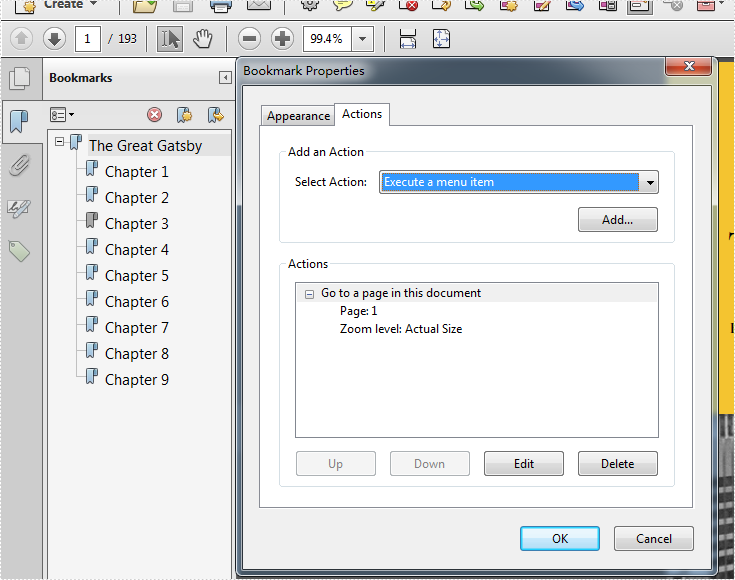
By using Acrobat, we can edit the PDF bookmark actions and set the zoom level to "Inherit Zoom". Then no matter which bookmark you click, the PDF page will stay the same size as the previous page you are viewing and it won't be changed. Spire.PDF also enables developers to set the Bookmark actions to inherit zoom by setting PdfDestination.Zoom as 0. This article will show you how to update bookmarks in a PDF document in C#.
Firstly, view the original screenshot of the PDF bookmark property:
Here comes to the step of how to use Spire.PDF to set the PDF bookmark actions.
Step 1: Create a new PDF document and load the document from file.
PdfDocument pdfdoc = new PdfDocument();
pdfdoc.LoadFromFile("TheGreatGatsby.pdf");
Step 2: Get bookmarks collections of the PDF file.
PdfBookmarkCollection bookmarks = pdfdoc.Bookmarks;
Step 3: Set Zoom level as 0, which the value is inherit zoom.
foreach (PdfBookmark bookMark in bookmarks)
 {
   //value 1 is the actual size, other value is the customized size.
   bookMark.Destination.Zoom =0;
 }
Step 4: Save the document to file.
pdfdoc.SaveToFile("result.pdf");
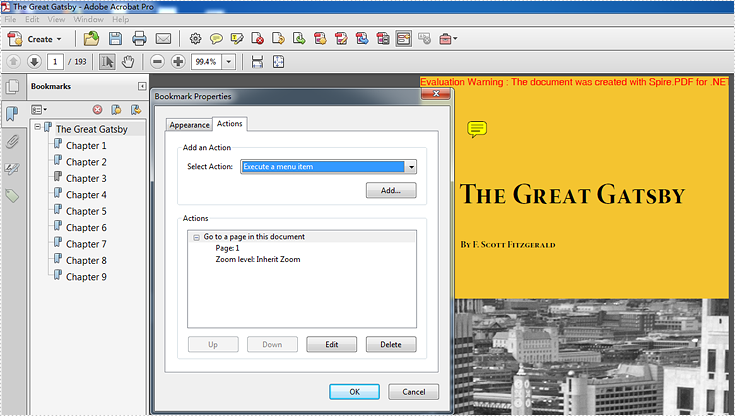
Effective screenshot after setting the zoom level to Inherit zoom.
Full codes:
using Spire.Pdf;
using Spire.Pdf.Bookmarks;


namespace SetInheritZoomProperty
{
    class Program
    {
        static void Main(string[] args)
        {

            PdfDocument pdfdoc = new PdfDocument();
            pdfdoc.LoadFromFile("TheGreatGatsby.pdf");

            PdfBookmarkCollection bookmarks = pdfdoc.Bookmarks;

            foreach (PdfBookmark bookMark in bookmarks)
            {
                bookMark.Destination.Zoom = 0;

            }

            pdfdoc.SaveToFile("result.pdf");
        }
    }
}
