
Knowledgebase (2417)
Children categories
Applying a background color or image to a PDF can be an effective way to enhance its visual appeal, create a professional look, or reinforce branding elements. By adding a background, you can customize the overall appearance of your PDF document and make it more engaging for readers. Whether you want to use a solid color or incorporate a captivating image, this feature allows you to personalize your PDFs and make them stand out. In this article, you will learn how to set a background color or image for a PDF document in Python using Spire.PDF for Python.
Install Spire.PDF for Python
This scenario requires Spire.PDF for Python and plum-dispatch v1.7.4. They can be easily installed in your Windows through the following pip command.
pip install Spire.PDF
If you are unsure how to install, please refer to this tutorial: How to Install Spire.PDF for Python on Windows
Set a Background Color for PDF in Python
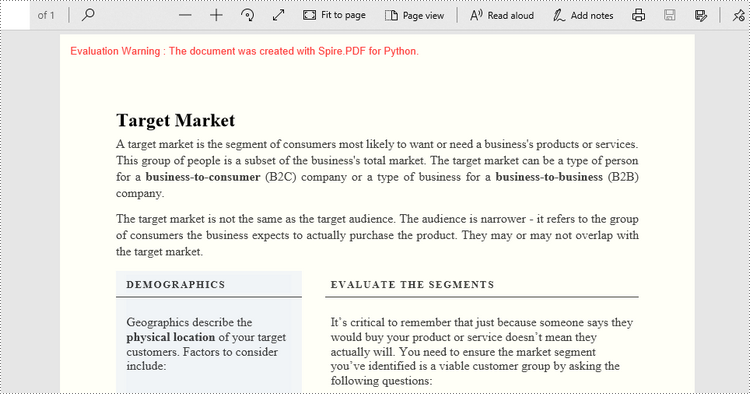
Spire.PDF for Python offers the PdfPageBase.BackgroundColor property to get or set the background color of a certain page. To add a solid color to the background of each page in the document, follow the steps below.
- Create a PdfDocument object.
- Load a PDF file using PdfDocument.LoadFromFile() method.
- Traverse through the pages in the document, and get a specific page through PdfDocument.Pages[index] property.
- Apply a solid color to the background through PdfPageBase.BackgroundColor property.
- Save the document to a different PDF file using PdfDocument.SaveToFile() method.
- Python
from spire.pdf.common import *
from spire.pdf import *

# Create a PdfDocument object
doc = PdfDocument()

# Load a PDF file
doc.LoadFromFile("C:\\Users\\Administrator\\Desktop\\input.pdf")

# Loop through the pages in the document
for i in range(doc.Pages.Count):

    # Get a particular page
    page = doc.Pages.get_Item(i)

    # Set background color
    page.BackgroundColor = Color.get_LightYellow()

# Save the document to a different file
doc.SaveToFile("output/SetBackgroundColor.pdf")
Set a Background Image for PDF in Python
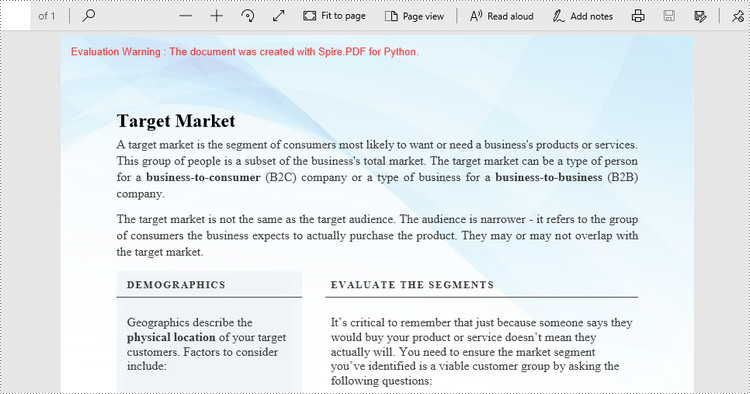
Likewise, an image can be applied to the background of a specific page via PdfPageBase.BackgroundImage property. The steps to set an image background for the entire document are as follows.
- Create a PdfDocument object.
- Load a PDF file using PdfDocument.LoadFromFile() method.
- Traverse through the pages in the document, and get a specific page through PdfDocument.Pages[index] property.
- Apply an image to the background through PdfPageBase.BackgroundImage property.
- Save the document to a different PDF file using PdfDocument.SaveToFile() method.
- Python
from spire.pdf.common import *
from spire.pdf import *

# Create a PdfDocument object
doc = PdfDocument()

# Load a PDF file
doc.LoadFromFile("C:\\Users\\Administrator\\Desktop\\input.pdf")

# Loop through the pages in the document
for i in range(doc.Pages.Count):

    # Get a particular page
    page = doc.Pages.get_Item(i)

    # Set background image
    page.BackgroundImage = Stream("C:\\Users\\Administrator\\Desktop\\img.jpg")

# Save the document to a different file
doc.SaveToFile("output/SetBackgroundImage.pdf")
Apply for a Temporary License
If you'd like to remove the evaluation message from the generated documents, or to get rid of the function limitations, please request a 30-day trial license for yourself.
If you receive or download a PDF file and find that some of the pages are displayed in the wrong orientation (e.g., sideways or upside down), rotating the PDF file allows you to correct the page orientation for easier reading and viewing. This article will demonstrate how to programmatically rotate PDF pages using Spire.PDF for Python.
Install Spire.PDF for Python
This scenario requires Spire.PDF for Python and plum-dispatch v1.7.4. They can be easily installed in your Windows through the following pip command.
pip install Spire.PDF
If you are unsure how to install, please refer to this tutorial: How to Install Spire.PDF for Python on Windows
Rotate a Specific Page in PDF in Python
Rotation is based on 90-degree increments. You can rotate a PDF page by 0/90/180/270 degrees. The following are the steps to rotate a PDF page:
- Create a PdfDocument object.
- Load a PDF document using PdfDocument.LoadFromFile() method.
- Get a specified page using PdfDocument.Pages[pageIndex] property.
- Get the original rotation angle of the page using PdfPageBase.Rotation.value property.
- Increase the original rotation angle by desired degrees.
- Apply the new rotation angle to the page using PdfPageBase.Rotation property
- Save the result document using PdfDocument.SaveToFile() method.
- Python
from spire.pdf.common import *
from spire.pdf import *

# Create a PdfDocument object
pdf = PdfDocument()

# Load a PDF document
pdf.LoadFromFile("Sample.pdf")

# Get the first page
page = doc.Pages.get_Item(0)

# Get the original rotation angle of the page
rotation = int(page.Rotation.value)

# Rotate the page 180 degrees clockwise based on the original rotation angle
rotation += int(PdfPageRotateAngle.RotateAngle180.value)
page.Rotation = PdfPageRotateAngle(rotation)

# Save the result document
pdf.SaveToFile("RotatePDFPage.pdf")
pdf.Close()
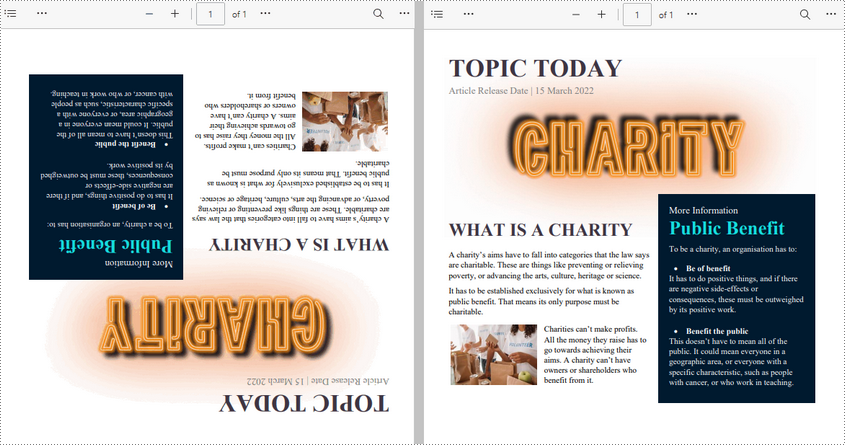
Rotate All Pages in PDF in Python
Spire.PDF for Python also allows you to loop through each page in a PDF file and then rotate them all. The following are the detailed steps.
- Create a PdfDocument object.
- Load a PDF document using PdfDocument.LoadFromFile() method.
- Loop through each page in the document.
- Get the original rotation angle of the page using PdfPageBase.Rotation.value property.
- Increase the original rotation angle by desired degrees.
- Apply the new rotation angle to the page using PdfPageBase.Rotation property.
- Save the result document using PdfDocument.SaveToFile() method.
- Python
from spire.pdf.common import *
from spire.pdf import *

# Create a PdfDocument object
pdf = PdfDocument()

# Load a PDF document
pdf.LoadFromFile("Input.pdf")

# Loop through each page in the document
for i in range(pdf.Pages.Count):
    page = pdf.Pages.get_Item(i)

    # Get the original rotation angle of the page
    rotation = int(page.Rotation.value)

    # Rotate the page 180 degrees clockwise based on the original rotation angle
    rotation += int(PdfPageRotateAngle.RotateAngle180.value)
    page.Rotation = PdfPageRotateAngle(rotation)

# Save the result document
pdf.SaveToFile("RotatePDF.pdf")
pdf.Close()
Apply for a Temporary License
If you'd like to remove the evaluation message from the generated documents, or to get rid of the function limitations, please request a 30-day trial license for yourself.
Convert PDF to Images in Python (PNG, JPG, BMP, SVG, TIFF)
2023-09-18 01:16:01 Written by Administrator
Converting PDF files to images in Python is a common need for developers and professionals working with digital documents. Whether you want to generate thumbnails, create previews, extract specific content areas, or prepare files for printing, transforming a PDF into image formats gives you flexibility and compatibility across platforms.
This comprehensive guide demonstrates how to convert PDF files into popular image formats—such as PNG, JPG, BMP, SVG, and TIFF—in Python, using practical, easy-to-follow code examples.
Table of Contents
- Why Convert PDF to Image
- Python PDF-to-Image Converter Library
- Simple PDF to PNG, JPG, and BMP Conversion
- Advanced Conversion Options
- Generate Multi-Page TIFF from PDF
- Export PDF as SVG
- Conclusion
- FAQs
Why Convert PDF to Image?
Converting PDF to image formats offers several benefits:
- Cross-platform compatibility: Images are easier to embed in web pages, mobile apps, or presentations.
- Preview and thumbnail generation: Quickly create page snapshots without rendering the full PDF.
- Selective content extraction: Save specific areas of a PDF as images for focused analysis or reuse.
- Simplified sharing: Images can be easily emailed, uploaded, or displayed without special PDF readers.
Python PDF-to-Image Converter Library
Spire.PDF for Python is a powerful and easy-to-use library designed for handling PDF files. It enables developers to convert PDF pages into multiple image formats like PNG, JPG, BMP, SVG, and TIFF with excellent quality and performance.
Installation
You can easily install the library using pip. Simply open your terminal and run the following command:
pip install Spire.PDF
Simple PDF to PNG, JPG, and BMP Conversion
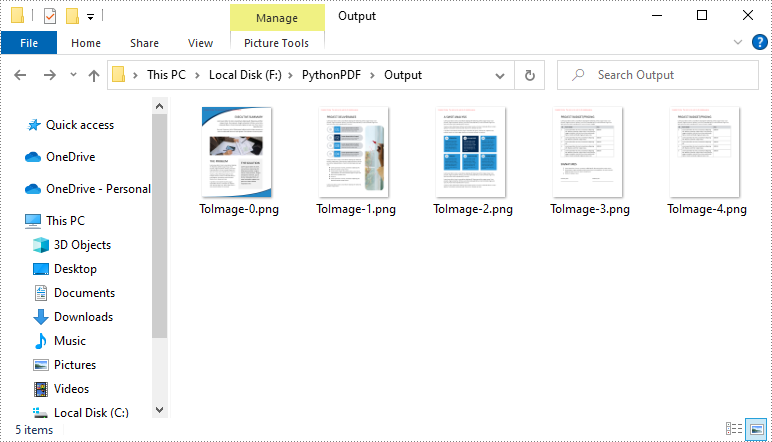
The SaveAsImage method of the PdfDocument class allows you to render each page of a PDF into an image format of your choice.
The code example below demonstrates how to load a PDF file, iterate through its pages, and save each one as a PNG image. You can easily adjust the file format to JPG or BMP by changing the file extension.
from spire.pdf import *

# Load the PDF file
pdf = PdfDocument()
pdf.LoadFromFile("template.pdf")

# Loop through pages and save as images
for i in range(pdf.Pages.Count):
    # Convert each page to image
    with pdf.SaveAsImage(i) as image:

        # Save in different formats as needed
        image.Save(f"Output/ToImage_{i}.png")
        # image.Save(f"Output/ToImage_{i}.jpg")
        # image.Save(f"Output/ToImage_{i}.bmp")

# Close the PDF document
pdf.Close()
Advanced Conversion Options
Enable Transparent Image Background
Transparent backgrounds help integrate images seamlessly into designs, avoiding unwanted borders or background colors.
To enable a transparent background during PDF-to-image conversion in Python, use the SetPdfToImageOptions() method with an alpha value of 0. This setting ensures that the background of the output image is fully transparent.
The following example demonstrates how to export each PDF page as a transparent PNG image.
from spire.pdf import *

# Load PDF document from file
pdf = PdfDocument()
pdf.LoadFromFile("template.pdf")

# Set the transparent value of the image's background to 0
pdf.ConvertOptions.SetPdfToImageOptions(0)

# Loop through all pages and save each as an image
for i in range(pdf.Pages.Count):
    # Convert each page to an image
    with pdf.SaveAsImage(i) as image:
        # Save the image to the output directory
        image.Save(f"Output/ToImage_{i}_transparent.png")

# Close the PDF document
pdf.Close()
Note: Transparency is supported in PNG but not in JPG or BMP formats.
Crop Specific PDF Areas to Image
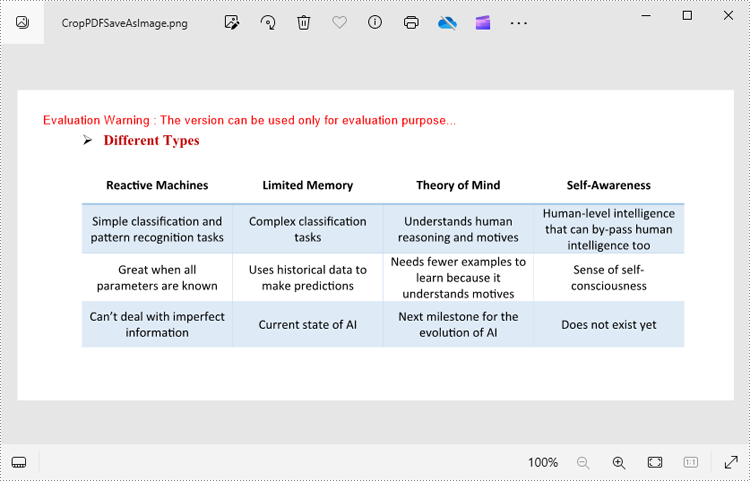
In some cases, you may only need to export a specific area of a PDF page—such as a chart, table, or block of text. This can be done by adjusting the page’s CropBox before rendering.
The CropBox property defines the visible region of the page used for display and printing. By setting it to a specific RectangleF(x, y, width, height) value, you can isolate and export only the desired portion of the content.
The example below demonstrates how to crop a rectangular area on the first page of a PDF and save that section as a PNG image.
from spire.pdf import *

# Load the PDF document from file
pdf = PdfDocument()
pdf.LoadFromFile("Sample.pdf")

# Access the first page of the PDF
page = doc.Pages.get_Item(0)

# Define the crop area of the page using a rectangle (x, y, width, height)
page.CropBox = RectangleF(0.0, 300.0, 600.0, 260.0)

# Convert the cropped page to an image
with pdf.SaveAsImage(0) as image:
    # Save the image to a PNG file
    image.Save("Output/CropPDFSaveAsImage.png")

# Close the PDF document
pdf.Close()
Note: You need to adjust the coordinates based on the location of your target content. Coordinates start from the top-left corner of the page.
Generate Multi-Page TIFF from PDF
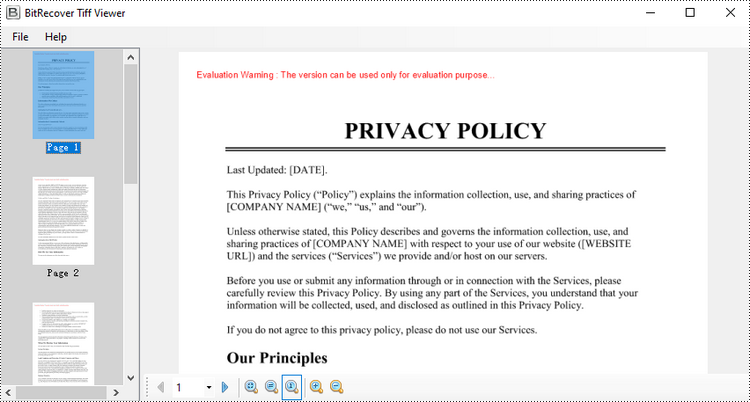
The TIFF format supports multi-page documents, making it a popular choice for archival and printing purposes. Although Spire.PDF for Python doesn't natively create multi-page TIFFs, you can render individual pages as images and then use the Pillow library to merge them into one .tiff file.
Before proceeding, ensure Pillow is installed by running:
pip install Pillow
The following example illustrates how to:
- Load a PDF
- Convert each page to an image
- Combine all images into a single multi-page TIFF
from spire.pdf import *

from PIL import Image
from io import BytesIO

# Load the PDF document from file
pdf = PdfDocument()
pdf.LoadFromFile("Input.pdf")

# Create an empty list to store PIL Images
images = []

# Iterate through all pages in the document
for i in range(pdf.Pages.Count):

    # Convert a specific page to an image stream
    with pdf.SaveAsImage(i) as imageData:

        # Open the image stream as a PIL image
        img = Image.open(BytesIO(imageData.ToArray()))

        # Append the PIL image to list
        images.append(img)

# Save the PIL Images as a multi-page TIFF file
images[0].save("Output/ToTIFF.tiff", save_all=True, append_images=images[1:])

# Dispose resources
pdf.Dispose()
It’s also possible to convert TIFF files back to PDF. For detailed instructions on it, please refer to the tutorial: Python: Convert PDF to TIFF and TIFF to PDF.
Export PDF as SVG
SVG (Scalable Vector Graphics) is an ideal format for content that requires scaling without quality loss, such as charts, vector illustrations, and technical diagrams.
By using the SaveToFile() method with the FileFormat.SVG option, you can export PDF pages as SVG files. This conversion preserves the vector characteristics of the content, making it well-suited for web embedding, responsive design, and further editing in vector graphic tools.
The following example demonstrates how to export an entire PDF document to SVG format.
from spire.pdf import *

# Load the PDF document from file
pdf = PdfDocument()
pdf.LoadFromFile("Example.pdf")

# Save each page of the file to a separate SVG file
pdf.SaveToFile("PdfToSVG/ToSVG.svg", FileFormat.SVG)

# Close the PdfDocument object
pdf.Close()
Note: Each page in the PDF will be saved as a separate SVG file named ToSVG_i.svg, where i is the page number (1-based).
To export specific pages or customize the SVG output size, please refer to our detailed guide: Python: Convert PDF to SVG.
Conclusion
Converting PDF to images in formats like PNG, JPG, BMP, SVG, and TIFF provides flexibility for sharing, displaying, and processing digital documents. With Spire.PDF for Python, you can:
- Export high-quality images from PDFs in various formats
- Crop specific regions for focused content extraction
- Generate multi-page TIFF files for archival purposes
- Create scalable SVG vector graphics for diagrams and charts
By automating PDF to image conversion in Python, you can seamlessly integrate image export into your applications and workflows.
FAQs
Q1: Can I convert a range of pages from a PDF to images?
A1: Yes. You can convert specific pages by specifying their indices in a loop. For example, to export pages 1 to 3:
# Convert only pages 1-3
for i in range(0, 3):  # 0-based index
    with pdf.SaveAsImage(i) as img:
        img.Save(f"page_{i}.png")
Q2: Can I batch convert multiple PDF files to images?
A2: Yes, batch conversion is supported. You can iterate through a list of PDF file paths and convert each one within a loop.
pdf_files = ["a.pdf", "b.pdf", "c.pdf"]
for file in pdf_files:
    pdf = PdfDocument()
    pdf.LoadFromFile(file)
    for i in range(pdf.Pages.Count):
        with pdf.SaveAsImage(i) as img:
            img.Save(f"{file}_page_{i}.png")
Q3: Is it possible to convert password-protected PDFs to images?
A3: Yes, you can convert secured PDFs to images as long as you provide the correct password when loading the PDF document.
pdf = PdfDocument()
pdf.LoadFromFile("protected.pdf", "password")
Q4: Is it possible to extract embedded images from a PDF instead of rendering pages?
A4: Yes. Aside from rendering entire pages, the library also supports extracting images directly from the PDF.
Get a Free License
To fully experience the capabilities of Spire.PDF for Python without any evaluation limitations, you can request a free 30-day trial license.
